Mason の Albion Online
ゲームAlbion OnlineのプライベートチートRadar Masonの作業中

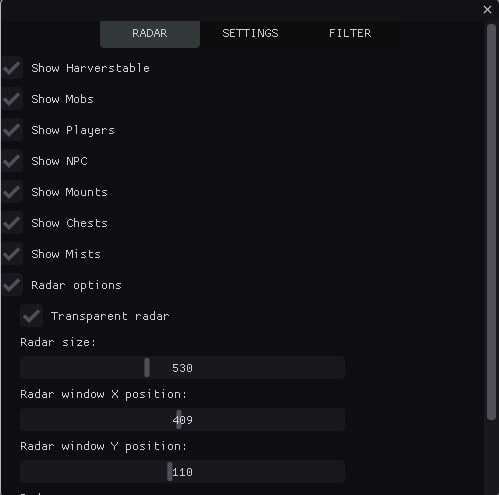
今日最も人気のあるオンライン ゲームの 1 つは、Albion Online です。 そのオープンワールド、自由に探索、戦闘、創造する能力は、世界中から何十万人ものプレイヤーを魅了しています。 ただし、すべてのゲームと同様に、成功を収めるために追加機能が必要になる場合があります。
それが、ゲーム Albion Online 用の高品質のプライベート チート レーダー メイソンを提供する理由です。 このチートには、ゲームで高い結果を達成するために必要な機能がすべて装備されています。 これには幅広い機能があり、Albion の世界の周囲のオブジェクトを完全に制御できるようになります。
メイソン チートの重要な機能の 1 つは、ゲームのすべての重要な要素を表示するミニマップです。 すべてのMob、リソース(木材、石、鉱石)、敵、NPC、マウント、チェストなどを確認できます。 これにより、必要なリソース、宝物、敵を簡単に見つけることができます。 さらに、メイソン チートには、ミニマップ上の表示を完全にカスタマイズできる多くの追加設定が用意されています。 表示色を変更したり、レベルや宝箱ごとにアイテムをフィルタリングしたりできます。
メイソン チートの主な利点の 1 つは、その信頼性です。 レーダーはブロックされる可能性を最小限に抑えて動作し、発射と設置が簡単です。 すべての機能を簡単に利用して、Albion Online ゲームのチートの利点を享受し始めることができます。
さらに、問題が発生した場合には、適切なサポートを保証します。 私たちのチームはいつでもお客様のすべての質問にお答えする準備ができています。
メイソンのプライベート チート レーダーは、最大限の結果を達成し、ゲーム エクスペリエンスを向上させたいと考えている Albion Online プレイヤーにとって不可欠なツールです。 メイソン チートを利用して、勝利の可能性を高め、ゲームのメリットをすべて享受してください。
今すぐメイソン プライベート チート レーダーを注文して、アルビオン オンラインの世界で誰にも止められない成功したプレイヤーになりましょう!
システム要件
🔔 チートの状態は開発者の通知に基づき当社のTelegramボットから自動更新されます — そちらで最新情報をフォローしてください。多くのチートはゲームの変更後に自動更新されるため、「確認中」の状態はチートが動作しないという意味ではなく、確認までの不確実性にすぎません。不安ですか?サイトのチャットで質問するかお問い合わせをご確認ください。
機能
メイン
- 資源の表示 / 資源の表示(木材、石、鉱石など)
- モブを表示 / モブを表示
- プレーヤーを表示 / プレーヤーを表示
- NPCを表示 / NPCを表示
- チェストを表示 / チェストを表示
- ミストを表示 / ミストを表示
- ショーマウント / ディスプレイマウント
- 各タイプのオブジェクトのカウンター / レーダー上の各オブジェクト タイプの数を表示します (CHEST、MOB、HARV など)
- 表示の最小/最大距離 / オブジェクトを距離でフィルタリングします。範囲外のオブジェクトは非表示になります
- サウンド通知 / さまざまなオブジェクトタイプ (プレイヤー、チェスト、リソース) を検出したときのサウンドアラート
- 最も近いオブジェクトを追跡 / プレーヤーに最も近いオブジェクトの情報を自動的に検出して表示します
- 座標をファイルにエクスポート / 検出されたすべてのオブジェクトの座標をテキスト ファイルに保存します (ホットキー: F3)
- 検出されたオブジェクトの履歴 / タイムスタンプを使用して検出履歴を追跡します
- ホットキー / クイック アクセス: F1 (メニュー)、F2 (保存)、F3 (座標のエクスポート)
- 自動構成保存 / 30 秒ごとに設定を自動保存
- 物体までの距離の表示 / レーダー上の各物体までの距離をメートル単位で表示します
- プレイヤー接近警告 / 他のプレイヤーが一定距離以内に近づくと警告音が鳴ります
- オブジェクトをタイプごとにグループ化 / 分析を容易にするためにオブジェクトをタイプごとにグループ化します
- 方向指示器 / レーダーで方向を示します
- 遠くのオブジェクトを自動的に隠す / スキャン範囲外のオブジェクトを隠す
- 検出時間統計 / 追跡検出統計 (最初/最後に確認された回数、カウント)
- サウンド通知の改善 / オブジェクトタイプ (チェスト、リソース、プレイヤー) ごとに異なるサウンド
- 視覚的なインジケーター/重要なオブジェクト (チェスト、アーティファクト) の点滅する円
- オブジェクト優先順位システム / ソート時のオブジェクトの優先順位付け (チェスト - 最高の優先順位)
- オブジェクト キャッシュ / パフォーマンスのためのオブジェクト キャッシュ
チェスト
- チェストフィルター / チェストフィルター
- 第 1 層のチェストのみ / 第 1 層のチェストを表示
- 2段目のチェストのみ / 2段目のチェストを表示
- 3段チェストのみ / 3段チェストを表示
- 4段チェストのみ / 4段チェストを表示
視覚効果
- オブジェクトへの線 / 視覚化を向上させるために、レーダーの中心から各オブジェクトまで線を描画します。
- 移動軌跡 / 設定可能な長さで移動軌跡を表示
- 可視ゾーン / スキャンゾーンを視覚化
- カラーグラデーション / オブジェクトのグラデーションカラーリング
- オブジェクトアニメーション / 速度を設定可能なパルス効果
- 影 / オブジェクトの下に影を付けて奥行きを持たせる
- グロー効果 / オブジェクトの周囲のグロー
- レーダーグリッド/方位用座標グリッド
- ゾーン境界 / コーナーマーカーによる視覚的なレーダー境界
- 方向矢印 / オブジェクトの方向を示す矢印
- オブジェクトアイコン / さまざまなオブジェクトタイプの固有のアイコン
- グラデーションライン / 色の変化が滑らかなライン
- オブジェクトの輪郭/太さを設定可能な輪郭
- ホバーハイライト / マウスホバーでハイライト
- 距離リング/同心リングによる距離視覚化
- パーティクル エフェクト / 重要なオブジェクト (チェスト、アーティファクト) の周囲のパーティクル
- 重要なオブジェクト (チェスト、アーティファクト) の視覚マーカー / スター マーカー
- 脈動効果 / オブジェクトの脈動
- 3D 奥行き効果 / オブジェクトの奥行き効果
レーダー
- レーダーオプション / レーダー設定
- レーダーを透明にする / レーダーの透明度を設定する
- レーダーサイズ / レーダーサイズの設定
- レーダー X 位置 / X 軸上のレーダー位置を設定します
- レーダー Y 位置 / Y 軸上のレーダー位置を設定します
- レーダーズーム / レーダーズームイン/アウトを設定します
- スキャン半径 / オブジェクトのスキャン半径を設定
ビジュアルカラー
- モブの色 / モブの表示色の設定
- NPCカラー / NPC表示色の設定
- プレーヤーの色 / プレーヤーの表示色の設定
- マウントカラー / マウント表示色の設定
- ミスト / ミスト表示色の設定
- リソースの階層 1 の色 / 階層 1 のリソースの色の設定
- リソースの階層 2 の色 / 階層 2 のリソースの色の設定
- リソースの階層 3 の色 / 階層 3 のリソースの色の設定
- リソースの階層 4 の色 / 階層 4 のリソースの色の設定
- リソースの階層 5 の色 / 階層 5 のリソースの色の設定
- リソースの階層 6 の色 / 階層 6 のリソースの色の設定
- リソースの階層 7 の色 / 階層 7 のリソースの色の設定
- リソースの階層 8 の色 / 階層 8 のリソースの色の設定
- チェストの色 / チェストの表示色の設定
リソース
- フィルターを有効にする / フィルターを有効にする
- リソースフィルター / リソース表示フィルター
- 第 1 階層アイテムのみ / 第 1 階層アイテムを表示
- 第 2 階層アイテムのみ / 第 2 階層アイテムを表示
- 3階層アイテムのみ / 3階層アイテムを表示
- 4階層アイテムのみ / 4階層アイテムを表示
- 5階層アイテムのみ / 5階層アイテムを表示
- 第6階層アイテムのみ / 第6階層アイテムを表示
- 第7階層アイテムのみ / 第7階層アイテムを表示
- 8階層アイテムのみ / 8階層アイテムを表示
カスタマーレビュー
すべてのレビューよくある質問
Masonにはどんな機能が含まれていますか?
どの支払い方法が利用できますか?
サポートにはどう連絡しますか?
支払いは確認済みですが商品がありません。どのくらい待ちますか?
キーはあります。ダウンロードと手順書はどこですか?
お支払い後、ソフトウェアのアクティベーション、起動、使用方法の詳細な説明をお届けします。
説明はお支払い前に指定されたメールアドレスに送信されます。
ダウンロードリンクと必要なコンポーネントもそちらでご確認いただけます。
チートコミュニティ
チートのアップデート、検出ステータス、他プレイヤーからのサポート — TelegramとDiscordで。