Mason สำหรับ Albion Online
ทำงานส่วนตัวโกง Radar Mason สำหรับเกม Albion Online

หนึ่งในเกมออนไลน์ที่ได้รับความนิยมมากที่สุดในปัจจุบันคือ Albion Online โลกที่เปิดกว้าง ความสามารถในการสำรวจ ต่อสู้ และสร้างสรรค์ได้อย่างอิสระ ดึงดูดผู้เล่นหลายแสนคนจากทั่วทุกมุมโลก อย่างไรก็ตาม เช่นเดียวกับเกมอื่นๆ บางครั้งจำเป็นต้องมีคุณสมบัติเพิ่มเติมเพื่อให้บรรลุความสำเร็จ
นั่นคือเหตุผลที่เราเสนอ Mason เรดาร์โกงส่วนตัวคุณภาพสูงสำหรับเกม Albion Online ให้กับคุณ สูตรโกงนี้มาพร้อมกับคุณสมบัติที่จำเป็นทั้งหมดเพื่อช่วยให้คุณได้รับผลลัพธ์ที่สูงในเกม มันมีความสามารถที่หลากหลายและจะช่วยให้คุณควบคุมวัตถุรอบๆ ในโลกของ Albion ได้อย่างสมบูรณ์
หนึ่งในคุณสมบัติหลักของสูตรโกง Mason คือแผนที่ขนาดเล็กซึ่งแสดงองค์ประกอบที่สำคัญทั้งหมดของเกม คุณจะสามารถมองเห็นฝูงสัตว์ ทรัพยากร (ไม้ หิน แร่) ศัตรู NPC สัตว์พาหนะ หีบสมบัติ และอื่นๆ อีกมากมาย สิ่งนี้จะช่วยให้คุณค้นหาทรัพยากร สมบัติ และคู่ต่อสู้ที่จำเป็นได้อย่างง่ายดาย นอกจากนี้ สูตรโกง Mason ยังมีการตั้งค่าเพิ่มเติมมากมายที่จะช่วยให้คุณปรับแต่งการแสดงผลบนแผนที่ย่อได้อย่างสมบูรณ์ คุณสามารถเปลี่ยนสีที่แสดง กรองรายการตามระดับและหน้าอกได้
ข้อดีหลักประการหนึ่งของสูตรโกง Mason คือความน่าเชื่อถือ เรดาร์ทำงานโดยมีโอกาสปิดกั้นน้อยที่สุด และเปิดและติดตั้งได้ง่าย คุณสามารถใช้ประโยชน์จากฟังก์ชันทั้งหมดได้อย่างง่ายดาย และเริ่มเพลิดเพลินกับสิทธิประโยชน์ของการโกงในเกม Albion Online
นอกจากนี้ เรารับประกันการสนับสนุนที่มีคุณสมบัติเหมาะสมในกรณีที่เกิดปัญหา ทีมของเราพร้อมเสมอที่จะช่วยเหลือและตอบทุกคำถามของคุณ
เรดาร์โกงส่วนตัวของ Mason จึงเป็นเครื่องมือที่ขาดไม่ได้สำหรับผู้เล่น Albion Online ที่ต้องการบรรลุผลสูงสุดและปรับปรุงประสบการณ์การเล่นเกมของพวกเขา ปล่อยให้ตัวเองเพิ่มโอกาสในการชนะและเพลิดเพลินไปกับสิทธิประโยชน์ทั้งหมดของเกมด้วยความช่วยเหลือจากสูตรโกงของ Mason
สั่งซื้อเรดาร์โกงส่วนตัวของ Mason ตอนนี้และกลายเป็นผู้เล่นที่ไม่มีใครหยุดยั้งและประสบความสำเร็จในโลกของ Albion Online!
ข้อกำหนดระบบ
🔔 สถานะของโปรแกรมอัปเดตอัตโนมัติจาก บอต Telegram ของเรา ตามการแจ้งเตือนของผู้พัฒนา — ติดตามข่าวได้ที่นั่น โปรแกรมหลายตัวอัปเดตตัวเองหลังเกมเปลี่ยนแปลง ดังนั้นสถานะ «กำลังตรวจสอบ» ไม่ได้แปลว่าใช้งานไม่ได้ เป็นเพียงความไม่แน่นอนจนกว่าจะยืนยัน ไม่แน่ใจ? สอบถามที่ แชทบนเว็บไซต์ หรือดู ติดต่อ
คีย์ Global — ใช้ได้ทั่วโลก
สินค้าบางรายการอาจชำระด้วยบัตร Binance ได้ โปรดส่งข้อความส่วนตัวหาเราก่อนซื้อเพื่อตรวจสอบและตกลงรายละเอียด
คุณสมบัติ
หลัก
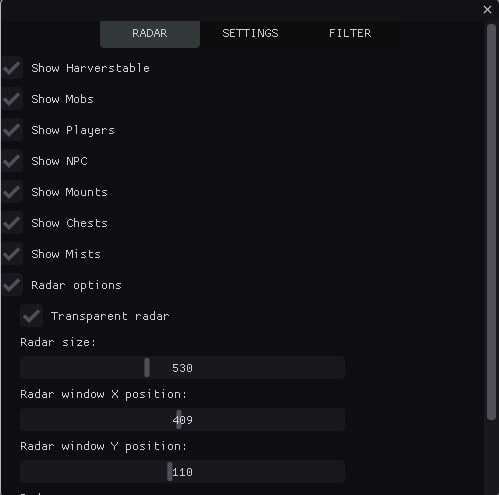
- แสดงทรัพยากร / แสดงทรัพยากร (ไม้ หิน แร่ ฯลฯ)
- แสดงม็อบ / แสดงม็อบ
- แสดงผู้เล่น / แสดงผู้เล่น
- แสดง NPC / แสดง NPC
- แสดงหีบสมบัติ / หีบแสดง
- แสดงหมอก / แสดงหมอก
- แสดง Mounts / Display Mounts
- ตัวนับวัตถุแต่ละประเภท / แสดงจำนวนวัตถุแต่ละประเภทบนเรดาร์ (CHEST, MOB, HARV ฯลฯ)
- ระยะทางต่ำสุด/สูงสุดสำหรับการแสดงผล / กรองวัตถุตามระยะทาง วัตถุที่อยู่นอกระยะจะถูกซ่อนไว้
- การแจ้งเตือนด้วยเสียง / การแจ้งเตือนเสียงเมื่อตรวจพบวัตถุประเภทต่างๆ (ผู้เล่น หีบสมบัติ ทรัพยากร)
- การติดตามวัตถุที่ใกล้ที่สุด / ตรวจจับและแสดงข้อมูลของวัตถุที่ใกล้ที่สุดโดยอัตโนมัติต่อเครื่องเล่น
- ส่งออกพิกัดไปยังไฟล์ / บันทึกพิกัดของวัตถุที่ตรวจพบทั้งหมดไปยังไฟล์ข้อความ (ปุ่มลัด: F3)
- ประวัติวัตถุที่ค้นพบ / ติดตามประวัติการค้นพบด้วยการประทับเวลา
- ปุ่มลัด / การเข้าถึงด่วน: F1 (เมนู), F2 (บันทึก), F3 (พิกัดส่งออก)
- บันทึกการกำหนดค่าอัตโนมัติ / บันทึกการตั้งค่าอัตโนมัติทุกๆ 30 วินาที
- การแสดงระยะทางถึงวัตถุ / แสดงระยะทางเป็นเมตรถึงวัตถุแต่ละชิ้นบนเรดาร์
- ผู้เล่นกำลังเข้าใกล้คำเตือน / เสียงเตือนเมื่อผู้เล่นอื่นเข้าใกล้ภายในระยะที่กำหนด
- การจัดกลุ่มวัตถุตามประเภท / จัดกลุ่มวัตถุตามประเภทเพื่อการวิเคราะห์ที่ง่ายขึ้น
- ตัวบ่งชี้ทิศทาง / แสดงทิศทางบนเรดาร์
- การซ่อนวัตถุที่อยู่ห่างไกลโดยอัตโนมัติ / ซ่อนวัตถุนอกรัศมีการสแกน
- สถิติเวลาในการตรวจจับ / สถิติการตรวจจับแทร็ก (ดูครั้งแรก/ครั้งสุดท้าย, นับ)
- ปรับปรุงการแจ้งเตือนด้วยเสียง / เสียงที่แตกต่างกันสำหรับวัตถุประเภทต่างๆ (หีบสมบัติ ทรัพยากร ผู้เล่น)
- ตัวบ่งชี้ที่มองเห็น / วงกลมกะพริบสำหรับวัตถุสำคัญ (หีบ, สิ่งประดิษฐ์)
- ระบบลำดับความสำคัญของวัตถุ / การจัดลำดับความสำคัญของวัตถุสำหรับการเรียงลำดับ (หีบ — ลำดับความสำคัญสูงสุด)
- การแคชวัตถุ / การแคชวัตถุเพื่อประสิทธิภาพ
หีบ
- ตัวกรองทรวงอก / ตัวกรองทรวงอก
- เฉพาะหีบสมบัติชั้นที่ 1 เท่านั้น / แสดงหีบสมบัติชั้นที่ 1
- เฉพาะหีบสมบัติชั้นที่ 2 เท่านั้น / แสดงหีบสมบัติชั้นที่ 2
- เฉพาะหีบระดับ 3 เท่านั้น / แสดงหีบระดับ 3
- เฉพาะหีบสมบัติระดับ 4 เท่านั้น / แสดงหีบสมบัติระดับ 4
เอฟเฟ็กต์ภาพ
- เส้นไปยังวัตถุ / ลากเส้นจากศูนย์กลางเรดาร์ไปยังวัตถุแต่ละชิ้นเพื่อให้เห็นภาพได้ดีขึ้น
- วิถีการเคลื่อนที่ / แสดงเส้นทางการเคลื่อนไหวที่มีความยาวที่กำหนดได้
- โซนการมองเห็น / แสดงภาพโซนสแกน
- การไล่ระดับสี / การไล่ระดับสีสำหรับวัตถุ
- ภาพเคลื่อนไหวของวัตถุ / เอฟเฟกต์การเต้นเป็นจังหวะพร้อมความเร็วที่กำหนดได้
- เงา / เงาใต้วัตถุเพื่อความลึก
- เอฟเฟกต์เรืองแสง / เรืองแสงรอบวัตถุ
- ตารางเรดาร์ / ตารางพิกัดสำหรับการวางแนว
- ขอบเขตโซน / ขอบเขตเรดาร์แบบมองเห็นพร้อมเครื่องหมายมุม
- ลูกศรบอกทิศทาง / ลูกศรแสดงทิศทางไปยังวัตถุ
- ไอคอนวัตถุ / ไอคอนเฉพาะสำหรับวัตถุประเภทต่างๆ
- เส้นไล่ระดับสี / เส้นที่มีการเปลี่ยนสีอย่างราบรื่น
- รูปทรงของวัตถุ / รูปทรงที่มีความหนาที่กำหนดได้
- โฮเวอร์ไฮไลต์ / ไฮไลต์บนเมาส์โฮเวอร์
- วงแหวนระยะทาง / วงแหวนศูนย์กลางสำหรับการแสดงภาพระยะทาง
- ผลกระทบของอนุภาค / อนุภาครอบๆ วัตถุสำคัญ (หีบ, สิ่งประดิษฐ์)
- เครื่องหมายมองเห็น / เครื่องหมายดาวสำหรับวัตถุสำคัญ (หีบ สิ่งประดิษฐ์)
- เอฟเฟกต์การเต้นเป็นจังหวะ / การเต้นเป็นจังหวะของวัตถุ
- เอฟเฟกต์ความลึก 3D / เอฟเฟกต์ความลึกสำหรับวัตถุ
เรดาร์
- ตัวเลือกเรดาร์ / การตั้งค่าเรดาร์
- เรดาร์โปร่งใส / ตั้งค่าความโปร่งใสของเรดาร์
- ขนาดเรดาร์ / ตั้งค่าขนาดเรดาร์
- ตำแหน่งเรดาร์ X / ตั้งค่าตำแหน่งเรดาร์บนแกน X
- ตำแหน่งเรดาร์ Y / ตั้งค่าตำแหน่งเรดาร์บนแกน Y
- การซูมเรดาร์ / ตั้งค่าการซูมเรดาร์เข้า/ออก
- รัศมีการสแกน / ตั้งค่ารัศมีการสแกนวัตถุ
ภาพสี
- สี Mobs / ตั้งค่าสีที่แสดงของ Mob
- สี NPC / ตั้งค่าสีที่แสดงของ NPC
- สีของผู้เล่น / ตั้งค่าสีที่แสดงของผู้เล่น
- สีของเมาท์ / ตั้งค่าสีที่แสดงของเมาท์
- หมอก / ตั้งค่าสีแสดงหมอก
- ทรัพยากรสีระดับ 1 / ตั้งค่าสีทรัพยากรระดับ 1
- สีของทรัพยากรระดับที่ 2 / ตั้งค่าสีของทรัพยากรระดับที่ 2
- สีทรัพยากรระดับ 3 / ตั้งค่าสีทรัพยากรระดับ 3
- ทรัพยากรสีระดับ 4 / ตั้งค่าสีของทรัพยากรระดับ 4
- ทรัพยากรสีระดับ 5 / ตั้งค่าสีของทรัพยากรระดับ 5
- ทรัพยากรสีระดับ 6 / ตั้งค่าสีทรัพยากรระดับ 6
- ทรัพยากรสีระดับ 7 / ตั้งค่าสีของทรัพยากรระดับ 7
- ทรัพยากรสีระดับ 8 / ตั้งค่าสีทรัพยากรระดับ 8
- สีทรวงอก / ตั้งค่าสีแสดงหน้าอก
ทรัพยากร
- เปิดใช้งานตัวกรอง / เปิดใช้งานตัวกรอง
- ตัวกรองทรัพยากร / ตัวกรองการแสดงทรัพยากร
- เฉพาะรายการระดับที่ 1 / แสดงรายการระดับที่ 1
- เฉพาะรายการระดับที่ 2 / แสดงรายการระดับที่ 2
- เฉพาะรายการระดับที่ 3 / แสดงรายการระดับที่ 3
- เฉพาะรายการระดับที่ 4 / แสดงรายการระดับที่ 4
- เฉพาะรายการระดับที่ 5 เท่านั้น / แสดงรายการระดับที่ 5
- เฉพาะรายการระดับที่ 6 / แสดงรายการระดับที่ 6
- เฉพาะรายการระดับ 7 เท่านั้น / แสดงรายการระดับ 7
- เฉพาะรายการระดับ 8 เท่านั้น / แสดงรายการระดับ 8
รีวิวจากลูกค้า
รีวิวทั้งหมดคำถามที่พบบ่อย
Mason มีฟีเจอร์อะไรบ้าง?
รับชำระเงินด้วยวิธีใดบ้าง?
ติดต่อฝ่ายสนับสนุนอย่างไร?
ยืนยันเงินแล้วแต่ไม่มีสินค้า ต้องรอนานแค่ไหน?
มีคีย์แล้ว ดาวน์โหลดโปรแกรมและคู่มือที่ไหน?
หลังชำระเงิน คุณจะได้รับคำแนะนำละเอียดเกี่ยวกับการเปิดใช้งาน เริ่มต้น และใช้งานซอฟต์แวร์
คำแนะนำจะถูกส่งไปยังอีเมลที่ระบุก่อนชำระเงิน
คุณยังจะพบลิงก์ดาวน์โหลดและส่วนประกอบที่จำเป็น
ชุมชนผู้ใช้ตัวช่วย
อัปเดตตัวช่วย สถานะการตรวจจับ และความช่วยเหลือจากผู้เล่นคนอื่น — ใน Telegram และ Discord ของเรา