Mason
为游戏 Albion Online 工作的私人作弊雷达·梅森 (Radar Mason)
当今最流行的在线游戏之一是 Albion Online。其开放的世界、自由探索、战斗和创造的能力吸引了来自世界各地的数十万玩家。然而,与所有游戏一样,有时需要额外的功能才能取得成功。
这就是为什么我们为游戏 Albion Online 提供高质量的私人作弊雷达 Mason。该作弊配备了所有必要的功能,可帮助您在游戏中取得高成绩。它具有广泛的功能,可以让您完全控制 Albion 世界中的周围物体。
梅森秘籍的主要功能之一是迷你地图,它显示了游戏的所有重要元素。您将能够看到所有生物、资源(木材、石头、矿石)、敌人、NPC、坐骑、宝箱等等。这将使您轻松找到必要的资源、宝藏和对手。此外,梅森作弊提供了许多附加设置,使您可以完全自定义小地图上的显示。您可以更改显示颜色,按级别和箱子过滤项目。
梅森作弊的主要优点之一是它的可靠性。该雷达运行时受阻的可能性极小,并且易于发射和安装。您可以轻松利用其所有功能,并开始享受 Albion Online 游戏中作弊的好处。
此外,我们保证在遇到困难时提供合格的支持。我们的团队随时准备帮助并回答您的所有问题。
因此,对于想要获得最大成绩并改善游戏体验的 Albion Online 玩家来说,Mason 的私人作弊雷达是不可或缺的工具。在梅森作弊的帮助下,让自己增加获胜的机会并享受游戏的所有好处。
立即订购 Mason 私人作弊雷达,成为 Albion Online 世界中势不可挡的成功玩家!
系统要求
全球密钥——全球通用。
如果您的银行卡无法使用我们的支付系统,您可以使用 Binance 礼品卡 (USDT) 支付。
此方式收取固定 +10% 服务费。优惠码和折扣无法使用。
- 联系我们确认您想要的产品是否支持此付款方式
- 在您所在国家的任何平台(Paxful、Binance 或当地经销商)购买所需金额的 Binance 礼品卡 (USDT) — 使用您方便的支付方式
- 将礼品卡代码发送给我们 — 我们将激活您的购买并交付产品
USDT (TRC-20) 也可在结账时作为支付选项使用 — 无额外费用。
功能
MAIN
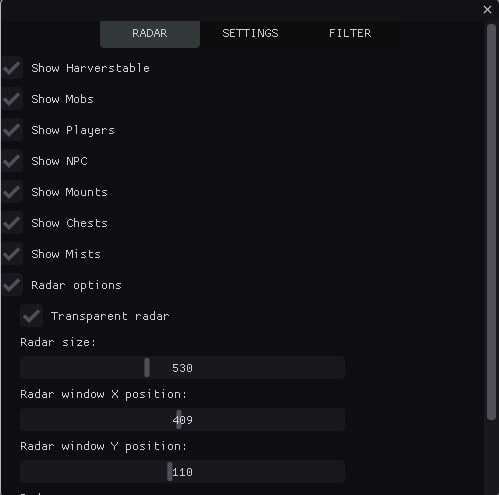
- Show Resources / Display resources (wood, stone, ore, etc.)
- Show Mobs / Display mobs
- Show Players / Display players
- Show NPC / Display NPCs
- Show Chests / Display chests
- Show Mists / Display mists
- Show Mounts / Display mounts
- Counter of objects of each type / Shows the count of each object type on the radar (CHEST, MOB, HARV, etc.)
- Minimum/maximum distance for display / Filter objects by distance; objects outside range are hidden
- Sound notifications / Sound alerts when detecting different object types (players, chests, resources)
- Tracking the nearest object / Automatically detects and shows info for the nearest object to the player
- Export coordinates to a file / Saves coordinates of all detected objects to a text file (hotkey: F3)
- History of discovered objects / Tracks discovery history with timestamps
- Hotkeys / Quick access: F1 (menu), F2 (save), F3 (export coordinates)
- Automatic configuration saving / Auto-saves settings every 30 seconds
- Displaying the distance to objects / Shows distance in meters to each object on the radar
- Player approaching warning / Sound warning when other players approach within a set distance
- Grouping objects by type / Groups objects by type for easier analysis
- Direction indicator / Shows direction on the radar
- Automatic hiding of distant objects / Hides objects outside scan radius
- Detection time statistics / Tracks detection stats (first/last seen, count)
- Improved sound notifications / Different sounds for different object types (chests, resources, players)
- Visual indicators / Pulsing circles for important objects (chests, artifacts)
- Object Priority System / Object prioritization for sorting (chests — highest priority)
- Object caching / Object caching for performance
CHESTS
- Chests filter / Chest filter
- Only 1-st TIER chests / Display 1st tier chests
- Only 2-st TIER chests / Display 2nd tier chests
- Only 3-st TIER chests / Display 3rd tier chests
- Only 4-st TIER chests / Display 4th tier chests
VISUAL EFFECTS
- Lines to objects / Draws lines from radar center to each object for better visualization
- Trajectories of movement / Shows movement trails with configurable length
- Visibility zones / Visualizes scan zone
- Color gradients / Gradient coloring for objects
- Object animations / Pulsing effects with configurable speed
- Shadows / Shadows under objects for depth
- Glow effects / Glow around objects
- Radar grid / Coordinate grid for orientation
- Zone boundaries / Visual radar boundaries with corner markers
- Directional arrows / Arrows showing direction to objects
- Object icons / Unique icons for different object types
- Gradient lines / Lines with smooth color transition
- Contours of objects / Contours with configurable thickness
- Hover highlight / Highlight on mouse hover
- Distance rings / Concentric rings for distance visualization
- Particle effects / Particles around important objects (chests, artifacts)
- Visual markers / Star markers for important objects (chests, artifacts)
- Pulsating effects / Object pulsation
- 3D depth effect / Depth effect for objects
RADAR
- Radar options / Radar settings
- Transparent radar / Set radar transparency
- Radar size / Set radar size
- Radar X position / Set radar position on X axis
- Radar Y position / Set radar position on Y axis
- Radar zoom / Set radar zoom in/out
- Scan radius / Set object scan radius
VISUALS COLORS
- Mobs color / Set mob display color
- NPC color / Set NPC display color
- Players color / Set player display color
- Mounts color / Set mount display color
- Mists / Set mist display color
- Resources TIER 1 color / Set tier 1 resource color
- Resources TIER 2 color / Set tier 2 resource color
- Resources TIER 3 color / Set tier 3 resource color
- Resources TIER 4 color / Set tier 4 resource color
- Resources TIER 5 color / Set tier 5 resource color
- Resources TIER 6 color / Set tier 6 resource color
- Resources TIER 7 color / Set tier 7 resource color
- Resources TIER 8 color / Set tier 8 resource color
- Chests color / Set chest display color
RESOURCES
- Enable filter / Enable filter
- Resources filter / Resource display filter
- Only 1-st TIER items / Display 1st tier items
- Only 2-st TIER items / Display 2nd tier items
- Only 3-st TIER items / Display 3rd tier items
- Only 4-st TIER items / Display 4th tier items
- Only 5-st TIER items / Display 5th tier items
- Only 6-st TIER items / Display 6th tier items
- Only 7-st TIER items / Display 7th tier items
- Only 8-st TIER items / Display 8th tier items

客户评价
所有评价常见问题
使用 为游戏 Albion Online 工作的私人作弊雷达·梅森 (Radar Mason) 安全吗?
如何安装和启动 为游戏 Albion Online 工作的私人作弊雷达·梅森 (Radar Mason)?
Albion Online 更新后 为游戏 Albion Online 工作的私人作弊雷达·梅森 (Radar Mason) 还能用吗?
为游戏 Albion Online 工作的私人作弊雷达·梅森 (Radar Mason) 包含哪些功能?
接受哪些付款方式?
如何联系客服?
付款后,您将收到关于软件激活、启动和使用的详细说明。
说明将发送到付款前提供的电子邮件地址。
您还将找到下载链接和必要的组件。