Fecurity für EFT Arena
Zuverlässiger privater Cheat Fecurity für Escape from Tarkov Arena
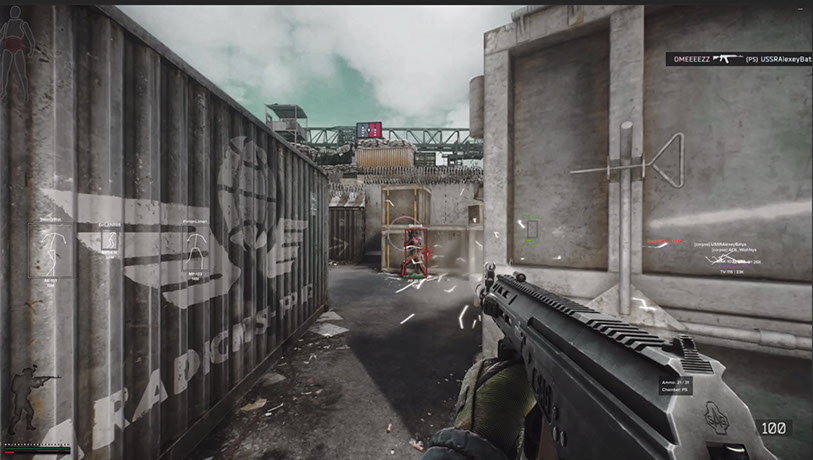
Fecurity für das Spiel Escape from Tarkov ist eine zuverlässige Option, die schon seit langem auf unserer Ressource veröffentlicht wird. Die Arena-Unterstützung wurde fast sofort eingeführt. Nach einiger Zeit entschieden wir uns, eine spezielle Version zu entwickeln, die günstiger ist als Software, die zwei Modi gleichzeitig unterstützt. In einfachen Worten schreibe ich in diesem Thema über den Fecurity-Cheat, der nur in Arena funktioniert. The functionality is almost the same as the original software. Das Programm ist zuverlässig und nutzt eine moderne Methode zur Umgehung von Anti-Cheat. Beliebt bei Benutzern. Ich veröffentliche diese Version auf der Website aufgrund der Bitte von Benutzern, die das klassische Battle nicht mehr spielen. Außerdem sehe ich keinen Sinn darin, zu viel zu bezahlen, wenn die Möglichkeit zum Sparen besteht.
Systemanforderungen
🔔 Cheat-Status wird automatisch aus unserem Telegram-Bot nach Entwickler-Benachrichtigungen aktualisiert — folge den News dort. Viele Cheats aktualisieren sich nach Spieländerungen selbst, daher bedeutet der Status „Wird geprüft“ nicht, dass der Cheat defekt ist — es ist nur Ungewissheit bis zur Bestätigung. Nicht sicher? Frag im Website-Chat oder unter Kontakte.
Globale Schlüssel — funktionieren weltweit.
Keys for 30 days are sent by the administrator manually. Once the client base appears, keys will be uploaded to online payment with automatic delivery.
Für ausgewählte Produkte kann die Zahlung mit einer Binance-Karte verfügbar sein. Schreiben Sie uns vor dem Kauf privat, um Verfügbarkeit und Details zu klären.
Funktionen
AIMBOT
- Aimbot aktivieren/deaktivieren
- Eine Art von Aimbot (Lautlos – unsichtbar auf dem Bildschirm des Spielers)
- Auto-Fire – automatischer Schuss
- Auto-Fire-Ziele – Zielauswahl (Bots, Follower, Bosse)
- Auto-Fire Hitscan Type – Hitscan-Typ für automatischen Schuss (zur Optimierung)
- Auto-Fire Hitscan Speed – Hitscan-Geschwindigkeit für automatischen Schuss (zur Optimierung)
- Steuerbares Sichtfeld – anpassbare Aimbot-Triggerzone
- FOV zeichnen – Aimbot-Triggerzone anzeigen
- Streuung entfernen – entfernt die Streuung auf Schrotflinten
- Silent Knife – nutzt automatisch und lautlos Nahkampf in einer Zone von ca. 1,5 m
- Geschwindigkeits- und Ballistikvorhersage – Vorhersage der Ballistik und der Geschwindigkeit des gegnerischen Spielers
- Veränderbarer Abstand des Aimbots
- Auto-Feuer-Distanz
- Einzigartiges Hitscan-System
Ausnutzen
- Beute durch Wände – Beute durch Wände
- Visier entfernen – Entfernt den Visiereffekt bei einigen Helmen
- Benutzerdefinierte Rückstoßkontrolle (0–100 %) – kontrolliert den Rückstoß der Waffe
- Rückstoßmodus (erhöhen/verringern) – ändern Sie, ob der Rückstoßprozentsatz hinzugefügt oder verringert wird
- Unendliche Ausdauer
- Wurfkraft – Wurfkraft für Granaten anpassen
- Instant ADS – sofortiges Zielen
- Schalter erzwingen – Entsperrt alle Schalter am Laborstandort
- Kein Gewicht – beseitigt den Übergewichtseffekt
- Keine Trägheit – beseitigt Trägheit
- Keine Fehlfunktion – beseitigt die Fehlfunktion der Waffe
VISUALS – Beute
- Loot ESP aktivieren/deaktivieren
- 3D-Box – 3D-Box um die Beute
- Questgegenstände – separate Farbe für Questgegenstände
- Mindestpreis – Mindestpreis der angezeigten Beute
- Seltener Preis – Preis, zu dem Gegenstände in eine seltene Farbe wechseln
- Maximale Gegenstandsentfernung – maximale Entfernung für die Beuteanzeige
- Maximale Containerentfernung – maximale Entfernung für die Containeranzeige
- Loot ESP-Tastenkombination
VISUALS – Exfiltration
- Exfiltrationspunkte ESP
- Nur geöffnet – geschlossene Ausgänge herausfiltern
- Informationen zum Exfiltrationspunkt (Entfernung, Status)
- Exfiltrationspunkt-ESP-Tastenkombination
BILDER – Granaten
- Granaten ESP
- Granateninfo (Timer, Entfernung)
- Maximale Entfernung für die Granatenanzeige
- Grenade ESP-Tastenkombination
VERSCHIEDENES
- Schnelle Suche
- Schnelle Untersuchung
- Schnell geöffneter Behälter
- Schnelles Laden/Entladen von Munition – schnelles Laden/Entladen von Patronen aus Magazinen
- Dynamisches Fadenkreuz – dynamisches Visier, das die Waffenrichtung anzeigt
- Wärmebild
- Nachtsicht
- Munitionsanzeige – Anzeige der verbleibenden Patronen und des Munitionstyps im Magazin
- Klicken Sie auf „Ton“.
- FOV überschreiben – Sichtfeld ändern
- Keine Sprungverzögerung – beseitigt Verzögerungen zwischen Sprüngen
- Hochsprung
- Kontrolle darüber, wie hoch der Sprung sein wird
- Benutzerdefinierte Spielzeit (0–24 Stunden) – Ändern Sie die aktuelle Spielzeit
- Dritte Person: Aktivieren Sie die Ansicht einer dritten Person per Tastenkombination
ANDERE
- Speedhack (nicht empfohlen – führt zu Desynchronisierung mit dem Server)
- No-Fog – entfernt Nebel
- Immer schießen – schießen Sie beim Laufen oder Springen
- Immer zielen – Zielen Sie beim Laufen oder Springen
- Keine körperliche Verfassung – Laufen mit gebrochenen Beinen, während der Heilung
BILDER – Spieler
- Visuals aktivieren/deaktivieren
- Nur Feind – entfernt ESP bei Verbündeten
- Boxen – Zeichnet einen Rahmen um gegnerische/verbündete Spieler
- Kastenumriss
- OOF-Pfeile – Pfeile in Richtung Spieler außerhalb der Sichtlinie
- OOF-Pfeilradius – Abstand der OOF-Pfeile vom Fadenkreuz
- Chams
- Skelett – Zeichnet Skelette von Spielern
VISUALS – Kugeln
Bullet Tracer aktivieren/deaktivieren
Besitzer wählen – wählen Sie aus, wessen Kugelspuren angezeigt werden sollen (selbst, Feinde, Teamkollegen)
VISUALS – Grenzzone
- ESP auf Minen/Scharfschützen
- Entfernung zu Minen/Scharfschützen anzeigen
- Filter – Minen- oder Scharfschützenanzeige umschalten
- Maximaler Abstand zur Anzeige
- Grenzzonen-ESP-Tastenkombination
Beutefilter
- Beutefilter aktivieren/deaktivieren
- Beuteentfernung ignorieren
Kundenbewertungen
Alle BewertungenHäufig gestellte Fragen
Welche Funktionen sind in Fecurity enthalten?
Welche Zahlungsmethoden werden akzeptiert?
Wie erreiche ich den Support?
Nach der Zahlung erhalten Sie detaillierte Anleitungen zur Aktivierung, zum Start und zur Nutzung der Software.
Die Anleitung wird an die vor der Zahlung angegebene E-Mail-Adresse gesendet.
Dort finden Sie auch den Download-Link und die notwendigen Komponenten.
Cheat-Community
Cheat-Updates, Erkennungsstatus und Hilfe von anderen Spielern — in unserem Telegram und Discord.