Fecurity cho EFT Arena
Gian lận riêng tư đáng tin cậy Fecurity để thoát khỏi Đấu trường Tarkov
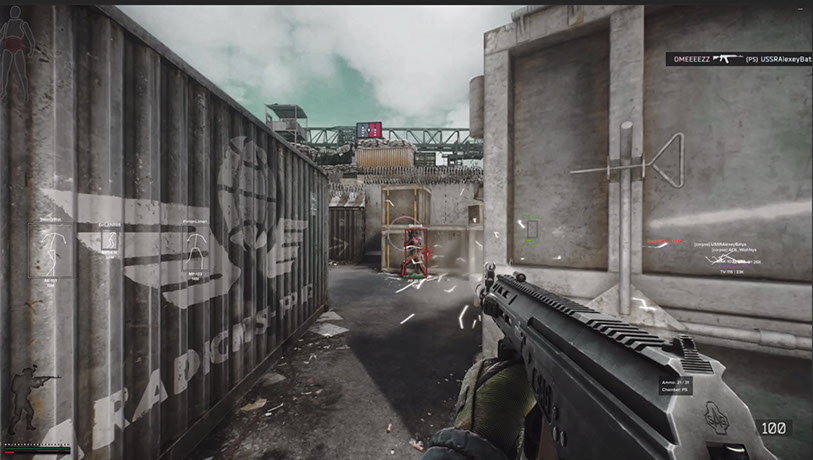
Tính an toàn cho trò chơi Escape from Tarkov là một lựa chọn đáng tin cậy đã được đăng trên tài nguyên của chúng tôi trong một thời gian dài. Hỗ trợ đấu trường đã được giới thiệu gần như ngay lập tức. Sau một thời gian, chúng tôi quyết định tạo một phiên bản đặc biệt, rẻ hơn phần mềm hỗ trợ hai chế độ cùng một lúc. Nói một cách đơn giản, trong chủ đề này tôi đang viết về trò gian lận Fecurity, trò gian lận này chỉ hoạt động trong Arena. Chức năng gần giống như phần mềm gốc. Chương trình này đáng tin cậy và sử dụng phương pháp hiện đại để vượt qua tính năng chống gian lận. Phổ biến trong số người dùng. Tôi đăng phiên bản này lên trang web do yêu cầu của những người dùng đã ngừng chơi trận chiến cổ điển. Ngoài ra, tôi không thấy việc trả quá nhiều khi có cơ hội tiết kiệm là vô ích.
Yêu cầu hệ thống
🔔 Trạng thái cheat cập nhật tự động từ bot Telegram của chúng tôi theo thông báo của nhà phát triển — hãy theo dõi tin tức ở đó. Nhiều cheat tự cập nhật sau khi game thay đổi, nên trạng thái «Đang kiểm tra» không có nghĩa là cheat không hoạt động — chỉ là chưa chắc chắn cho đến khi được xác nhận. Không chắc? Hỏi trong chat trên trang hoặc xem Liên hệ.
Key toàn cầu — hoạt động trên toàn thế giới.
Keys for 30 days are sent by the administrator manually. Once the client base appears, keys will be uploaded to online payment with automatic delivery.
Một số sản phẩm có thể hỗ trợ thanh toán bằng thẻ Binance. Hãy nhắn riêng cho chúng tôi trước khi mua để kiểm tra và thống nhất chi tiết.
Tính năng
AIMBOT
- Bật/tắt Aimbot
- Một loại aimbot (Im lặng - ẩn trên màn hình của người chơi)
- Auto-Fire - bắn tự động
- Mục tiêu tự động bắn - lựa chọn mục tiêu (bot, người theo dõi, ông chủ)
- Auto-Fire Hitscan Type — loại Hitscan để bắn tự động (để tối ưu hóa)
- Tốc độ quét tự động bắn - tốc độ quét lượt truy cập để bắn tự động (để tối ưu hóa)
- FOV có thể kiểm soát - vùng kích hoạt aimbot có thể tùy chỉnh
- Vẽ FOV - hiển thị vùng kích hoạt aimbot
- Loại bỏ sự phân tán - loại bỏ sự lan truyền trên súng ngắn
- Silent Knife - tự động và âm thầm sử dụng cận chiến trong phạm vi ~1,5m
- Dự đoán vận tốc & đường đạn - dự đoán đường đạn và tốc độ của người chơi đối phương
- Khoảng cách có thể thay đổi của aimbot
- Khoảng cách tự động bắn
- Hệ thống Hitscan độc đáo
KHAI THÁC
- Cướp qua tường - cướp qua tường
- Remove Visor - loại bỏ hiệu ứng tấm che trên một số mũ bảo hiểm
- Kiểm soát độ giật tùy chỉnh (0-100%) - kiểm soát độ giật của vũ khí
- Chế độ giật (tăng/giảm) - thay đổi xem % độ giật được thêm hay giảm
- Sức chịu đựng vô hạn
- Lực ném - điều chỉnh lực ném cho lựu đạn
- QUẢNG CÁO tức thì - nhắm mục tiêu tức thì
- Công tắc cưỡng bức - mở khóa tất cả các công tắc ở vị trí phòng thí nghiệm
- Không có trọng lượng - loại bỏ hiệu ứng thừa cân
- Không có quán tính - loại bỏ quán tính
- Không có trục trặc - loại bỏ trục trặc vũ khí
HÌNH ẢNH — Loot
- Kích hoạt/vô hiệu hóa Loot ESP
- Hộp 3D - Hộp 3D xung quanh chiến lợi phẩm
- Vật phẩm nhiệm vụ - màu riêng biệt cho vật phẩm nhiệm vụ
- Giá tối thiểu - giá tối thiểu của chiến lợi phẩm được hiển thị
- Giá hiếm - giá mà vật phẩm chuyển sang màu hiếm
- Khoảng cách tối đa của vật phẩm - khoảng cách tối đa để hiển thị chiến lợi phẩm
- Khoảng cách tối đa của vùng chứa - khoảng cách tối đa để hiển thị vùng chứa
- Cướp khóa ESP
HÌNH ẢNH — Exfilter
- Điểm lọc ESP
- Chỉ mở - lọc ra các lối thoát đã đóng
- Thông tin điểm thoát (khoảng cách, trạng thái)
- Liên kết phím ESP điểm lọc
HÌNH ẢNH — Lựu Đạn
- Lựu đạn ESP
- Thông tin về lựu đạn (đồng hồ, khoảng cách)
- Khoảng cách tối đa để hiển thị lựu đạn
- Móc khóa Grenade ESP
MISC
- Tìm kiếm nhanh
- Kiểm tra nhanh
- Thùng mở nhanh
- Nạp/Dỡ đạn nhanh — hộp mực nạp/dỡ nhanh từ tạp chí
- Dynamic Crosshair - tầm nhìn động hiển thị hướng vũ khí
- Tầm nhìn nhiệt
- Tầm nhìn ban đêm
- Bảng Đạn - hiển thị các hộp đạn còn lại và loại đạn trong băng đạn
- Lượt âm thanh
- Ghi đè FOV - thay đổi trường nhìn
- Không có độ trễ khi nhảy - loại bỏ độ trễ giữa các lần nhảy
- Nhảy cao
- Kiểm soát độ cao của bước nhảy
- Thời gian trò chơi tùy chỉnh (0-24h) - thay đổi thời gian trong trò chơi hiện tại
- Người thứ ba - cho phép xem người thứ ba bằng keybind
KHÁC
- Hack tốc độ (không được khuyến nghị - gây ra tình trạng mất đồng bộ hóa với máy chủ)
- Không có sương mù - loại bỏ sương mù
- Luôn bắn - bắn trong khi chạy, nhảy
- Luôn nhắm - nhắm trong khi chạy, nhảy
- Không có tình trạng thể chất - chạy khi bị gãy chân, trong quá trình hồi phục
HÌNH ẢNH — Người chơi
- Bật/tắt hình ảnh
- Chỉ kẻ thù - loại bỏ ESP trên đồng minh
- Hộp - vẽ hộp xung quanh kẻ thù/người chơi đồng minh
- Phác thảo hộp
- Mũi tên OOF - mũi tên hướng tới người chơi ngoài tầm nhìn
- Bán kính mũi tên OOF - khoảng cách của Mũi tên OOF từ tâm ngắm
- người Chăm
- Skeleton — vẽ bộ xương của người chơi
HÌNH ẢNH — Viên đạn
- Bật/tắt tính năng dò vết đạn
- Chủ sở hữu chọn - chọn dấu vết đạn sẽ hiển thị (bản thân, kẻ thù, đồng đội)
HÌNH ẢNH — Vùng biên giới
- ESP trên mìn/tay bắn tỉa
- Hiển thị khoảng cách đến mỏ/tay bắn tỉa
- Bộ lọc - chuyển đổi hiển thị mìn hoặc lính bắn tỉa
- Khoảng cách tối đa để hiển thị
- Liên kết phím ESP vùng biên giới
LỌC LỘC BÓN
- Bật/tắt bộ lọc chiến lợi phẩm
- Bỏ qua khoảng cách cướp bóc
Đánh giá của khách hàng
Tất cả đánh giáCâu hỏi thường gặp
Fecurity bao gồm những tính năng gì?
Những phương thức thanh toán nào được chấp nhận?
Làm sao liên hệ hỗ trợ?
Sau khi thanh toán, bạn sẽ nhận được hướng dẫn chi tiết về kích hoạt, khởi chạy và sử dụng phần mềm.
Hướng dẫn sẽ được gửi đến email đã cung cấp trước khi thanh toán.
Bạn cũng sẽ tìm thấy link tải xuống và các thành phần cần thiết.
Cộng đồng cheat
Cập nhật cheat, trạng thái phát hiện và hỗ trợ từ người chơi khác — trên Telegram và Discord của chúng tôi.