[ON] Aimbot [ON] ESP [ON] WH
Telegram Discord 제품 상태 IVSOFTE Pass Duck Hunt 설명서 자주 묻는 질문
EFT Arena 치트 더보기

Fecurity

Tarkov Arena에서의 탈출을 위한 믿을 수 있는 개인 치트 Fecurity
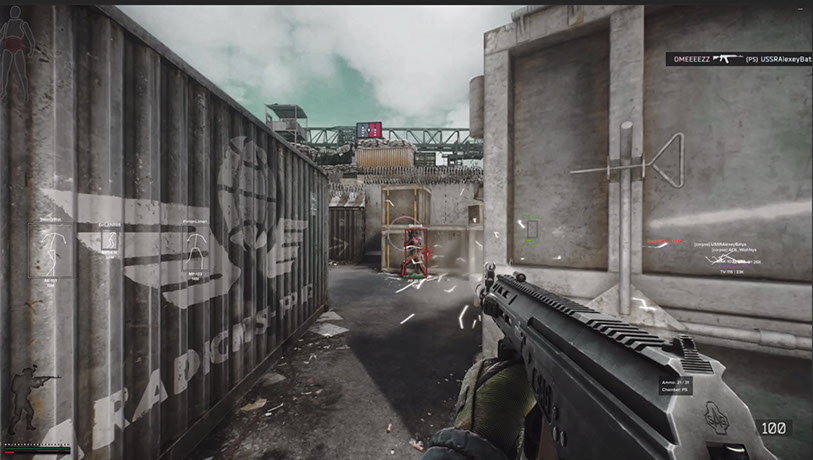
개발자: Fecurity
Escape from Tarkov 게임의

안전성은 오랫동안 우리 리소스에 게시되어 온 신뢰할 수 있는 옵션입니다. Arena 지원은 거의 즉시 도입되었습니다. 얼마 후, 우리는 두 가지 모드를 동시에 지원하는 소프트웨어보다 저렴한 특별 버전을 만들기로 결정했습니다. 간단히 말해서, 이 주제에서는 Arena에서만 작동하는 Fecurity 치트에 대해 쓰고 있습니다. 기능은 원래 소프트웨어와 거의 동일합니다. 이 프로그램은 신뢰할 수 있으며 치트 방지를 우회하는 현대적인 방법을 사용합니다. 사용자들 사이에서 인기가 있습니다. 클래식 배틀 플레이를 중단하신 유저들의 요청으로 인해 이 버전을 사이트에 게시하게 되었습니다. 또한 저축할 기회가 있을 때 초과 지불하는 것은 의미가 없다고 생각합니다.

시스템 요구사항

프로세서
INTEL 6th Gen+ (4th Gen is also supported but can take Windows with it to the next world) and AMD
스트림/스크린샷에서 숨기기
No
Supported Bios Format
UEFI only (Legacy not supported). Check with instructions HERE
Required Disk Format
GPT only (MBR does not work!). Check with instructions HERE
Built-In Spoofer
YES — Dynamic (enabled by default) + Static
Anti-Cheat
BATTLEYE
Supported Game Modes
Windowed, Borderless, Fullscreen
Supported Systems
Windows 10 (21H2, 22H2), Windows 11

글로벌 키 — 전 세계에서 사용 가능.

1 day$3.5구매
7 days$20구매
30 days$35구매

Keys for 30 days are sent by the administrator manually. Once the client base appears, keys will be uploaded to online payment with automatic delivery.

카드로 결제할 수 없나요?

은행 카드가 결제 시스템에서 작동하지 않는 경우, Binance 기프트 카드 (USDT)로 결제할 수 있습니다.

이 방법에는 고정 +10% 수수료가 부과됩니다. 프로모션 코드 및 할인은 적용할 수 없습니다.

  1. 이 결제 방법이 원하시는 제품에 사용 가능한지 문의해 주세요
  2. 국내 마켓플레이스(Paxful, Binance 또는 현지 판매자)에서 필요한 금액의 Binance 기프트 카드(USDT)를 구매하세요 — 편리한 결제 수단으로
  3. 기프트 카드 코드를 보내주시면 — 구매를 활성화하고 제품을 전달해 드립니다

USDT (TRC-20)도 결제 페이지에서 사용할 수 있습니다 — 추가 수수료 없이.

-7%
프로모션 코드 할인
C9704BAFEA114619
까지 4월 19일
보증
안전한 결제
빠른 지원
즉시 배송

기능

AIMBOT

  • Aimbot enable/disable
  • One type of aimbot (Silent — invisible on player's screen)
  • Auto-Fire — automatic shot
  • Auto-Fire Targets — target selection (bots, followers, bosses)
  • Auto-Fire Hitscan Type — hitscan type for automatic shot (for optimization)
  • Auto-Fire Hitscan Speed — hitscan speed for automatic shot (for optimization)
  • Controllable FOV — customizable aimbot trigger zone
  • Draw FOV — display aimbot trigger zone
  • Remove Dispersion — removes spread on shotguns
  • Silent Knife — automatically and silently uses melee in ~1.5m zone
  • Velocity & Ballistic prediction — prediction of ballistics and enemy player speed
  • Changeable distance of aimbot
  • Auto-Fire distance
  • Unique hitscan system

EXPLOIT

  • Loot thru walls — loot through walls
  • Remove Visor — removes visor effect on some helmets
  • Custom Recoil Control (0-100%) — control weapon recoil
  • Recoil Mode (increase/decrease) — change whether recoil % is added or decreased
  • Infinite Stamina
  • Throwing Force — adjust throwing force for grenades
  • Instant ADS — instant aiming
  • Force Switches — unlocks all switches in laboratory location
  • No weight — removes overweight effect
  • No inertia — removes inertia
  • No malfunction — removes weapon malfunction

VISUALS — Loot

  • Loot ESP enable/disable
  • 3D Box — 3D box around loot
  • Quest Items — separate color for quest items
  • Minimum price — minimum price of displayed loot
  • Rare price — price at which items change to rare color
  • Item Max Distance — max distance for loot display
  • Container Max Distance — max distance for container display
  • Loot ESP keybind

VISUALS — Exfiltration

  • Exfiltration points ESP
  • Opened only — filter out closed exits
  • Exfiltration point info (distance, status)
  • Exfiltration point ESP keybind

VISUALS — Grenades

  • Grenades ESP
  • Grenade info (timer, distance)
  • Maximum Distance for grenade display
  • Grenade ESP keybind

MISC

  • Fast Search
  • Fast Examine
  • Fast Open Container
  • Fast Load/Unload Ammo — fast loading/unloading cartridges from magazines
  • Dynamic Crosshair — dynamic sight showing weapon direction
  • Thermal Vision
  • Night Vision
  • Ammo Panel — display of remaining cartridges and ammo type in magazine
  • Hit Sound
  • Override FOV — change the field of view
  • No jump delay — removes delay between jumps
  • High jump
  • Control of how high the jump will be
  • Custom game Time (0-24h) — change current in-game time
  • Thirdperson — enable third person view by keybind

OTHER

  • Speedhack (not recommended — causes desynchronization with server)
  • No-Fog — removes fog
  • Always Fire — shoot while running, jumping
  • Always Aiming — aim while running, jumping
  • No physical condition — run with broken legs, during healing

VISUALS — Player

  • Visuals enable/disable
  • Enemy only — removes ESP on allies
  • Boxes — draws box around enemy/allied players
  • Box outline
  • OOF Arrows — arrows towards players outside line of sight
  • OOF Arrow Radius — distance of OOF Arrows from crosshair
  • Chams
  • Skeleton — draws skeleton of players

VISUALS — Bullets

  • Bullet tracers enable/disable
  • Owners select — choose whose bullet traces to display (self, enemies, teammates)

VISUALS — Border Zone

  • ESP on mines/snipers
  • Show distance to mines/snipers
  • Filter — toggle mines or snipers display
  • Maximum distance for display
  • Border zone ESP keybind

LOOT FILTER

  • Enable/disable loot filter
  • Ignore loot distance

고객 리뷰

모든 리뷰

자주 묻는 질문

Tarkov Arena에서의 탈출을 위한 믿을 수 있는 개인 치트 Fecurity을(를) 사용하는 것이 안전한가요?
네, Tarkov Arena에서의 탈출을 위한 믿을 수 있는 개인 치트 Fecurity은(는) 안전을 최우선으로 설계되었습니다. 최신 안티치트 우회 기술을 사용하며 정기적으로 업데이트합니다. 다만 100% 밴 방지 보장은 없으므로 별도 계정 사용을 권장합니다.
Tarkov Arena에서의 탈출을 위한 믿을 수 있는 개인 치트 Fecurity을(를) 어떻게 설치하고 실행하나요?
구매 후 oplata.info 링크를 받게 되며, 설치 안내, 다운로드 링크, 활성화 키가 포함되어 있습니다. 단계별 가이드를 따르면 됩니다 — 설치는 보통 2-5분 정도 소요됩니다.
EFT Arena 업데이트 후에도 Tarkov Arena에서의 탈출을 위한 믿을 수 있는 개인 치트 Fecurity이(가) 작동하나요?
매 EFT Arena 패치 후 Tarkov Arena에서의 탈출을 위한 믿을 수 있는 개인 치트 Fecurity을(를) 신속하게 업데이트합니다. 업데이트는 보통 1-48시간 이내에 릴리스됩니다. 업데이트 중에는 구독이 동결되어 결제한 시간을 잃지 않습니다.
Tarkov Arena에서의 탈출을 위한 믿을 수 있는 개인 치트 Fecurity에는 어떤 기능이 포함되어 있나요?
Tarkov Arena에서의 탈출을 위한 믿을 수 있는 개인 치트 Fecurity의 기능 세트는 선택한 플랜에 따라 다릅니다. 일반적으로 Aimbot, ESP/Wallhack, Radar 등이 제공됩니다. 전체 기능 목록은 위의 상품 설명에 나와 있습니다.
어떤 결제 수단을 사용할 수 있나요?
oplata.info(은행 카드, 전자지갑, 암호화폐)와 일부 상품의 EliteSeller로 결제를 받습니다. 자세한 내용은 결제 페이지를 참고하세요.
고객 지원은 어떻게 문의하나요?
Telegram(@undetect), Telegram 채팅, Discord 또는 이메일 ivsofte@gmail.com로 관리자에게 연락하세요. 업무 시간: 10:00–00:00 (UTC+3).
모든 질문과 답변

결제 후 소프트웨어의 활성화, 실행 및 사용에 대한 자세한 안내를 받으실 수 있습니다.

안내는 결제 전 제공한 이메일 주소로 전송됩니다.

다운로드 링크와 필요한 구성 요소도 함께 제공됩니다.