[ON] Aimbot [ON] ESP [ON] WH
Telegram Discord 製品ステータス IVSOFTE Pass Duck Hunt 使い方ガイド よくある質問
EFT Arenaのチートをもっと見る

Fecurity

信頼できるプライベートチート Fecurity for Escape from Tarkov Arena
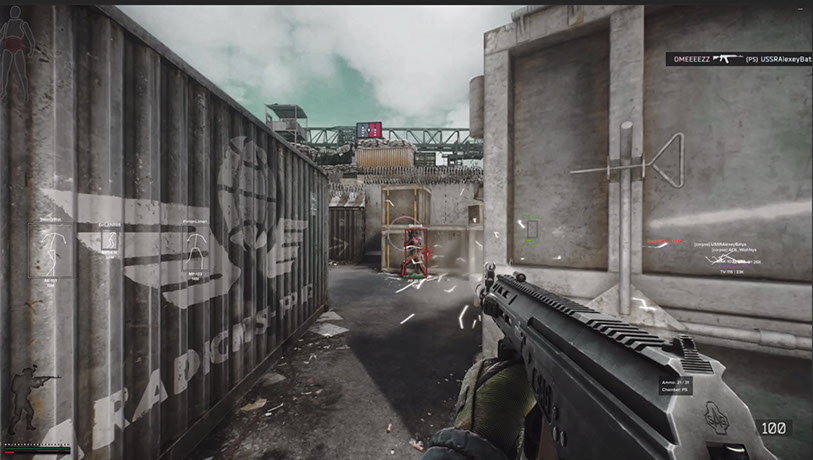
開発者: Fecurity
ゲーム Escape from Tarkov の

Fecurity は、当社のリソースに長い間掲載されている信頼できるオプションです。 アリーナのサポートはほぼすぐに導入されました。 しばらくして、私たちは 2 つのモードを同時にサポートするソフトウェアよりも安価な特別バージョンを作成することにしました。 簡単に言えば、このトピックではアリーナでのみ機能する Fecurity チートについて書いています。 機能は元のソフトウェアとほぼ同じです。 このプログラムは信頼性が高く、アンチチートをバイパスする最新の方法を使用しています。 ユーザーの間で人気があります。 クラシックバトルをプレイしなくなったユーザーの要望により、このバージョンをサイトに掲載します。 また、節約できるチャンスがあるのに過剰に支払うことに意味がありません。

システム要件

プロセッサ
INTEL 6th Gen+ (4th Gen is also supported but can take Windows with it to the next world) and AMD
配信/スクリーンショットで非表示
No
Supported Bios Format
UEFI only (Legacy not supported). Check with instructions HERE
Required Disk Format
GPT only (MBR does not work!). Check with instructions HERE
Built-In Spoofer
YES — Dynamic (enabled by default) + Static
Anti-Cheat
BATTLEYE
Supported Game Modes
Windowed, Borderless, Fullscreen
Supported Systems
Windows 10 (21H2, 22H2), Windows 11

グローバルキー — 世界中で使用可能。

1 day$3.5購入
7 days$20購入
30 days$35購入

Keys for 30 days are sent by the administrator manually. Once the client base appears, keys will be uploaded to online payment with automatic delivery.

カードで支払えませんか?

銀行カードが当社の決済システムで使えない場合、Binance ギフトカード (USDT) でお支払いいただけます。

この方法には固定 +10% のサービス手数料がかかります。プロモコードや割引は適用できません。

  1. この支払い方法がご希望の商品に対応しているか、お問い合わせください
  2. お住まいの国のマーケットプレイス(Paxful、Binance、または現地の販売店)で必要な金額の Binance ギフトカード (USDT) を購入してください — お好みの支払い方法で
  3. ギフトカードのコードを送信してください — 購入を有効化し、商品をお届けします

USDT (TRC-20) はチェックアウト時にもご利用いただけます — 追加手数料なし。

-7%
プロモーションコード割引
C9704BAFEA114619
まで 4月19日
保証
安全な決済
迅速なサポート
即時配信

機能

AIMBOT

  • Aimbot enable/disable
  • One type of aimbot (Silent — invisible on player's screen)
  • Auto-Fire — automatic shot
  • Auto-Fire Targets — target selection (bots, followers, bosses)
  • Auto-Fire Hitscan Type — hitscan type for automatic shot (for optimization)
  • Auto-Fire Hitscan Speed — hitscan speed for automatic shot (for optimization)
  • Controllable FOV — customizable aimbot trigger zone
  • Draw FOV — display aimbot trigger zone
  • Remove Dispersion — removes spread on shotguns
  • Silent Knife — automatically and silently uses melee in ~1.5m zone
  • Velocity & Ballistic prediction — prediction of ballistics and enemy player speed
  • Changeable distance of aimbot
  • Auto-Fire distance
  • Unique hitscan system

EXPLOIT

  • Loot thru walls — loot through walls
  • Remove Visor — removes visor effect on some helmets
  • Custom Recoil Control (0-100%) — control weapon recoil
  • Recoil Mode (increase/decrease) — change whether recoil % is added or decreased
  • Infinite Stamina
  • Throwing Force — adjust throwing force for grenades
  • Instant ADS — instant aiming
  • Force Switches — unlocks all switches in laboratory location
  • No weight — removes overweight effect
  • No inertia — removes inertia
  • No malfunction — removes weapon malfunction

VISUALS — Loot

  • Loot ESP enable/disable
  • 3D Box — 3D box around loot
  • Quest Items — separate color for quest items
  • Minimum price — minimum price of displayed loot
  • Rare price — price at which items change to rare color
  • Item Max Distance — max distance for loot display
  • Container Max Distance — max distance for container display
  • Loot ESP keybind

VISUALS — Exfiltration

  • Exfiltration points ESP
  • Opened only — filter out closed exits
  • Exfiltration point info (distance, status)
  • Exfiltration point ESP keybind

VISUALS — Grenades

  • Grenades ESP
  • Grenade info (timer, distance)
  • Maximum Distance for grenade display
  • Grenade ESP keybind

MISC

  • Fast Search
  • Fast Examine
  • Fast Open Container
  • Fast Load/Unload Ammo — fast loading/unloading cartridges from magazines
  • Dynamic Crosshair — dynamic sight showing weapon direction
  • Thermal Vision
  • Night Vision
  • Ammo Panel — display of remaining cartridges and ammo type in magazine
  • Hit Sound
  • Override FOV — change the field of view
  • No jump delay — removes delay between jumps
  • High jump
  • Control of how high the jump will be
  • Custom game Time (0-24h) — change current in-game time
  • Thirdperson — enable third person view by keybind

OTHER

  • Speedhack (not recommended — causes desynchronization with server)
  • No-Fog — removes fog
  • Always Fire — shoot while running, jumping
  • Always Aiming — aim while running, jumping
  • No physical condition — run with broken legs, during healing

VISUALS — Player

  • Visuals enable/disable
  • Enemy only — removes ESP on allies
  • Boxes — draws box around enemy/allied players
  • Box outline
  • OOF Arrows — arrows towards players outside line of sight
  • OOF Arrow Radius — distance of OOF Arrows from crosshair
  • Chams
  • Skeleton — draws skeleton of players

VISUALS — Bullets

  • Bullet tracers enable/disable
  • Owners select — choose whose bullet traces to display (self, enemies, teammates)

VISUALS — Border Zone

  • ESP on mines/snipers
  • Show distance to mines/snipers
  • Filter — toggle mines or snipers display
  • Maximum distance for display
  • Border zone ESP keybind

LOOT FILTER

  • Enable/disable loot filter
  • Ignore loot distance

カスタマーレビュー

すべてのレビュー

よくある質問

信頼できるプライベートチート Fecurity for Escape from Tarkov Arenaの使用は安全ですか?
はい、信頼できるプライベートチート Fecurity for Escape from Tarkov Arenaはセキュリティを重視して設計されています。高度なアンチチート回避技術を使用し、定期的にソフトウェアを更新しています。ただし100%のBAN防止保証はありません — 別アカウントの使用を推奨します。
信頼できるプライベートチート Fecurity for Escape from Tarkov Arenaのインストールと起動方法は?
購入後、oplata.infoへのリンクが届きます。手順書、ダウンロードリンク、アクティベーションキーが含まれています。ステップバイステップのガイドに従ってください — インストールは通常2〜5分です。
EFT Arenaのアップデート後も信頼できるプライベートチート Fecurity for Escape from Tarkov Arenaは動作しますか?
EFT Arenaの各パッチ後、信頼できるプライベートチート Fecurity for Escape from Tarkov Arenaを迅速に更新します。更新は通常1〜48時間以内にリリースされます。更新中はサブスクリプションが凍結され、支払い済みの時間は失われません。
信頼できるプライベートチート Fecurity for Escape from Tarkov Arenaにはどんな機能が含まれていますか?
信頼できるプライベートチート Fecurity for Escape from Tarkov Arenaの機能セットは選択プランによって異なります。通常、Aimbot、ESP/Wallhack、Radarなどが利用可能です。機能の完全なリストは上記の商品説明をご覧ください。
どの支払い方法が利用できますか?
oplata.info(銀行カード、電子ウォレット、暗号資産)および一部商品のEliteSellerでのお支払いに対応しています。詳細はお支払いページをご覧ください。
サポートにはどう連絡しますか?
Telegram(@undetect)TelegramチャットDiscord、またはメール ivsofte@gmail.com で管理者に連絡できます。対応時間:10:00~翌0:00 (UTC+3)。
すべての質問と回答

お支払い後、ソフトウェアのアクティベーション、起動、使用方法の詳細な説明をお届けします。

説明はお支払い前に指定されたメールアドレスに送信されます。

ダウンロードリンクと必要なコンポーネントもそちらでご確認いただけます。