Fecurity สำหรับ EFT Arena
การโกงส่วนตัวที่เชื่อถือได้ Fecurity สำหรับ Escape from Tarkov Arena
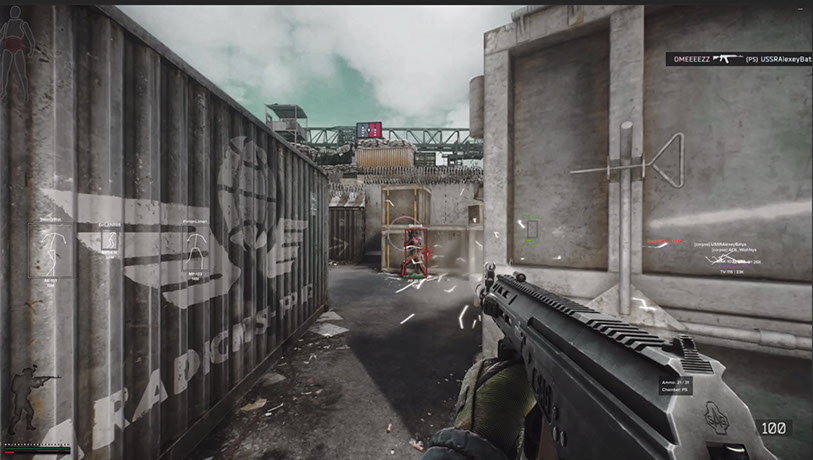
Fecurity สำหรับเกม Escape from Tarkov เป็นตัวเลือกที่เชื่อถือได้ซึ่งโพสต์ไว้ในแหล่งข้อมูลของเรามาเป็นเวลานาน การสนับสนุน Arena ถูกนำมาใช้เกือบจะในทันที หลังจากนั้นไม่นาน เราก็ตัดสินใจสร้างเวอร์ชันพิเศษซึ่งมีราคาถูกกว่าซอฟต์แวร์ที่รองรับสองโหมดพร้อมกัน พูดง่ายๆ ก็คือ ในหัวข้อนี้ ฉันกำลังเขียนเกี่ยวกับการโกง Fecurity ซึ่งใช้ได้เฉพาะใน Arena เท่านั้น ฟังก์ชั่นการทำงานเกือบจะเหมือนกับซอฟต์แวร์ต้นฉบับ โปรแกรมมีความน่าเชื่อถือและใช้วิธีการที่ทันสมัยในการเลี่ยงผ่านการต่อต้านการโกง เป็นที่นิยมในหมู่ผู้ใช้ ฉันกำลังโพสต์เวอร์ชันนี้บนเว็บไซต์เนื่องจากการร้องขอของผู้ใช้ที่หยุดเล่นการต่อสู้แบบคลาสสิก นอกจากนี้ ฉันไม่เห็นประเด็นของการจ่ายเงินมากเกินไปเมื่อมีโอกาสประหยัดเงิน
ข้อกำหนดระบบ
🔔 สถานะของโปรแกรมอัปเดตอัตโนมัติจาก บอต Telegram ของเรา ตามการแจ้งเตือนของผู้พัฒนา — ติดตามข่าวได้ที่นั่น โปรแกรมหลายตัวอัปเดตตัวเองหลังเกมเปลี่ยนแปลง ดังนั้นสถานะ «กำลังตรวจสอบ» ไม่ได้แปลว่าใช้งานไม่ได้ เป็นเพียงความไม่แน่นอนจนกว่าจะยืนยัน ไม่แน่ใจ? สอบถามที่ แชทบนเว็บไซต์ หรือดู ติดต่อ
คีย์ Global — ใช้ได้ทั่วโลก
Keys for 30 days are sent by the administrator manually. Once the client base appears, keys will be uploaded to online payment with automatic delivery.
สินค้าบางรายการอาจชำระด้วยบัตร Binance ได้ โปรดส่งข้อความส่วนตัวหาเราก่อนซื้อเพื่อตรวจสอบและตกลงรายละเอียด
คุณสมบัติ
เอมบอต
- Aimbot เปิด/ปิด
- Aimbot ชนิดหนึ่ง (เงียบ — มองไม่เห็นบนหน้าจอของผู้เล่น)
- ยิงอัตโนมัติ — ยิงอัตโนมัติ
- เป้าหมายการยิงอัตโนมัติ — การเลือกเป้าหมาย (บอท ผู้ติดตาม บอส)
- ประเภท Hitscan การยิงอัตโนมัติ — ประเภท Hitscan สำหรับการยิงอัตโนมัติ (เพื่อการปรับให้เหมาะสม)
- Auto-Fire Hitscan Speed - ความเร็ว hitscan สำหรับการยิงอัตโนมัติ (เพื่อการปรับให้เหมาะสม)
- FOV ที่ควบคุมได้ — โซนทริกเกอร์ Aimbot ที่ปรับแต่งได้
- Draw FOV — display aimbot trigger zone
- Remove Dispersion – ลบการแพร่กระจายของปืนลูกซอง
- Silent Knife — ใช้การโจมตีระยะประชิดโดยอัตโนมัติและเงียบ ๆ ในโซนประมาณ 1.5 เมตร
- การทำนายความเร็วและขีปนาวุธ - การทำนายขีปนาวุธและความเร็วของผู้เล่นศัตรู
- Changeable distance of aimbot
- ระยะการยิงอัตโนมัติ
- ระบบฮิตสแกนที่ไม่ซ้ำใคร
ใช้ประโยชน์
- Loot thru walls — loot through walls
- Remove Visor — ลบเอฟเฟกต์กระบังหน้าบนหมวกกันน็อคบางใบ
- การควบคุมการหดตัวแบบกำหนดเอง (0-100%) — ควบคุมการหดตัวของอาวุธ
- โหมดการหดตัว (เพิ่ม/ลด) — เปลี่ยนว่า % การหดตัวจะถูกเพิ่มหรือลดลง
- ความแข็งแกร่งที่ไม่มีที่สิ้นสุด
- Throwing Force — ปรับแรงขว้างสำหรับระเบิด
- Instant ADS — instant aiming
- Force Switches — ปลดล็อคสวิตช์ทั้งหมดในตำแหน่งห้องปฏิบัติการ
- No weight — removes overweight effect
- ไม่มีความเฉื่อย – ขจัดความเฉื่อย
- No malfunction — removes weapon malfunction
ภาพ – ปล้น
- เปิด/ปิด Loot ESP
- 3D Box — 3D box around loot
- Quest Items — separate color for quest items
- ราคาขั้นต่ำ — ราคาขั้นต่ำของไอเทมที่แสดง
- ราคาที่หายาก — ราคาที่สินค้าเปลี่ยนเป็นสีที่หายาก
- Item Max Distance — ระยะทางสูงสุดสำหรับการแสดงไอเทม
- Container Max Distance - ระยะทางสูงสุดสำหรับการแสดงคอนเทนเนอร์
- ยกเค้าคีย์ ESP
ภาพ — การกรอง
- จุดกรอง ESP
- เปิดเท่านั้น — กรองทางออกที่ปิดออก
- ข้อมูลจุดกรอง (ระยะทาง สถานะ)
- การเชื่อมโยงคีย์ ESP ของจุดกรอง
ภาพ - ระเบิดมือ
- ระเบิดมือ ESP
- ข้อมูลระเบิดมือ (จับเวลา, ระยะทาง)
- ระยะทางสูงสุดสำหรับการแสดงระเบิดมือ
- ปุ่มลัด Grenade ESP
เบ็ดเตล็ด
- ค้นหาอย่างรวดเร็ว
- ตรวจสอบอย่างรวดเร็ว
- เปิดคอนเทนเนอร์อย่างรวดเร็ว
- Fast Load/Unload Ammo — บรรจุ/ขนกระสุนออกจากแม็กกาซีนอย่างรวดเร็ว
- Dynamic Crosshair — การมองเห็นแบบไดนามิกที่แสดงทิศทางของอาวุธ
- วิสัยทัศน์ความร้อน
- การมองเห็นตอนกลางคืน
- แผงกระสุน - แสดงกระสุนที่เหลืออยู่และประเภทกระสุนในแม็กกาซีน
- ตีเสียง
- Override FOV — change the field of view
- No jump delay — removes delay between jumps
- กระโดดสูง
- Control of how high the jump will be
- เวลาเกมที่กำหนดเอง (0-24 ชม.) — เปลี่ยนเวลาในเกมปัจจุบัน
- บุคคลที่สาม — เปิดใช้งานมุมมองบุคคลที่สามด้วยการผูกปุ่ม
อื่นๆ
- Speedhack (ไม่แนะนำ — ทำให้เกิดการไม่ซิงโครไนซ์กับเซิร์ฟเวอร์)
- No-Fog - กำจัดหมอก
- Always Fire — shoot while running, jumping
- Always Aiming — aim while running, jumping
- ไม่มีสภาพร่างกาย — วิ่งโดยที่ขาหักระหว่างการรักษา
ภาพ — ผู้เล่น
- ภาพเปิด / ปิด
- Enemy only — removes ESP on allies
- Boxes — draws box around enemy/allied players
- โครงร่างกล่อง
- OOF Arrows - ลูกศรไปยังผู้เล่นที่อยู่นอกระยะการมองเห็น
- OOF Arrow Radius - ระยะห่างของลูกศร OOF จากเป้าเล็ง
- จามส์
- Skeleton — draws skeleton of players
ภาพ – กระสุน
- เครื่องมือติดตามสัญลักษณ์แสดงหัวข้อย่อยเปิด/ปิด
- เจ้าของเลือก — เลือกร่องรอยกระสุนที่จะแสดง (ตนเอง ศัตรู เพื่อนร่วมทีม)
ภาพ – เขตชายแดน
- ESP ในทุ่นระเบิด/สไนเปอร์
- แสดงระยะทางถึงทุ่นระเบิด/สไนเปอร์
- ตัวกรอง — สลับการแสดงทุ่นระเบิดหรือพลซุ่มยิง
- ระยะทางสูงสุดในการแสดงผล
- การเชื่อมโยงคีย์ ESP ของโซนชายแดน
ตัวกรองของขวัญ
- เปิด/ปิดตัวกรองไอเทม
- ละเว้นระยะทางปล้น
รีวิวจากลูกค้า
รีวิวทั้งหมดคำถามที่พบบ่อย
Fecurity มีฟีเจอร์อะไรบ้าง?
รับชำระเงินด้วยวิธีใดบ้าง?
ติดต่อฝ่ายสนับสนุนอย่างไร?
หลังชำระเงิน คุณจะได้รับคำแนะนำละเอียดเกี่ยวกับการเปิดใช้งาน เริ่มต้น และใช้งานซอฟต์แวร์
คำแนะนำจะถูกส่งไปยังอีเมลที่ระบุก่อนชำระเงิน
คุณยังจะพบลิงก์ดาวน์โหลดและส่วนประกอบที่จำเป็น
ชุมชนผู้ใช้ตัวช่วย
อัปเดตตัวช่วย สถานะการตรวจจับ และความช่วยเหลือจากผู้เล่นคนอื่น — ใน Telegram และ Discord ของเรา