Phoenix Full for PUBG
Phoenix Full - complete private cheat for PUBG
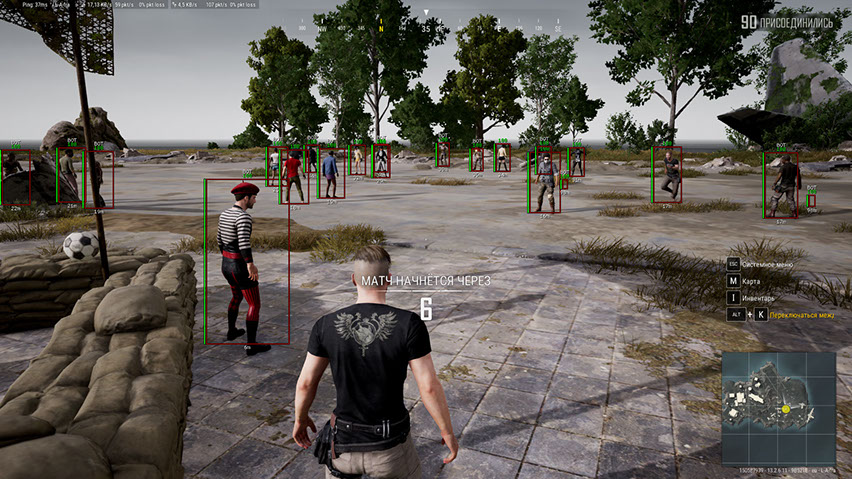
Meet the full version of the legendary Phoenix — one of the most well-known and feature-rich cheats for PUBG. The software has long proven itself with stable performance, extensive capabilities, and a thoughtful approach to comfortable gameplay without unnecessary risks.
The key feature of Phoenix is a vector aimbot with a flexible settings system. It allows you to precisely adjust the crosshair behavior for different combat styles — from careful legit shooting to more confident aggressive firefights. Aim control is intuitive and requires no lengthy setup.
The informative ESP (WallHack) displays players, vehicles, loot, airdrops and other important objects on the map. Additionally, a spectator display function is implemented, helping you control the situation and avoid suspicious moments.
To increase focus during combat, Battle Mode is provided — a mode that disables World and Loot ESP, leaving only player information.
Phoenix comes with an HWID Spoofer, and the convenient menu supports Russian and English languages. An excellent choice for those who value functionality, stability and control over every detail of PUBG gameplay.
System Requirements
🔔 Cheat statuses update automatically from our Telegram bot via developer notifications — follow the news there. Many cheats update themselves after game changes, so a “Checking” status does not mean the cheat is broken — it is just uncertainty until confirmed. Not sure? Ask in the site chat or on our Contacts page.
Global keys — work worldwide.
Payment with a Binance card may be available for selected products. Contact us privately before buying to check availability and agree the details.
Features
Loot ESP (WH for Loot)
- Loot ESP — ability to see various loot lying on the ground
- Loot Filter — flexible system for filtering displayed loot by categories
- Armor 1 LVL — show first level armor (body armor, helmets, backpacks)
- Armor 2 LVL — show second level armor (body armor, helmets, backpacks)
- Armor 3 LVL — show third level armor (body armor, helmets, backpacks)
- Blade — highlight melee weapons
- Pistols — provides information about pistol locations
- Submachine — shows submachine guns
- Shotguns — shows shotguns
- Rifles — provides information about assault rifle locations
- Snipers — shows where sniper weapons are lying
- Scopes — various sights and optics
- Medicine — large and small first aid kits, bandages, painkillers, energy drinks and adrenaline syringes
- Attachments — all other weapon modifications
- Grenades — grenades and other throwable weapons in PUBG
- Distance — distance to displayed items in meters
- Max Distance — allows you to limit the range of loot WH
Aimbot (Vector Aim)
- Enabled — enable/disable aimbot
- Vector Aimbot — vector aimbot helps you aim by moving the mouse cursor for you
- Field of View (FOV) — size of the area in which the aimbot works
- Show FOV — display the size of the aim working area as a circle around the crosshair
- Aim Key — choose a key to activate the aimbot
- Smooth — smoothing of aimbot movements towards targets
- RCS — weapon recoil control system when shooting with aimbot
Other Features
- Crosshair — constantly draw a static crosshair right in the center of the screen
- Spectators — show how many players are watching your game
- Combat Mode — disables all PUBG ESP functions except player WH
- Combat Filter — filter for objects displayed in Combat Mode
- Colors — ability to choose colors to your taste for most visual features in the cheat
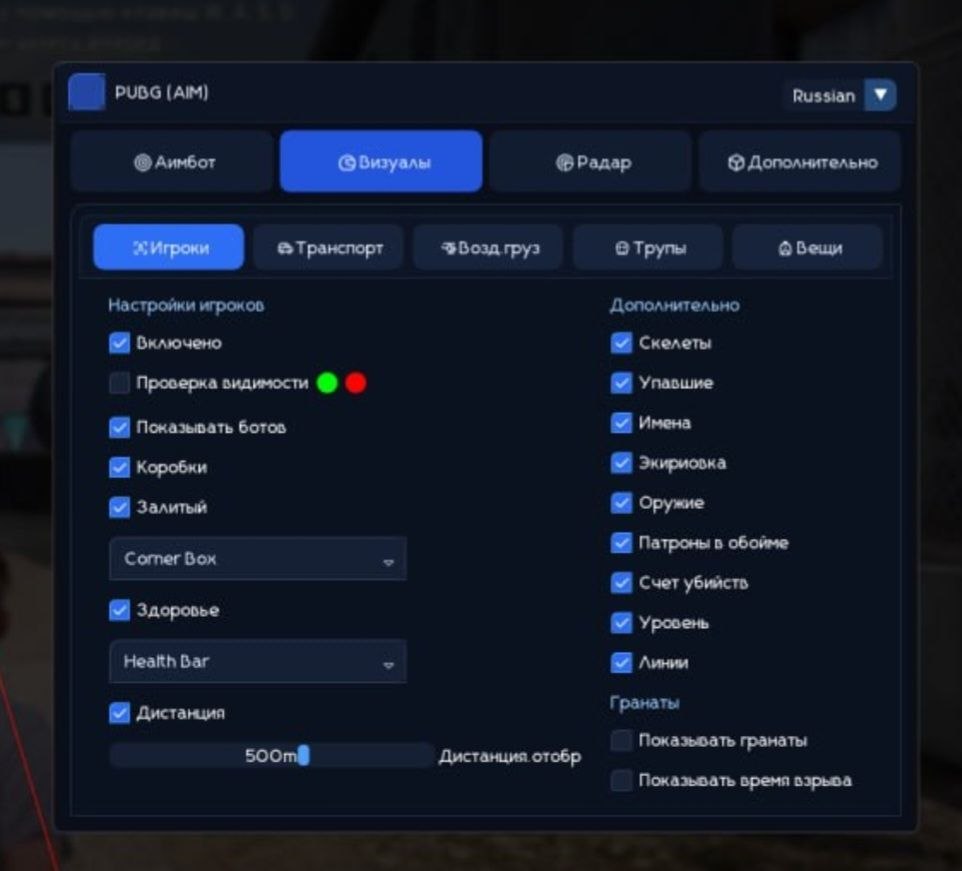
- Language — cheat menu for PUBG supports 2 languages: English and Russian
- HWID Spoofer — along with the cheat you also get a spoofer to bypass PUBG bans
Players ESP (WH)
- Players ESP — provides various information about enemies
- Visible Check — enemies in direct line of sight and behind walls will be colored differently
- Show Bots (AI) — ESP feature that distinguishes bots from players, bot boxes will be labeled bot
- Boxes — highlighting characters behind walls and obstacles using boxes
- Box Style (2D, Corners, Filled) — visual style settings for boxes
- Health (Text, Bar) — displays player HP amount using text and indicator (bar)
- Skeleton — highlights people by overlaying skeletons on top of their models
- Knocked — if checked, WH will work against knocked players
- Equipment — show current player equipment
- Weapon — show what weapon enemies are holding
- Ammo — number of bullets in magazine and reserves of opponents
- Snaplines — wallhack type in the form of lines from your model to opponent models
- Kill Score — number of kills per player
- Level — show player level
- Distance — shows distance to other players in meters
- Max Distance — allows you to limit the range of ESP functions
- Enemy Only — ESP features work only against enemy players
World ESP (WH for Objects)
- Vehicles — show where vehicles are located using WH
- Vehicles Info (Health, Fuel) — information about fuel reserves and vehicle durability
- Airdrop — show airdrop locations
- Airdrop Content — show the list of loot inside the airdrop
- Corpses — shows dead player boxes (corpses)
- Corpse Content — show inventory contents of player corpses
- Name — names of displayed objects
- Distance — distance in meters to displayed objects
- Max Distance — ability to customize ESP display range for different types of objects
- Show Grenades — show thrown grenades and time until explosion
What's new in this cheat
Recent software updates — from the freshest to older ones.
-
Phoenix Full PUBG (Aimbot) — UI revamped and protection updated
The cheat menu UI has been fully redesigned and refreshed. Language switching (English / Russian) is restored. The font has been changed to a more comfortable and pleasant one for gameplay. Minor bugs and rough edges fixed. Security and anti-ban protection improved. A new menu screenshot has been added to the product gallery.
Menu Screenshots
Customer Reviews
All reviewsFrequently Asked Questions
What features are included in Phoenix Full?
What payment methods are accepted?
How to contact support?
After payment you will receive detailed instructions on activation, launch and use of the software.
Instructions will be sent to the email address specified before payment.
You will also find a download link and necessary components for the software.
Cheat community
Cheats for PUBG and PUBG Mobile: updates, detection status and a players' chat.