Phoenix Full cho PUBG
Phoenix Full - trò lừa đảo riêng tư hoàn chỉnh cho PUBG
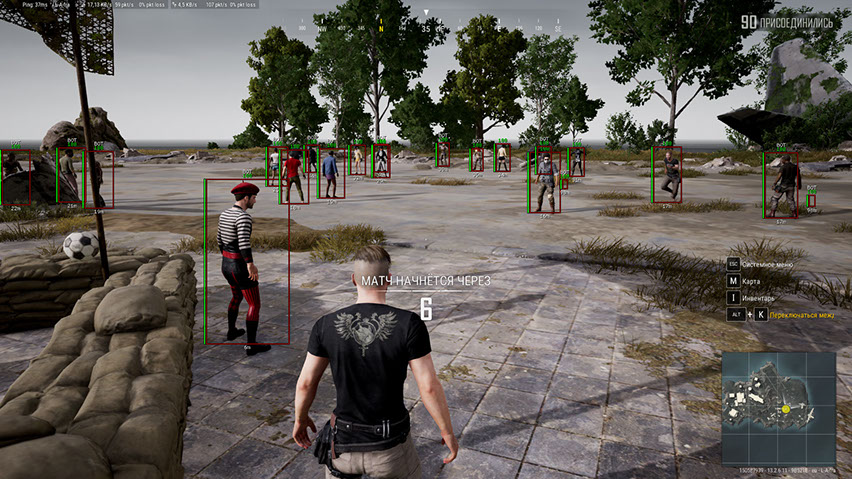
Gặp gỡ phiên bản đầy đủ của Phượng hoàng huyền thoại — một trong những mánh gian lận nổi tiếng và giàu tính năng nhất trong PUBG. Phần mềm này từ lâu đã chứng tỏ được mình với hiệu suất ổn định, khả năng mở rộng và cách tiếp cận chu đáo để mang lại trải nghiệm chơi game thoải mái mà không gặp rủi ro không cần thiết.
Tính năng chính của Phoenix là aimbot vector với hệ thống cài đặt linh hoạt. Nó cho phép bạn điều chỉnh chính xác hoạt động của tâm ngắm cho các phong cách chiến đấu khác nhau — từ bắn súng hợp lý cẩn thận đến các cuộc đọ súng quyết liệt tự tin hơn. Kiểm soát mục tiêu trực quan và không cần thiết lập dài dòng.
Thông tin ESP (WallHack) hiển thị người chơi, phương tiện, chiến lợi phẩm, airdrop và các vật thể quan trọng khác trên bản đồ. Ngoài ra, chức năng hiển thị khán giả cũng được triển khai, giúp bạn kiểm soát tình hình và tránh những khoảnh khắc đáng ngờ.
Để tăng sự tập trung trong khi chiến đấu, Chế độ chiến đấu được cung cấp — một chế độ vô hiệu hóa World và Loot ESP, chỉ để lại thông tin người chơi.
Phoenix đi kèm với Bộ giả mạo HWID và menu tiện lợi hỗ trợ tiếng Nga và tiếng Anh. Một sự lựa chọn tuyệt vời cho những ai coi trọng chức năng, tính ổn định và khả năng kiểm soát từng chi tiết trong lối chơi PUBG.
Yêu cầu hệ thống
🔔 Trạng thái cheat cập nhật tự động từ bot Telegram của chúng tôi theo thông báo của nhà phát triển — hãy theo dõi tin tức ở đó. Nhiều cheat tự cập nhật sau khi game thay đổi, nên trạng thái «Đang kiểm tra» không có nghĩa là cheat không hoạt động — chỉ là chưa chắc chắn cho đến khi được xác nhận. Không chắc? Hỏi trong chat trên trang hoặc xem Liên hệ.
Key toàn cầu — hoạt động trên toàn thế giới.
Một số sản phẩm có thể hỗ trợ thanh toán bằng thẻ Binance. Hãy nhắn riêng cho chúng tôi trước khi mua để kiểm tra và thống nhất chi tiết.
Tính năng
Loot ESP (WH cho Loot)
- Loot ESP - khả năng nhìn thấy nhiều chiến lợi phẩm khác nhau nằm trên mặt đất
- Bộ lọc chiến lợi phẩm - hệ thống linh hoạt để lọc chiến lợi phẩm được hiển thị theo danh mục
- Giáp 1 LVL - hiển thị áo giáp cấp một (áo giáp, mũ bảo hiểm, ba lô)
- Giáp 2 LVL - hiển thị áo giáp cấp hai (áo giáp, mũ bảo hiểm, ba lô)
- Giáp 3 LVL - hiển thị áo giáp cấp ba (áo giáp, mũ bảo hiểm, ba lô)
- Blade - làm nổi bật vũ khí cận chiến
- Súng lục - cung cấp thông tin về vị trí súng lục
- Tiểu liên - hiển thị súng tiểu liên
- Súng ngắn - cho thấy súng ngắn
- Súng trường - cung cấp thông tin về vị trí súng trường tấn công
- Lính bắn tỉa - cho thấy vũ khí bắn tỉa đang nằm ở đâu
- Phạm vi - điểm tham quan và quang học khác nhau
- Thuốc - bộ dụng cụ sơ cứu lớn và nhỏ, băng, thuốc giảm đau, nước tăng lực và ống tiêm adrenaline
- Tệp đính kèm - tất cả các sửa đổi vũ khí khác
- Lựu đạn – lựu đạn và vũ khí ném khác trong PUBG
- Khoảng cách - khoảng cách đến các mục được hiển thị tính bằng mét
- Khoảng cách tối đa - cho phép bạn giới hạn phạm vi cướp bóc WH
Aimbot (Vector Aim)
- Đã bật - bật/tắt aimbot
- Vector Aimbot — vector aimbot giúp bạn nhắm mục tiêu bằng cách di chuyển con trỏ chuột cho bạn
- Trường nhìn (FOV) - kích thước của khu vực mà aimbot hoạt động
- Hiển thị FOV - hiển thị kích thước của vùng làm việc mục tiêu dưới dạng vòng tròn xung quanh tâm chữ thập
- Aim Key - chọn một phím để kích hoạt aimbot
- Mượt mà - làm trơn tru các chuyển động của aimbot về phía mục tiêu
- RCS - hệ thống kiểm soát độ giật của vũ khí khi bắn bằng aimbot
Các tính năng khác
- Crosshair - liên tục vẽ một crosshair tĩnh ngay giữa màn hình
- Khán giả - hiển thị số lượng người chơi đang xem trò chơi của bạn
- Chế độ chiến đấu - vô hiệu hóa tất cả các chức năng của PUBG ESP ngoại trừ người chơi WH
- Bộ lọc chiến đấu - bộ lọc cho các đối tượng được hiển thị trong Chế độ chiến đấu
- Màu sắc - khả năng chọn màu theo sở thích của bạn cho hầu hết các đặc điểm hình ảnh trong cheat
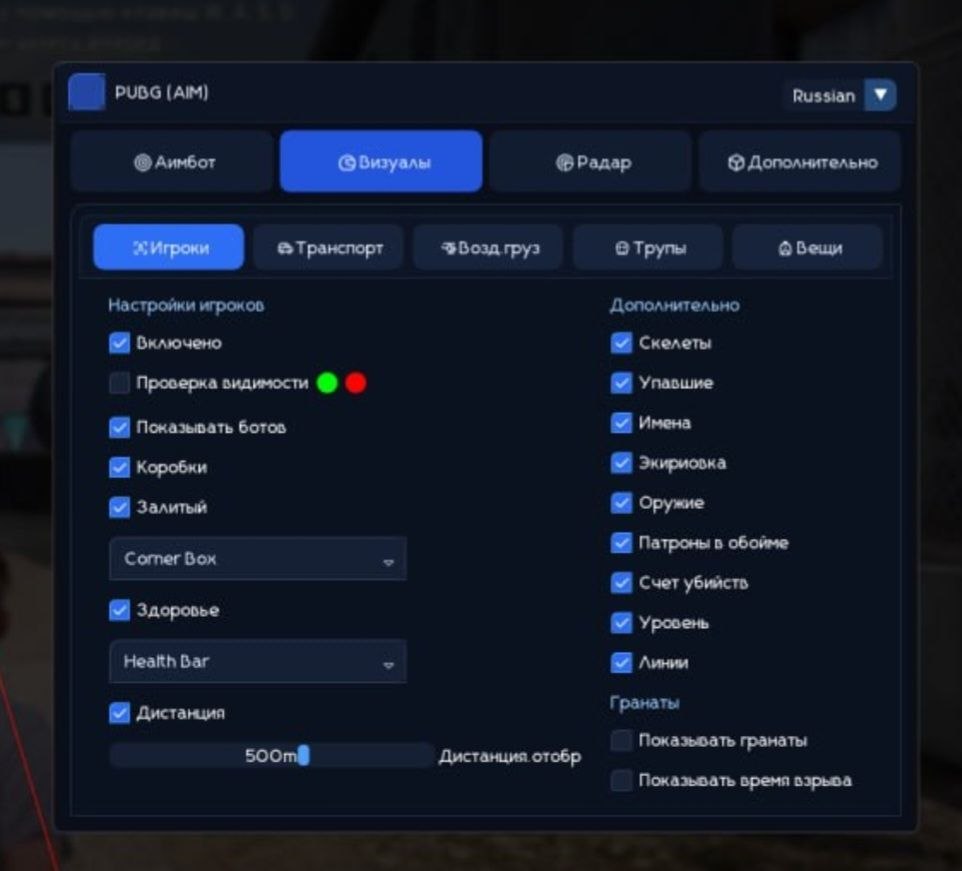
- Ngôn ngữ — cheat menu cho PUBG hỗ trợ 2 ngôn ngữ: tiếng Anh và tiếng Nga
- HWID Spoofer - cùng với mánh gian lận, bạn cũng có được một mánh lừa đảo để vượt qua các lệnh cấm của PUBG
Người chơi ESP (WH)
- Người chơi ESP - cung cấp nhiều thông tin khác nhau về kẻ thù
- Kiểm tra có thể nhìn thấy - kẻ thù trong tầm nhìn trực tiếp và phía sau bức tường sẽ có màu khác nhau
- Show Bots (AI) — Tính năng ESP giúp phân biệt bot với người chơi, hộp bot sẽ được gắn nhãn bot
- Hộp - làm nổi bật các ký tự đằng sau bức tường và chướng ngại vật bằng cách sử dụng hộp
- Box Style (2D, Corners, Filled) — cài đặt kiểu trực quan cho hộp
- Sức khỏe (Văn bản, Thanh) - hiển thị lượng HP của người chơi bằng văn bản và chỉ báo (thanh)
- Skeleton - làm nổi bật mọi người bằng cách phủ các bộ xương lên trên mô hình của họ
- Bị đánh gục - nếu được chọn, WH sẽ có tác dụng chống lại người chơi bị đánh ngã
- Thiết bị - hiển thị thiết bị của người chơi hiện tại
- Vũ khí - hiển thị vũ khí mà kẻ thù đang cầm
- Đạn — số lượng đạn trong băng đạn và lượng đạn dự trữ của đối thủ
- Snaplines - loại wallhack dưới dạng các đường từ mô hình của bạn đến mô hình của đối thủ
- Kill Score - số lần tiêu diệt mỗi người chơi
- Cấp độ - hiển thị cấp độ người chơi
- Khoảng cách - hiển thị khoảng cách với người chơi khác tính bằng mét
- Khoảng cách tối đa - cho phép bạn giới hạn phạm vi chức năng ESP
- Chỉ kẻ thù - Tính năng ESP chỉ hoạt động chống lại người chơi kẻ thù
World ESP (WH cho đồ vật)
- Xe cộ - hiển thị vị trí xe cộ bằng WH
- Thông tin về xe (Sức khỏe, Nhiên liệu) - thông tin về trữ lượng nhiên liệu và độ bền của xe
- Airdrop - hiển thị vị trí airdrop
- Nội dung Airdrop - hiển thị danh sách chiến lợi phẩm bên trong airdrop
- Xác chết - hiển thị hộp người chơi đã chết (xác chết)
- Nội dung xác chết - hiển thị nội dung tồn kho của xác người chơi
- Tên - tên của các đối tượng được hiển thị
- Khoảng cách - khoảng cách tính bằng mét đến các đối tượng được hiển thị
- Khoảng cách tối đa - khả năng tùy chỉnh phạm vi hiển thị ESP cho các loại đối tượng khác nhau
- Hiển thị Lựu đạn - hiển thị lựu đạn được ném và thời gian cho đến khi nổ
Có gì mới trong cheat này
Lịch sử các bản cập nhật phần mềm gần đây — từ mới đến cũ.
-
Phoenix Full PUBG (Aimbot) — UI revamped and protection updated
The cheat menu UI has been fully redesigned and refreshed. Language switching (English / Russian) is restored. The font has been changed to a more comfortable and pleasant one for gameplay. Minor bugs and rough edges fixed. Security and anti-ban protection improved. A new menu screenshot has been added to the product gallery.
Ảnh chụp menu
Đánh giá của khách hàng
Tất cả đánh giáCâu hỏi thường gặp
Phoenix Full bao gồm những tính năng gì?
Những phương thức thanh toán nào được chấp nhận?
Làm sao liên hệ hỗ trợ?
Sau khi thanh toán, bạn sẽ nhận được hướng dẫn chi tiết về kích hoạt, khởi chạy và sử dụng phần mềm.
Hướng dẫn sẽ được gửi đến email đã cung cấp trước khi thanh toán.
Bạn cũng sẽ tìm thấy link tải xuống và các thành phần cần thiết.
Cộng đồng cheat
Cheat cho PUBG và PUBG Mobile: cập nhật, trạng thái phát hiện và chat người chơi.