Phoenix Full 용 PUBG
Phoenix Full - PUBG를 위한 완전한 비공개 치트
가장 잘 알려지고 기능이 풍부한 PUBG 치트 중 하나인 전설적인 Phoenix의 정식 버전을 만나보세요. 이 소프트웨어는 안정적인 성능, 광범위한 기능, 불필요한 위험 없이 편안한 게임 플레이를 위한 사려 깊은 접근 방식으로 오랫동안 그 자체로 입증되었습니다.
Phoenix의 주요 기능은 유연한 설정 시스템을 갖춘 벡터 조준봇입니다. 이를 통해 신중하고 합법적인 사격부터 보다 자신감 있고 공격적인 총격전까지 다양한 전투 스타일에 맞게 십자선 동작을 정밀하게 조정할 수 있습니다. 조준 제어는 직관적이며 긴 설정이 필요하지 않습니다.
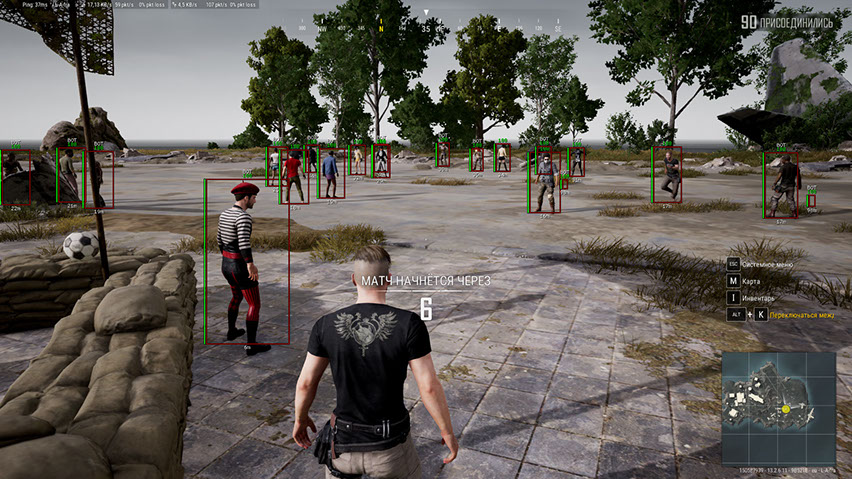
유익한 ESP(WallHack)는 플레이어, 차량, 전리품, 공중 투하 및 기타 중요한 개체를 지도에 표시합니다. 또한 관전자 표시 기능이 구현되어 상황을 제어하고 의심스러운 순간을 피할 수 있습니다.
전투 중 집중력을 높이기 위해 월드 및 전리품 ESP를 비활성화하고 플레이어 정보만 남기는 전투 모드가 제공됩니다.
Phoenix에는 HWID Spoofer가 함께 제공되며 편리한 메뉴는 러시아어와 영어를 지원합니다. PUBG 게임플레이의 모든 세부 사항에 대한 기능성, 안정성 및 제어력을 중시하는 사람들에게 탁월한 선택입니다.
시스템 요구사항
🔔 치트 상태는 개발자 알림에 따라 텔레그램 봇에서 자동으로 업데이트됩니다 — 그곳에서 소식을 확인하세요. 많은 치트는 게임 변경 후 스스로 업데이트되므로 «확인 중» 상태가 치트가 작동하지 않는다는 뜻은 아니며, 확인 전까지의 불확실성일 뿐입니다. 확실하지 않나요? 사이트 채팅에서 문의하거나 연락처를 확인하세요.
글로벌 키 — 전 세계에서 사용 가능.
일부 상품은 Binance 카드 결제가 가능할 수 있습니다. 구매 전에 개인 메시지로 이용 가능 여부와 세부 정보를 확인하세요.
기능
전리품 ESP(전리품용 WH)
- 전리품 ESP — 땅에 누워 있는 다양한 전리품을 볼 수 있는 능력
- 전리품 필터 — 표시된 전리품을 카테고리별로 필터링하는 유연한 시스템
- Armor 1 LVL — 첫 번째 레벨 갑옷 표시(방탄복, 헬멧, 배낭)
- Armor 2 LVL — 두 번째 레벨 갑옷 표시(방탄복, 헬멧, 배낭)
- Armor 3 LVL — 세 번째 레벨 갑옷 표시(방탄복, 헬멧, 배낭)
- 블레이드 — 근접 무기 강조 표시
- 권총 — 권총 위치에 대한 정보를 제공합니다.
- 기관단총 - 기관단총을 보여줍니다.
- Shotguns — 산탄총을 보여줍니다.
- 소총 — 돌격 소총 위치에 대한 정보를 제공합니다.
- 스나이퍼(Snipers) — 저격 무기가 어디에 있는지 보여줍니다.
- 스코프 - 다양한 조준경 및 광학 장치
- 의약품 - 크고 작은 구급 상자, 붕대, 진통제, 에너지 음료 및 아드레날린 주사기
- 부착물 — 기타 모든 무기 개조
- 수류탄 — PUBG의 수류탄 및 기타 던질 수 있는 무기
- 거리 — 표시된 항목까지의 거리(미터)
- Max Distance — 전리품 WH의 범위를 제한할 수 있습니다.
Aimbot(벡터 조준)
- 활성화됨 — aimbot 활성화/비활성화
- Vector Aimbot — 벡터 aimbot은 마우스 커서를 움직여 조준하는 데 도움을 줍니다.
- 시야(FOV) - aimbot이 작동하는 영역의 크기
- FOV 표시 — 조준 작업 영역의 크기를 십자선 주위에 원으로 표시합니다.
- 조준 키 — 조준봇을 활성화할 키를 선택하세요
- Smooth — 목표물을 향한 aimbot의 움직임을 부드럽게 합니다.
- RCS — aimbot으로 촬영할 때 무기 반동 제어 시스템
기타 기능
- 십자선 — 화면 중앙에 고정 십자선을 지속적으로 그립니다.
- 관중 — 얼마나 많은 플레이어가 게임을 시청하고 있는지 보여줍니다.
- 전투 모드 — 플레이어 WH를 제외한 모든 PUBG ESP 기능을 비활성화합니다.
- 전투 필터 — 전투 모드에 표시되는 개체에 대한 필터
- 색상 — 치트의 대부분의 시각적 기능에 대해 취향에 맞게 색상을 선택할 수 있는 기능
- 언어 — PUBG의 치트 메뉴는 영어와 러시아어의 2개 언어를 지원합니다.
- HWID 스푸퍼 — 치트와 함께 PUBG 금지를 우회할 수 있는 스푸퍼도 얻을 수 있습니다.
플레이어 ESP(WH)
- 플레이어 ESP — 적에 대한 다양한 정보 제공
- Visible Check - 직접 시야에 있는 적과 벽 뒤에 있는 적의 색상이 다르게 표시됩니다.
- Show Bots(AI) — 봇과 플레이어를 구별하는 ESP 기능, 봇 상자에는 봇이라는 라벨이 지정됩니다.
- 상자 — 상자를 사용하여 벽과 장애물 뒤에 있는 캐릭터 강조 표시
- 상자 스타일(2D, 모서리, 채우기) — 상자의 시각적 스타일 설정
- Health (Text, Bar) — 텍스트와 표시기(bar)를 사용하여 플레이어 HP 양을 표시합니다.
- 스켈레톤 — 모델 위에 스켈레톤을 오버레이하여 사람을 강조합니다.
- Knocked — 선택하면 WH가 쓰러진 플레이어에게 작동합니다.
- 장비 — 현재 플레이어 장비 표시
- 무기 — 적들이 어떤 무기를 들고 있는지 보여줍니다.
- 탄약 — 탄창에 있는 총알 수와 상대방의 보유량
- 스냅라인(Snaplines) — 모델에서 상대 모델까지 선 형태로 표시되는 월해킹 유형
- 킬 점수 — 플레이어당 킬 수
- 레벨 — 플레이어 레벨 표시
- 거리 — 다른 플레이어와의 거리를 미터 단위로 표시합니다.
- Max Distance — ESP 기능의 범위를 제한할 수 있습니다.
- Enemy Only — ESP 기능은 적 플레이어에게만 작동합니다.
World ESP(객체용 WH)
- 차량 - WH를 사용하여 차량의 위치를 표시합니다.
- 차량 정보(건강, 연료) - 연료 보유량 및 차량 내구성에 대한 정보
- 에어드롭 — 에어드롭 위치 표시
- 에어드롭 콘텐츠 — 에어드롭 내부의 전리품 목록을 표시합니다.
- 시체 — 죽은 플레이어 상자(시체)를 표시합니다.
- 시체 콘텐츠 — 플레이어 시체의 인벤토리 콘텐츠 표시
- 이름 — 표시된 객체의 이름
- 거리 — 표시된 객체까지의 거리(미터)
- 최대 거리 — 다양한 유형의 물체에 대해 ESP 표시 범위를 사용자 정의하는 기능
- 수류탄 표시 — 투척된 수류탄과 폭발까지의 시간을 표시합니다.
이 치트의 새 기능
최근 소프트웨어 업데이트 기록 — 최신순.
-
Phoenix Full PUBG (Aimbot) — UI revamped and protection updated
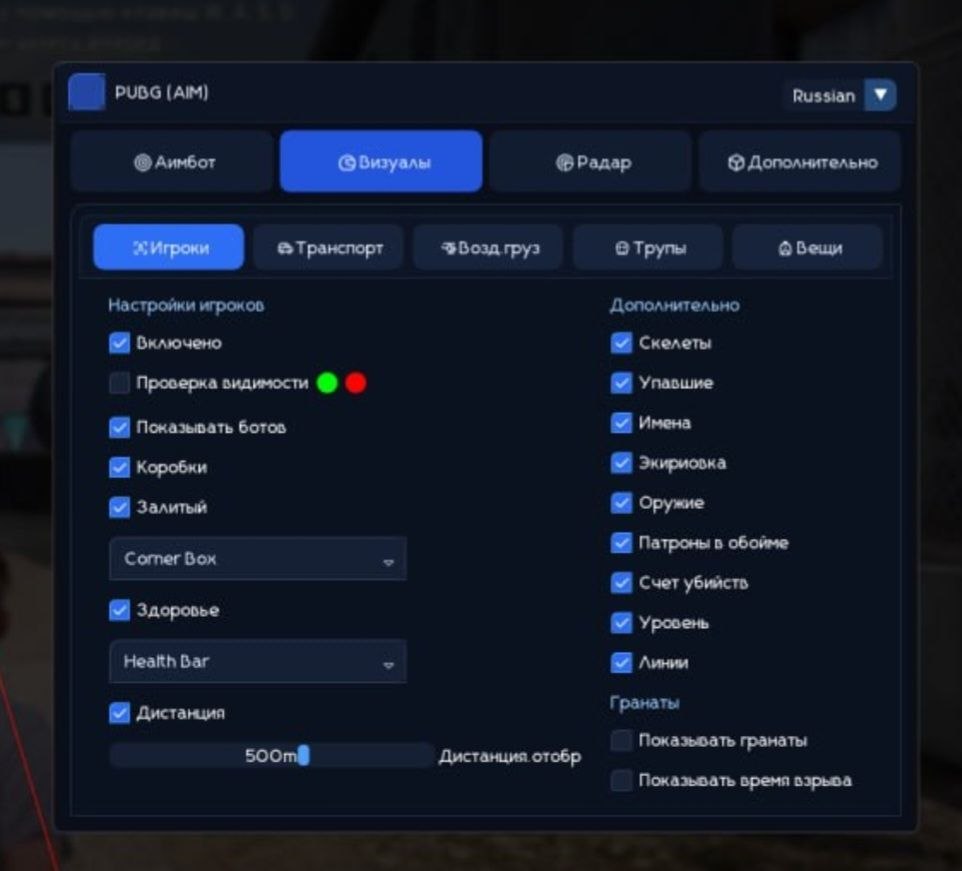
The cheat menu UI has been fully redesigned and refreshed. Language switching (English / Russian) is restored. The font has been changed to a more comfortable and pleasant one for gameplay. Minor bugs and rough edges fixed. Security and anti-ban protection improved. A new menu screenshot has been added to the product gallery.
메뉴 스크린샷
고객 리뷰
모든 리뷰자주 묻는 질문
Phoenix Full에는 어떤 기능이 포함되어 있나요?
어떤 결제 수단을 사용할 수 있나요?
고객 지원은 어떻게 문의하나요?
결제 후 소프트웨어의 활성화, 실행 및 사용에 대한 자세한 안내를 받으실 수 있습니다.
안내는 결제 전 제공한 이메일 주소로 전송됩니다.
다운로드 링크와 필요한 구성 요소도 함께 제공됩니다.
치트 커뮤니티
PUBG 및 PUBG 모바일 치트: 업데이트, 탐지 상태, 플레이어 채팅.