Phoenix Full para PUBG
Phoenix Full - cheat privado completo para PUBG
Vendas temporariamente pausadas
- Entrega instantânea
- Pagamento seguro
- Suporte diário
Conheça a versão completa do lendário Phoenix — um dos cheats mais conhecidos e ricos em recursos para PUBG. O software já provou seu desempenho estável, amplos recursos e uma abordagem cuidadosa para uma jogabilidade confortável sem riscos desnecessários.
A principal característica do Phoenix é um aimbot vetorial com um sistema de configurações flexível. Ele permite que você ajuste com precisão o comportamento da mira para diferentes estilos de combate – desde tiros legítimos e cuidadosos até tiroteios agressivos mais confiantes. O controle de mira é intuitivo e não requer configurações demoradas.
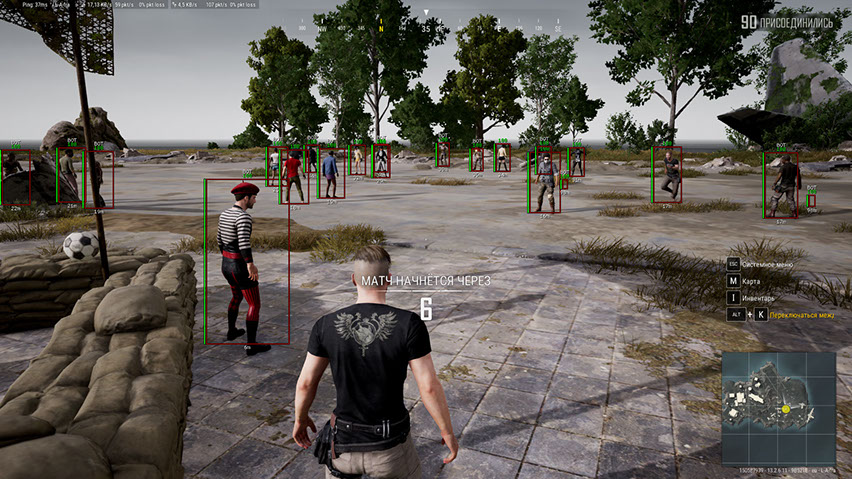
O ESP informativo (WallHack) exibe jogadores, veículos, saques, lançamentos aéreos e outros objetos importantes no mapa. Além disso, é implementada uma função de exibição de espectadores, ajudando você a controlar a situação e evitar momentos suspeitos.
Para aumentar o foco durante o combate, é fornecido o Modo Batalha, um modo que desativa o World e o Loot ESP, deixando apenas as informações do jogador.
O Phoenix vem com um Spoofer HWID e o menu conveniente oferece suporte aos idiomas russo e inglês. Uma excelente escolha para quem valoriza funcionalidade, estabilidade e controle sobre cada detalhe da jogabilidade do PUBG.
Requisitos do Sistema
🔔 Os status dos cheats são atualizados automaticamente a partir do nosso bot do Telegram por avisos dos desenvolvedores — acompanhe as novidades lá. Muitos cheats se atualizam sozinhos após mudanças no jogo, então o status «Verificando» não significa que o cheat não funciona — é apenas incerteza até a confirmação. Não tem certeza? Pergunte no chat do site ou veja Contatos.
Chaves globais — funcionam em todo o mundo.
O pagamento com cartão Binance pode estar disponível para alguns produtos. Fale connosco em privado antes de comprar para confirmar disponibilidade e detalhes.
Recursos
Loot ESP (WH para saque)
- Loot ESP – capacidade de ver vários itens caídos no chão
- Loot Filter — sistema flexível para filtrar itens exibidos por categorias
- Armadura 1 LVL – mostra armadura de primeiro nível (armadura corporal, capacetes, mochilas)
- Armadura 2 LVL – mostra armadura de segundo nível (armadura corporal, capacetes, mochilas)
- Armadura 3 LVL – mostra armadura de terceiro nível (armadura corporal, capacetes, mochilas)
- Blade – destaque armas brancas
- Pistolas — fornece informações sobre a localização das pistolas
- Submetralhadora — mostra metralhadoras
- Espingardas – mostra espingardas
- Rifles — fornece informações sobre a localização dos rifles de assalto
- Snipers – mostra onde estão as armas dos atiradores
- Escopos – vários pontos turísticos e óticas
- Remédios – kits grandes e pequenos de primeiros socorros, curativos, analgésicos, bebidas energéticas e seringas de adrenalina
- Anexos – todas as outras modificações de armas
- Granadas – granadas e outras armas jogáveis em PUBG
- Distância — distância até os itens exibidos em metros
- Distância Máxima — permite limitar o alcance do saque WH
Aimbot (objetivo vetorial)
- Ativado – ativar/desativar o aimbot
- Vector Aimbot — o vector aimbot ajuda você a mirar movendo o cursor do mouse para você
- Campo de visão (FOV) — tamanho da área em que o aimbot trabalha
- Mostrar FOV — exibe o tamanho da área de trabalho da mira como um círculo ao redor da mira
- Aim Key – escolha uma chave para ativar o aimbot
- Smooth — suavização dos movimentos do aimbot em direção aos alvos
- RCS — sistema de controle de recuo da arma ao atirar com aimbot
Outros recursos
- Mira – desenhe constantemente uma mira estática bem no centro da tela
- Espectadores — mostre quantos jogadores estão assistindo ao seu jogo
- Modo Combate – desativa todas as funções do PUBG ESP, exceto o jogador WH
- Filtro de Combate — filtro para objetos exibidos no Modo Combate
- Cores — capacidade de escolher cores de acordo com seu gosto para a maioria dos recursos visuais do cheat
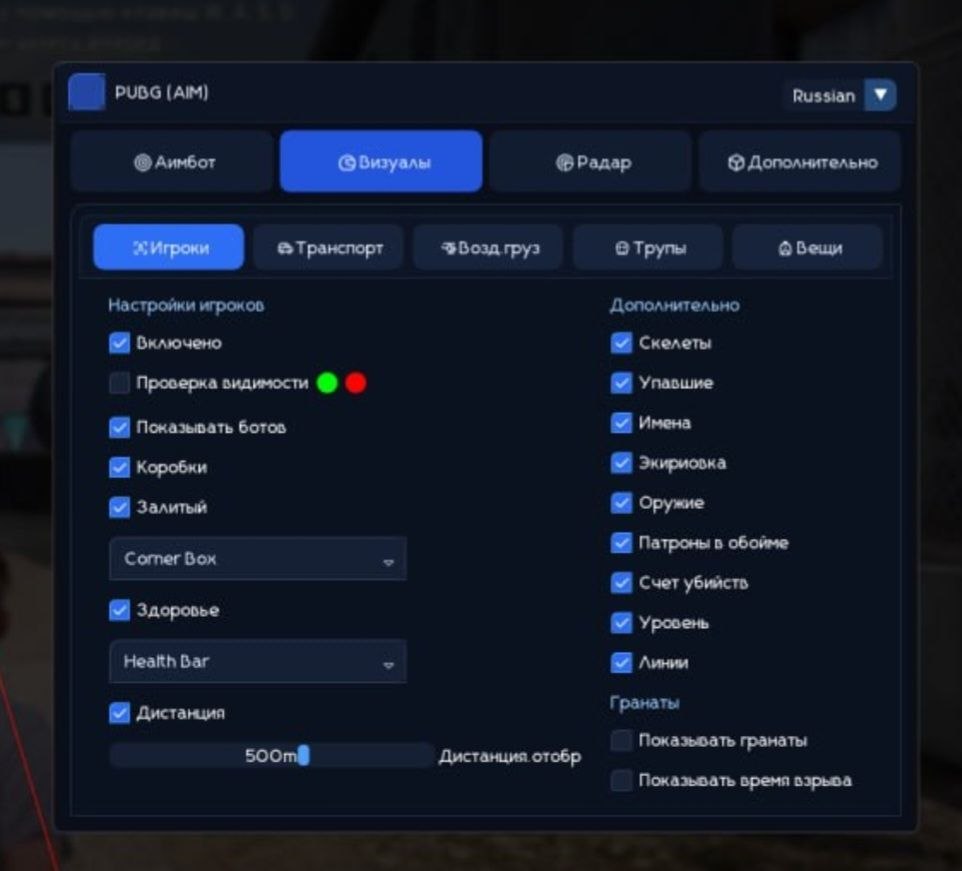
- Idioma – o menu de truques do PUBG suporta 2 idiomas: inglês e russo
- HWID Spoofer – junto com o cheat, você também recebe um spoofer para contornar as proibições do PUBG
Jogadores ESP (WH)
- Players ESP — fornece várias informações sobre os inimigos
- Verificação de Visibilidade – os inimigos na linha de visão direta e atrás das paredes terão cores diferentes
- Mostrar Bots (AI) — Recurso ESP que distingue bots de jogadores, caixas de bot serão rotuladas como bot
- Caixas — destacando personagens atrás de paredes e obstáculos usando caixas
- Estilo de caixa (2D, cantos, preenchido) — configurações de estilo visual para caixas
- Saúde (Texto, Barra) — exibe a quantidade de HP do jogador usando texto e indicador (barra)
- Esqueleto — destaca pessoas sobrepondo esqueletos sobre seus modelos
- Knocked – se marcado, WH funcionará contra jogadores knocked
- Equipamento — mostra o equipamento atual do jogador
- Arma – mostra qual arma os inimigos estão segurando
- Munição — número de balas no carregador e reservas dos oponentes
- Snaplines — tipo wallhack na forma de linhas do seu modelo até os modelos oponentes
- Kill Score — número de mortes por jogador
- Nível — mostra o nível do jogador
- Distância — mostra a distância até outros jogadores em metros
- Distância máxima — permite limitar o alcance das funções ESP
- Apenas Inimigo – Os recursos ESP funcionam apenas contra jogadores inimigos
World ESP (WH para objetos)
- Veículos — mostre onde os veículos estão localizados usando WH
- Informações sobre veículos (saúde, combustível) — informações sobre reservas de combustível e durabilidade do veículo
- Airdrop – mostra locais de lançamento aéreo
- Conteúdo do Airdrop – mostra a lista de itens dentro do airdrop
- Cadáveres — mostra caixas de jogadores mortos (cadáveres)
- Conteúdo do cadáver – mostra o conteúdo do inventário dos cadáveres dos jogadores
- Nome — nomes dos objetos exibidos
- Distância — distância em metros até os objetos exibidos
- Distância Máxima — capacidade de personalizar o alcance de exibição do ESP para diferentes tipos de objetos
- Mostrar Granadas — mostra as granadas lançadas e o tempo até a explosão
Novidades neste cheat
Histórico das atualizações recentes do software — da mais nova à mais antiga.
-
Phoenix Full PUBG (Aimbot) — UI revamped and protection updated
The cheat menu UI has been fully redesigned and refreshed. Language switching (English / Russian) is restored. The font has been changed to a more comfortable and pleasant one for gameplay. Minor bugs and rough edges fixed. Security and anti-ban protection improved. A new menu screenshot has been added to the product gallery.
Screenshots do Menu
Avaliações de Clientes
Todas as avaliaçõesPerguntas Frequentes
Quais funções estão incluídas no Phoenix Full?
Quais métodos de pagamento são aceites?
Como falar com o suporte?
Após o pagamento, você receberá instruções detalhadas sobre ativação, inicialização e uso do software.
As instruções serão enviadas para o e-mail informado antes do pagamento.
Você também encontrará o link de download e os componentes necessários.
Comunidade de cheats
Cheats para PUBG e PUBG Mobile: atualizações, status de detecção e chat de jogadores.