Phoenix Full dla PUBG
Phoenix Full - kompletny prywatny kod do PUBG
Sprzedaż tymczasowo wstrzymana
- Natychmiastowa dostawa
- Bezpieczna płatność
- Codzienna pomoc
Poznaj pełną wersję legendarnego Phoenixa — jednego z najbardziej znanych i bogatych w funkcje kodów do PUBG. Oprogramowanie od dawna sprawdza się dzięki stabilnej wydajności, rozbudowanym możliwościom i przemyślanemu podejściu do wygodnej rozgrywki bez niepotrzebnego ryzyka.
Kluczową cechą Phoenix jest wektorowy aimbot z elastycznym systemem ustawień. Pozwala precyzyjnie dostosować zachowanie celownika do różnych stylów walki — od ostrożnego, prawidłowego strzelania po pewniejsze, agresywne strzelaniny. Sterowanie celowaniem jest intuicyjne i nie wymaga długotrwałej konfiguracji.
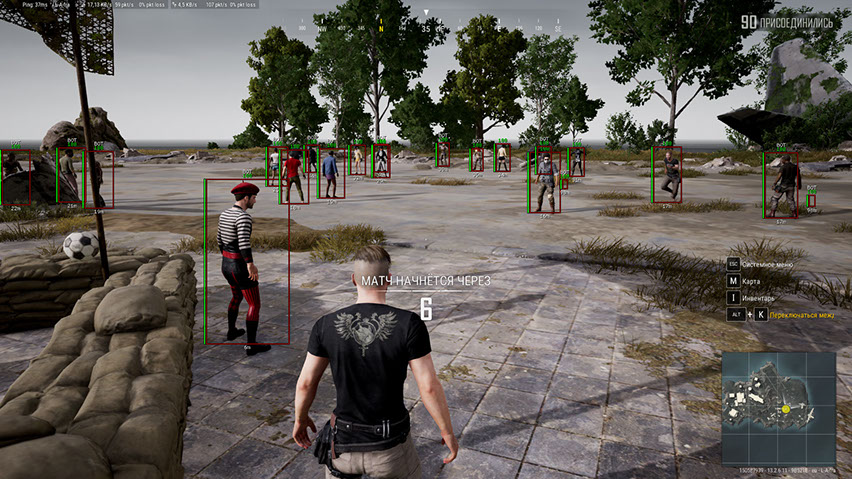
Informacyjny ESP (WallHack) wyświetla graczy, pojazdy, łupy, zrzuty i inne ważne obiekty na mapie. Dodatkowo zaimplementowano funkcję wyświetlania widzów, która pomaga kontrolować sytuację i unikać podejrzanych momentów.
Aby zwiększyć koncentrację podczas walki, udostępniono tryb bitwy — tryb, który wyłącza ESP dotyczące świata i łupów, pozostawiając jedynie informacje o graczu.
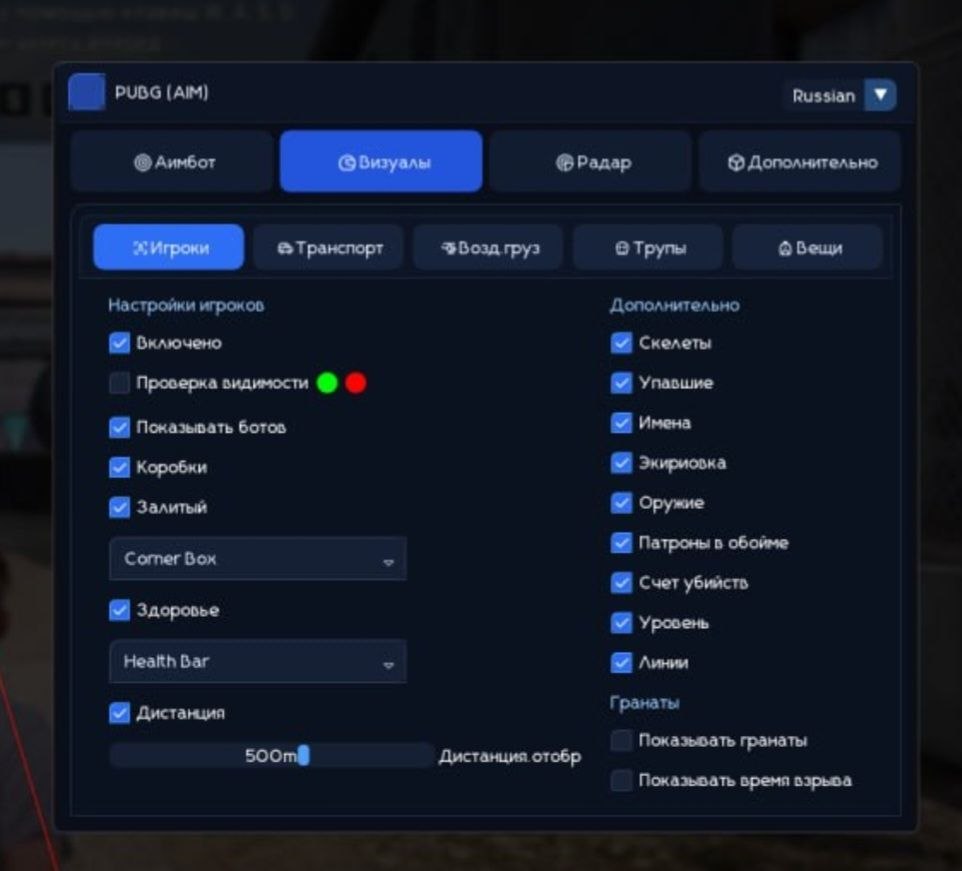
Phoenix jest wyposażony w funkcję HWID Spoofer, a wygodne menu obsługuje języki rosyjski i angielski. Doskonały wybór dla tych, którzy cenią funkcjonalność, stabilność i kontrolę nad każdym szczegółem rozgrywki PUBG.
Wymagania systemowe
🔔 Statusy cheatów aktualizują się automatycznie z naszego bota Telegram na podstawie powiadomień deweloperów — śledź tam nowości. Wiele cheatów aktualizuje się samo po zmianach w grze, więc status «Sprawdzanie» nie oznacza, że cheat nie działa — to tylko niepewność do potwierdzenia. Nie masz pewności? Zapytaj na czacie na stronie lub sprawdź Kontakt.
Klucze globalne — działają na całym świecie.
Dla wybranych produktów może być dostępna płatność kartą Binance. Napisz do nas prywatnie przed zakupem, aby sprawdzić dostępność i uzgodnić szczegóły.
Funkcje
Łup ESP (WH dla łupów)
- Loot ESP — możliwość zobaczenia różnych łupów leżących na ziemi
- Loot Filter — elastyczny system filtrowania wyświetlanych łupów według kategorii
- Pancerz 1 LVL — pokaż zbroję pierwszego poziomu (kamizelki kuloodporne, hełmy, plecaki)
- Pancerz 2 LVL — pokaż zbroję drugiego poziomu (kamizelki kuloodporne, hełmy, plecaki)
- Pancerz 3 LVL — pokaż zbroję trzeciego poziomu (kamizelki kuloodporne, hełmy, plecaki)
- Ostrze — podświetl broń do walki wręcz
- Pistolety — dostarcza informacji o lokalizacji pistoletów
- Submachine — pokazuje pistolety maszynowe
- Strzelby — pokazuje strzelby
- Karabiny — dostarcza informacji o lokalizacji karabinów szturmowych
- Snajperzy — pokazuje, gdzie leży broń snajperska
- Lunety — różne celowniki i optyka
- Medycyna — duże i małe apteczki, bandaże, środki przeciwbólowe, napoje energetyczne i strzykawki z adrenaliną
- Dodatki — wszystkie inne modyfikacje broni
- Granaty — granaty i inna broń do rzucania w PUBG
- Odległość — odległość do wyświetlanych elementów w metrach
- Maksymalna odległość — pozwala ograniczyć zasięg łupu WH
Aimbot (cel wektorowy)
- Włączone — włącz/wyłącz aimbota
- Aimbot wektorowy — aimbot wektorowy pomaga celować, przesuwając kursor myszy
- Pole widzenia (FOV) — wielkość obszaru, w którym działa aimbot
- Pokaż FOV — wyświetla rozmiar obszaru roboczego celowania jako okrąg wokół celownika
- Aim Key — wybierz klawisz, aby aktywować aimbota
- Smooth — wygładzenie ruchów aimbota w stronę celów
- RCS — system kontroli odrzutu broni podczas strzelania za pomocą aimbota
Inne funkcje
- Celownik — stale rysuj statyczny celownik na środku ekranu
- Widzowie — pokaż, ilu graczy ogląda Twoją grę
- Tryb walki — wyłącza wszystkie funkcje PUBG ESP z wyjątkiem odtwarzacza WH
- Filtr bojowy — filtr obiektów wyświetlanych w trybie walki
- Kolory — możliwość wyboru kolorów według własnych upodobań w przypadku większości funkcji wizualnych w oprogramowaniu
- Język — menu cheatów dla PUBG obsługuje 2 języki: angielski i rosyjski
- HWID Spoofer — wraz z kodem otrzymujesz także spoofer umożliwiający ominięcie zakazów PUBG
Gracze ESP (WH)
- ESP graczy — dostarcza różnych informacji o wrogach
- Kontrola widoczności — wrogowie znajdujący się w bezpośrednim zasięgu wzroku i za ścianami będą mieli inny kolor
- Pokaż boty (AI) — funkcja ESP, która odróżnia boty od graczy, pola botów będą oznaczone etykietą bot
- Skrzynie — podświetlanie postaci za ścianami i przeszkodami za pomocą skrzynek
- Styl ramki (2D, narożniki, wypełnienie) — ustawienia stylu wizualnego pudełek
- Zdrowie (tekst, pasek) — wyświetla ilość HP gracza za pomocą tekstu i wskaźnika (pasek)
- Szkielet — wyróżnia ludzi, nakładając szkielety na ich modele
- Powalony — jeśli zaznaczone, WH będzie działać przeciwko powalonym graczom
- Sprzęt — pokaż aktualne wyposażenie gracza
- Broń — pokaż, jaką broń trzymają wrogowie
- Amunicja — liczba nabojów w magazynku i rezerwy przeciwników
- Snaplines — typ wallhacka w postaci linii łączących Twój model z modelami przeciwnika
- Kill Score — liczba zabójstw na gracza
- Poziom — pokaż poziom gracza
- Odległość — pokazuje odległość do innych graczy w metrach
- Maksymalna odległość — umożliwia ograniczenie zakresu funkcji ESP
- Tylko wróg — funkcje ESP działają tylko przeciwko wrogim graczom
Świat ESP (WH dla obiektów)
- Pojazdy — pokaż, gdzie znajdują się pojazdy, korzystając z WH
- Informacje o pojazdach (Zdrowie, Paliwo) — informacje o zapasach paliwa i trwałości pojazdu
- Zrzut — pokaż lokalizacje zrzutów
- Zawartość zrzutu — pokaż listę łupów znajdujących się w zrzucie
- Zwłoki — pokazuje skrzynki martwych graczy (zwłoki)
- Zawartość zwłok — wyświetla zawartość ekwipunku zwłok graczy
- Nazwa — nazwy wyświetlanych obiektów
- Odległość — odległość w metrach od wyświetlanych obiektów
- Maksymalna odległość — możliwość dostosowania zasięgu wyświetlania ESP dla różnych typów obiektów
- Pokaż granaty — pokaż rzucone granaty i czas do eksplozji
Co nowego w tym czicie
Historia ostatnich aktualizacji oprogramowania — od najnowszych do starszych.
-
Phoenix Full PUBG (Aimbot) — UI revamped and protection updated
The cheat menu UI has been fully redesigned and refreshed. Language switching (English / Russian) is restored. The font has been changed to a more comfortable and pleasant one for gameplay. Minor bugs and rough edges fixed. Security and anti-ban protection improved. A new menu screenshot has been added to the product gallery.
Zrzuty ekranu menu
Recenzje klientów
Wszystkie recenzjeCzęsto zadawane pytania
Jakie funkcje zawiera Phoenix Full?
Jakie metody płatności są akceptowane?
Jak skontaktować się z pomocą?
Po opłacie otrzymasz szczegółowe instrukcje dotyczące aktywacji, uruchomienia i użytkowania oprogramowania.
Instrukcje zostaną wysłane na adres e-mail podany przed płatnością.
Znajdziesz tam również link do pobrania i niezbędne komponenty.
Społeczność cheatów
Cheaty do PUBG i PUBG Mobile: aktualizacje, status wykrywania i czat graczy.