Phoenix Full の PUBG
Phoenix Full - PUBG 用の完全なプライベート チート
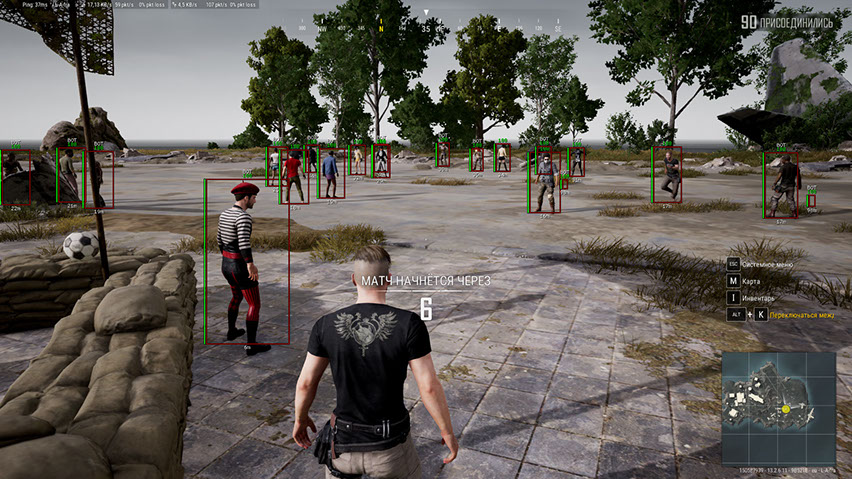
PUBG の最も有名で機能豊富なチートの 1 つである伝説のフェニックスの完全版をご紹介します。 このソフトウェアは、安定したパフォーマンス、広範な機能、不必要なリスクを回避して快適なゲームプレイを実現するための思慮深いアプローチを備えていることが長年にわたって証明されています。
Phoenix の主な特徴は、柔軟な設定システムを備えたベクター エイムボットです。 これにより、慎重な正当な射撃からより自信を持った攻撃的な銃撃戦まで、さまざまな戦闘スタイルに合わせて十字線の動作を正確に調整できます。 照準制御は直観的であり、時間のかかるセットアップは必要ありません。
有益な ESP (WallHack) は、プレイヤー、車両、戦利品、エアドロップ、その他の重要なオブジェクトをマップ上に表示します。 さらに、観客表示機能が実装されているため、状況を制御し、不審な瞬間を回避することができます。
戦闘中の集中力を高めるために、バトル モードが提供されています。これは、ワールドと戦利品の ESP を無効にし、プレイヤー情報のみを残すモードです。
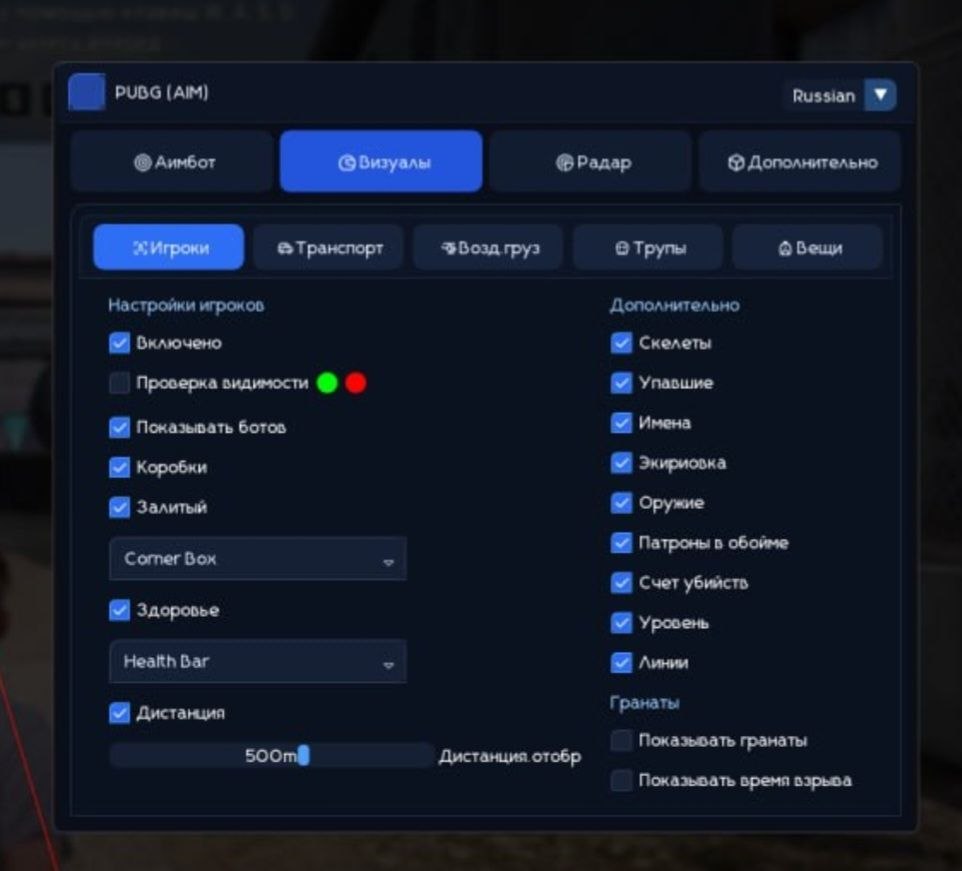
Phoenix には HWID Spoofer が付属しており、便利なメニューはロシア語と英語をサポートしています。 機能性、安定性、PUBG ゲームプレイのあらゆる詳細を制御することを重視する人にとっては、優れた選択肢です。
システム要件
🔔 チートの状態は開発者の通知に基づき当社のTelegramボットから自動更新されます — そちらで最新情報をフォローしてください。多くのチートはゲームの変更後に自動更新されるため、「確認中」の状態はチートが動作しないという意味ではなく、確認までの不確実性にすぎません。不安ですか?サイトのチャットで質問するかお問い合わせをご確認ください。
グローバルキー — 世界中で使用可能。
一部の商品ではBinanceカードで支払える場合があります。購入前に個別メッセージで利用可否と詳細を確認してください。
機能
戦利品ESP (戦利品のWH)
- Loot ESP — 地面に落ちているさまざまな戦利品を確認する機能
- 戦利品フィルター — 表示された戦利品をカテゴリごとにフィルタリングするための柔軟なシステム
- アーマー 1 LVL — 第一レベルのアーマー (ボディアーマー、ヘルメット、バックパック) を表示します。
- アーマー 2 LVL — 第 2 レベルのアーマー (ボディアーマー、ヘルメット、バックパック) を表示します。
- アーマー 3 LVL — 第 3 レベルのアーマー (ボディアーマー、ヘルメット、バックパック) を表示します。
- ブレード — 近接武器を強調表示します
- ピストル — ピストルの場所に関する情報を提供します
- サブマシン — サブマシンガンを示します
- Shotguns — ショットガンを示します
- ライフル — アサルトライフルの場所に関する情報を提供します
- 狙撃兵 — 狙撃兵の武器がどこにあるかを示します
- スコープ — さまざまな照準器と光学系
- 医薬品 – 大小の応急処置キット、包帯、鎮痛剤、エナジードリンク、アドレナリン注射器
- アタッチメント - 他のすべての武器の改造
- 手榴弾 — PUBG における手榴弾およびその他の投擲可能な武器
- 距離 — 表示アイテムまでの距離 (メートル単位)
- 最大距離 — 戦利品WHの範囲を制限できます
エイムボット (ベクターエイム)
- 有効 — エイムボットを有効/無効にします
- ベクター エイムボット — ベクター エイムボットは、マウス カーソルを移動することで狙いを定めるのに役立ちます
- 視野 (FOV) — エイムボットが動作するエリアのサイズ
- FOV を表示 — 照準の作業領域のサイズを十字線の周囲の円として表示します。
- エイムキー — エイムボットを起動するキーを選択します
- スムーズ — ターゲットに向かうエイムボットの動きをスムーズにします
- RCS — エイムボットで射撃する際の武器反動制御システム
その他の機能
- 十字線 — 常に画面の中央に静的な十字線を描画します。
- 観客 — 何人のプレイヤーがゲームを観戦しているかを表示します
- 戦闘モード — プレイヤーWHを除くすべてのPUBG ESP機能を無効にします
- 戦闘フィルター — 戦闘モードで表示されるオブジェクトのフィルター
- 色 — チートのほとんどの視覚機能に対して好みに合わせて色を選択する機能
- 言語 - PUBG のチート メニューは 2 つの言語をサポートしています: 英語とロシア語
- HWID Spoofer — チートに加えて、PUBG 禁止を回避するための Spoofer も入手できます
プレイヤー ESP (WH)
- プレイヤー ESP — 敵に関するさまざまな情報を提供します
- 可視チェック — 直接視線にある敵と壁の後ろの敵の色が異なります。
- Show Bots (AI) — ボットとプレイヤーを区別する ESP 機能。ボット ボックスにはボットというラベルが付けられます。
- ボックス — ボックスを使用して壁や障害物の背後にあるキャラクターを強調表示します。
- ボックス スタイル (2D、コーナー、塗りつぶし) — ボックスの視覚スタイル設定
- ヘルス (テキスト、バー) — テキストとインジケーター (バー) を使用してプレイヤーの HP 量を表示します。
- スケルトン — モデルの上にスケルトンを重ねて人物を強調します。
- ノック — チェックすると、WH はノックされたプレイヤーに対して機能します
- 装備 — 現在のプレーヤーの装備を表示します
- 武器 — 敵がどの武器を持っているかを表示します
- 弾薬 — マガジン内の弾丸の数と対戦相手の予備
- スナップライン — 自分のモデルから相手のモデルまでの線の形式のウォールハック タイプ
- キルスコア — プレイヤーごとのキル数
- レベル — プレーヤーのレベルを表示します
- 距離 — 他のプレイヤーまでの距離をメートル単位で表示します
- 最大距離 — ESP 機能の範囲を制限できます。
- 敵のみ - ESP 機能は敵プレイヤーに対してのみ機能します。
World ESP (WH for Objects)
- 車両 — WH を使用して車両の位置を表示します
- 車両情報 (健康状態、燃料) — 燃料の備蓄量と車両の耐久性に関する情報
- エアドロップ — エアドロップの場所を表示
- エアドロップコンテンツ — エアドロップ内の戦利品のリストを表示します
- Corpses — 死亡したプレイヤーのボックス (死体) を表示します。
- 死体コンテンツ — プレイヤーの死体のインベントリの内容を表示します
- 名前 — 表示されるオブジェクトの名前
- 距離 — 表示されているオブジェクトまでの距離 (メートル単位)
- Max Distance — さまざまな種類のオブジェクトの ESP 表示範囲をカスタマイズする機能
- 手榴弾を表示 — 投げられた手榴弾と爆発までの時間を表示します
このチートの新機能
最近のソフトウェア更新履歴 — 新しい順。
-
Phoenix Full PUBG (Aimbot) — UI revamped and protection updated
The cheat menu UI has been fully redesigned and refreshed. Language switching (English / Russian) is restored. The font has been changed to a more comfortable and pleasant one for gameplay. Minor bugs and rough edges fixed. Security and anti-ban protection improved. A new menu screenshot has been added to the product gallery.
メニューのスクリーンショット
カスタマーレビュー
すべてのレビューよくある質問
Phoenix Fullにはどんな機能が含まれていますか?
どの支払い方法が利用できますか?
サポートにはどう連絡しますか?
お支払い後、ソフトウェアのアクティベーション、起動、使用方法の詳細な説明をお届けします。
説明はお支払い前に指定されたメールアドレスに送信されます。
ダウンロードリンクと必要なコンポーネントもそちらでご確認いただけます。
チートコミュニティ
PUBGおよびPUBG Mobileのチート:アップデート、検出ステータス、プレイヤーチャット。