Stealth for Apex Legends
Stealth is the most stable private cheat for Apex Legends 2026
Stealth is a private external cheat for Apex Legends built for maximum stealth and rock-solid stability. Thanks to its external injection method, anti-cheat has virtually no way to detect it, and regular updates for every season ensure uninterrupted performance.
The software gives you complete control over gunfights: an intelligent aiming system with fine-tuned smoothing and human-like behavior simulation lets you play legit without raising any suspicion. At the same time, you always have full situational awareness — seeing every opponent's position, health, weapon, and movement direction through any obstacle.
The advanced loot system deserves special attention — you instantly find the best gear by filtering items by rarity. A built-in radar with adjustable radius and scale completes the picture, displaying all surrounding information on a mini-map.
A flexible profile system lets you instantly switch between calm and aggressive playstyles with a single key press. Full color scheme customization, English and Russian interface, hotkeys for every action — all of this makes Stealth one of the most convenient solutions for Apex Legends.
System Requirements
🔔 Cheat statuses update automatically from our Telegram bot via developer notifications — follow the news there. Many cheats update themselves after game changes, so a “Checking” status does not mean the cheat is broken — it is just uncertainty until confirmed. Not sure? Ask in the site chat or on our Contacts page.
Global keys — work worldwide.
Payment with a Binance card may be available for selected products. Contact us privately before buying to check availability and agree the details.
Features
General
- Aimbot is the main function of automatic aiming:
Players
- Box – 2D box around players // Classic box around players
- Name – Show player nickname // Display nickname
- Health – Health value or health bar // HP in numbers or stripes
- Weapon – Current weapon name // What weapon is in your hands
- Skeleton – Draw full player skeleton // Full skeleton
- Hitbox – Show hitbox positions // Display hitboxes
- Distance – Distance to player // Distance to player
- Distance Limit – Max render distance (0–1000 m) // Maximum rendering distance of ESP players
Loot
- Weapons – Highlight dropped weapons // Highlighting weapons on the ground
- Ammo – Show ammunition // Ammo
- Heal – Highlight meds / heals // Medicines and healing
- Equipment – Armor and clothing // Armor, helmets, clothing
- Grenades – Explosive items // Grenades, arcs, etc.
- Attachment – Weapon attachments // Body kits and modules
- Minimum LVL – Minimum rarity filter // Filter by minimum rarity level
- Distance – Show distance to item // Distance to item
- Distance Limit – Loot ESP radius (0–1000 m) // Maximum loot range
Colors
- Box visible – Color for visible players (RGB) // Color of the frame of visible players
- Box invisible – Color for occluded (behind wall) players // Color behind the wall
- Box knocked – Color for knocked players // Color of the fallen
- Skeleton – Skeleton color // Skeleton color
- Corpse – Corpse highlight color // Corpse color
- Aimbot visuals – Color of FOV / crosshair / target marker // Colors of aimbot elements
- Hitbox alpha – Hitbox transparency (0–255) // Hitbox transparency
Settings
- Language – Interface: English / Russian // Menu language
- Menu key – Hotkey to open/close menu // Key to open the menu
- Unload key – Hotkey to completely unload cheat // Key to completely unload the cheat
- Battle mode – Separate aggressive config mode // Separate combat mode (can be quickly switched)
- Battle mode key – Hotkey to toggle battle mode // Key to enable battle mode
Aimbot
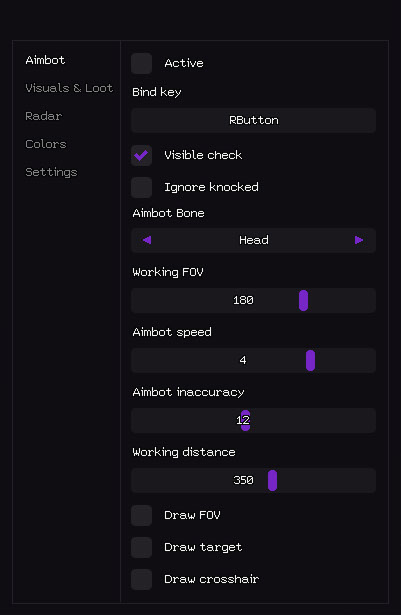
- Active – Enable / Disable aimbot // Enable / disable aimbot
- Bind key – Hotkey to toggle aimbot (example: RButton) // Activation key (can be held or toggled)
- Visible check – Aim only at visible enemies // Works only on visible targets (does not shoot through walls)
- Ignore knocked – Skip downed/knocked players // Skip downed/fallen players
- Aimbot Bone – Target priority: Head / Chest / Pelvis // Aimbot priority bone
- Working FOV – Field of view radius for target selection // Target acquisition radius (FOV)
- Aimbot speed – Aim smoothing speed (1–10) // Aiming speed (the lower, the smoother and more legitimate)
- Aimbot inaccuracy – Artificial spread / humanization // Artificial spread (for greater legitimacy)
- Working distance – Max aimbot range (0–600 meters) // Maximum aimbot working distance
- Draw FOV – Show FOV circle on screen // Drawing a circle of the working area
- Draw target – Highlight current locked target // Highlighting the current target
- Draw crosshair – Draw custom static crosshair // Static crosshair on the screen
- Visuals and display of loot - everything that is visible through the walls:
- Visuals & Loot
Corpses
- Corpse – Highlight dead player bodies // Highlighting corpses
- Distance – Distance to corpse // Distance to body
- Distance Limit – Corpse ESP radius (0–1000 m) // Corpse drawing range
- Radar - mini-map with information about players and loot:
Radar
- Active – Enable radar // Enable radar
- Show players – Display players on radar // Show players
- Player names – Show nicknames on radar // Nicknames of players on the radar
- Player direction – Show view direction arrow // View direction (arrow)
- Player Distance – Distance to player // Distance to player
- Show loot – Display loot on radar // Show loot
- Loot name – Show item name // Item name
- Loot distance – Distance to loot // Distance to loot
- Loot minimum LVL – Minimum rarity filter // Loot rarity filter
- Size – Radar window size (50–200 px) // Radar window size
- Draw distance – Radar working radius (50–400 m) // Radar operating radius
- Color customization - you can do it completely to your liking:
What's new in this cheat
1
New features, meaningful improvements and important fixes for this product.
EA App support added
- Full support for the EA App has been added. The product now works with both the Steam and EA App versions of the game.
Customer Reviews
All reviewsFrequently Asked Questions
What features are included in Stealth?
What payment methods are accepted?
How to contact support?
Payment is confirmed, but the product is missing. How long should I wait?
I have a key. Where are the download and instructions?
After payment you will receive detailed instructions on activation, launch and use of the software.
Instructions will be sent to the email address specified before payment.
You will also find a download link and necessary components for the software.
Cheat community
Cheat updates, detection status and help from other players — in our Telegram and Discord.