Stealth 的 Apex Legends
Stealth 是 Apex Legends 2026 最稳定的私人秘籍
Stealth 是 Apex Legends 的私人外部作弊工具,旨在实现最大程度的隐身性和坚如磐石的稳定性。 由于其外部注入方法,反作弊几乎无法检测到它,并且每个季节的定期更新可确保性能不间断。
该软件让您可以完全控制枪战:智能瞄准系统具有微调平滑和类人行为模拟功能,让您可以合法地玩游戏而不会引起任何怀疑。 同时,您始终拥有全面的态势感知能力 - 通过任何障碍看到每个对手的位置、生命值、武器和移动方向。
先进的战利品系统值得特别关注——你可以通过按稀有度过滤物品来立即找到最好的装备。 半径和比例可调的内置雷达完善了图像,在迷你地图上显示所有周围信息。
灵活的配置文件系统让您只需按一下键即可在冷静和激进的游戏风格之间切换。 完整的配色方案定制、英语和俄语界面、每个操作的热键——所有这些使得 Stealth 成为 Apex Legends 最方便的解决方案之一。
系统要求
操作系统
windows 10, 11 (x64) versions 21h1, 22h2, 23h2, 24h2, 25h2; Windows 11 26H2
游戏客户端
Steam, EA App
处理器
only intel or AMD;
BIOS 要求
uefi only;
游戏最新补丁: 2026年8月26日
核实中 详细状态
🔔 作弊状态根据开发者通知从我们的 Telegram 机器人自动更新——请在那里关注最新消息。许多作弊会在游戏更新后自动更新,因此「核实中」状态并不代表作弊不可用,只是确认前的不确定。不确定?请在网站聊天询问或查看联系方式。
功能
一般
- Aimbot主要功能是自动瞄准:
玩家
- 盒子 – 玩家周围的 2D 盒子 // 玩家周围的经典盒子
- Name – Showplayer昵称 //显示昵称
- 健康 – 健康值或健康栏 // HP 数字或条纹
- Weapon – 当前武器名称 // 你手里是什么武器
- Skeleton – 绘制完整的玩家骨骼 // 完整的骨骼
- Hitbox – 显示碰撞箱位置 // 显示碰撞箱
- 距离 – 到玩家的距离 // 到玩家的距离
- Distance Limit – Max render distance (0–1000 m) // ESP 玩家的最大渲染距离
战利品
- 武器 – 突出显示掉落的武器 // 突出显示地面上的武器
- 弹药 – 显示弹药 // 弹药
- 治愈 – 突出显示药物/治愈 // 药物和治愈
- 装备 – 盔甲和服装 // 盔甲、头盔、服装
- 手榴弹 – 爆炸物品 // 手榴弹、电弧等。
- 附件 – 武器附件//车身套件和模块
- 最小 LVL – 最小稀有度过滤器 // 按最小稀有度级别过滤
- 距离 – 显示到项目的距离 // 到项目的距离
- 距离限制 – 战利品 ESP 半径 (0–1000 m) // 最大战利品范围
颜色
- Boxvisible – 可见玩家的颜色 (RGB) // 可见玩家边框的颜色
- 盒子不可见 – 被遮挡(墙后)玩家的颜色 // 墙后的颜色
- 盒子被撞了 – 被撞玩家的颜色 // 倒下的颜色
- 骨架 – 骨架颜色 // 骨架颜色
- Corpse – 尸体高亮颜色 // 尸体颜色
- Aimbot 视觉效果 – FOV/十字准线/目标标记的颜色 // Aimbot 元素的颜色
- Hitbox alpha – Hitbox 透明度 (0–255) // Hitbox 透明度
设置
- 语言 – 界面:英语/俄语 // 菜单语言
- 菜单键 – 打开/关闭菜单的热键 // 打开菜单的键
- 卸载键 – 完全卸载作弊的热键 // 完全卸载作弊的键
- 战斗模式 – 单独的攻击配置模式 // 单独的战斗模式(可以快速切换)
- 战斗模式键 – 切换战斗模式的热键 // 启用战斗模式的键
瞄准机器人
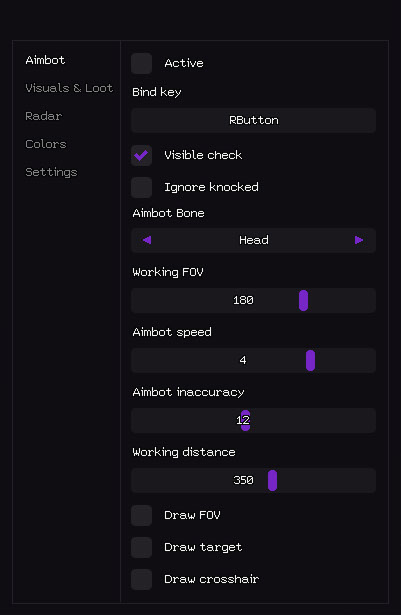
- Active – 启用/禁用瞄准机器人 // 启用/禁用瞄准机器人
- 绑定键 – 切换瞄准机器人的热键(例如:RButton)//激活键(可以按住或切换)
- 可见检查 – 仅瞄准可见敌人 // 仅适用于可见目标(不会射穿墙壁)
- 忽略被击倒 – 跳过被击倒/被击倒的玩家 // 跳过被击倒/摔倒的玩家
- Aimbot Bone – 目标优先级:头部/胸部/骨盆 // Aimbot 优先级骨骼
- 工作 FOV – 目标选择的视场半径 // 目标采集半径 (FOV)
- Aimbot speed – 瞄准平滑速度(1–10) // 瞄准速度(越低越平滑越合法)
- Aimbot 不准确 – 人为传播/人性化 // 人为传播(为了更大的合法性)
- 工作距离 – 瞄准机器人最大范围(0–600 米)//瞄准机器人最大工作距离
- 绘制 FOV – 在屏幕上显示 FOV 圆 // 绘制工作区域的圆
- Draw target – 高亮当前锁定目标 // 高亮当前目标
- Draw crosshair – 绘制自定义静态十字线 // 屏幕上的静态十字线
- 战利品的视觉效果和展示 - 透过墙壁可见的一切:
- 视觉效果和战利品
尸体
- 尸体 – 突出显示死去的玩家尸体 // 突出显示尸体
- Distance – 到尸体的距离 // 到身体的距离
- 距离限制 – 尸体 ESP 半径 (0–1000 m) // 尸体绘制范围
- 雷达 - 包含玩家和战利品信息的迷你地图:
雷达
- Active – 启用雷达 // 启用雷达
- 显示玩家 – 在雷达上显示玩家 // 显示玩家
- 玩家姓名 – 在雷达上显示昵称 // 雷达上玩家的昵称
- 玩家方向 – 显示视图方向箭头 // 视图方向(箭头)
- 玩家距离 – 到玩家的距离 // 到玩家的距离
- 显示战利品 – 在雷达上显示战利品 // 显示战利品
- 战利品名称 – 显示物品名称 // 物品名称
- 战利品距离 – 战利品距离 // 战利品距离
- 战利品最小 LVL – 最低稀有度过滤器 // 战利品稀有度过滤器
- Size – 雷达窗口大小 (50–200 px) // 雷达窗口大小
- 绘制距离 – 雷达工作半径 (50–400 m) // 雷达工作半径
- 颜色定制 - 您可以完全按照自己的喜好进行:
此外挂的新功能
1
这是什么意思?
客户评价
所有评价常见问题
Stealth 包含哪些功能?
Stealth 的功能取决于所选套餐。通常包括:自动瞄准、透视/穿墙、雷达等。完整功能列表请参见上方商品描述。
接受哪些付款方式?
可用的付款方式由付款服务商在结账页面显示。具体选项取决于商品和地区;付款前请向客服确认详情。
如何联系客服?
在私信中提供订单号、商品及版本、付款平台、当前阶段、错误和已做的尝试。如已有这些信息,请继续原对话。隐藏密钥、密码、登录验证码、付款资料和私人链接;不要在公开群聊发布订单号。 联系支持.
付款已确认但未收到商品,需要等多久?
打开原订单页面:交付方式和时间取决于商品及结账条件。自动交付和人工处理是不同流程。如果超过承诺时间,或付款确认后仍无商品,请私下把订单号发给卖家。 付款后帮助.
已有密钥,在哪里下载程序和查看说明?
使用所购商品及版本的专用说明,链接位于商品页面或订单交付内容中。密钥是访问数据,不是通用下载链接。请从该说明或订单下载。缺少链接时联系支持,不要套用其他商品的说明。 付款后帮助.
付款后,您将收到关于软件激活、启动和使用的详细说明。
说明将发送到付款前提供的电子邮件地址。
您还将找到下载链接和必要的组件。
作弊社区
作弊更新、检测状态以及其他玩家的帮助——尽在我们的 Telegram 和 Discord。