Stealth 용 Apex Legends
Stealth는 Apex Legends 2026의 가장 안정적인 개인 치트입니다.
Stealth는 최대의 스텔스와 견고한 안정성을 위해 제작된 Apex Legends용 비공개 외부 치트입니다. 외부 주입 방식 덕분에 Anti-Cheat는 사실상 탐지할 방법이 없으며 매 시즌 정기적인 업데이트를 통해 중단 없는 성능을 보장합니다.
이 소프트웨어를 사용하면 총격전을 완벽하게 제어할 수 있습니다. 미세 조정된 스무딩 및 인간과 유사한 행동 시뮬레이션을 갖춘 지능형 조준 시스템을 통해 의심을 일으키지 않고 합법적인 플레이를 즐길 수 있습니다. 동시에 장애물을 통과하여 모든 상대의 위치, 체력, 무기, 이동 방향을 볼 수 있어 상황을 항상 완벽하게 인식할 수 있습니다.
고급 전리품 시스템은 특별한 주의를 기울일 가치가 있습니다. 희귀도별로 항목을 필터링하여 최고의 장비를 즉시 찾을 수 있습니다. 반경과 규모를 조정할 수 있는 내장 레이더가 사진을 완성하여 모든 주변 정보를 미니 지도에 표시합니다.
유연한 프로필 시스템을 통해 키 하나만 누르면 차분한 플레이 스타일과 공격적인 플레이 스타일을 즉시 전환할 수 있습니다. 전체 색상 구성표 사용자 정의, 영어 및 러시아어 인터페이스, 모든 작업에 대한 단축키 등 이 모든 것이 Stealth를 Apex Legends의 가장 편리한 솔루션 중 하나로 만듭니다.
시스템 요구사항
🔔 치트 상태는 개발자 알림에 따라 텔레그램 봇에서 자동으로 업데이트됩니다 — 그곳에서 소식을 확인하세요. 많은 치트는 게임 변경 후 스스로 업데이트되므로 «확인 중» 상태가 치트가 작동하지 않는다는 뜻은 아니며, 확인 전까지의 불확실성일 뿐입니다. 확실하지 않나요? 사이트 채팅에서 문의하거나 연락처를 확인하세요.
글로벌 키 — 전 세계에서 사용 가능.
일부 상품은 Binance 카드 결제가 가능할 수 있습니다. 구매 전에 개인 메시지로 이용 가능 여부와 세부 정보를 확인하세요.
기능
일반
- Aimbot은 자동 조준의 주요 기능입니다.
플레이어
- Box – 플레이어 주변의 2D 상자 // 플레이어 주변의 클래식 상자
- 이름 – 플레이어 닉네임 표시 // 닉네임 표시
- 건강 – 건강 값 또는 건강 막대 // 숫자 또는 줄무늬로 표시된 HP
- 무기 – 현재 무기 이름 // 손에 들고 있는 무기
- 스켈레톤 – 전체 플레이어 스켈레톤 그리기 // 전체 스켈레톤
- Hitbox – 히트박스 위치 표시 // 히트박스 표시
- 거리 – 플레이어까지의 거리 // 플레이어까지의 거리
- 거리 제한 - 최대 렌더링 거리(0~1000m) // ESP 플레이어의 최대 렌더링 거리
전리품
- 무기 – 떨어진 무기 강조 표시 // 지상에 있는 무기 강조 표시
- 탄약 – 탄약 표시 // 탄약
- Heal – 약/치유 강조 표시 // 약 및 치유
- 장비 - 갑옷 및 의복 // 갑옷, 투구, 의복
- 수류탄 – 폭발성 아이템 // 수류탄, 아크 등
- 부착 – 무기 부착 // 바디 키트 및 모듈
- 최소 LVL – 최소 희귀도 필터 // 최소 희귀도 수준으로 필터링
- 거리 – 항목까지의 거리 표시 // 항목까지의 거리
- 거리 제한 – 전리품 ESP 반경(0–1000m) // 최대 전리품 범위
색상
- Box visible – 보이는 플레이어의 색상(RGB) // 보이는 플레이어의 프레임 색상
- 상자 보이지 않음 – 막힌(벽 뒤) 플레이어의 색상 // 벽 뒤의 색상
- Box knocked – 쓰러진 플레이어의 색상 // 쓰러진 플레이어의 색상
- 뼈대 - 뼈대 색상 // 뼈대 색상
- 시체 - 시체 하이라이트 색상 // 시체 색상
- Aimbot 시각적 개체 – FOV 색상 / 십자선 / 대상 마커 // aimbot 요소 색상
- Hitbox alpha – Hitbox 투명도(0–255) // Hitbox 투명도
설정
- 언어 – 인터페이스: 영어/러시아어 // 메뉴 언어
- 메뉴 키 - 메뉴를 열고 닫는 단축키 // 메뉴를 여는 키
- 언로드 키 - 치트를 완전히 언로드하는 단축키 // 치트를 완전히 언로드하는 키
- 전투 모드 – 별도의 공격적 구성 모드 // 별도의 전투 모드(빠른 전환 가능)
- 전투 모드 키 - 전투 모드를 전환하는 단축키 // 전투 모드를 활성화하는 키
에임봇
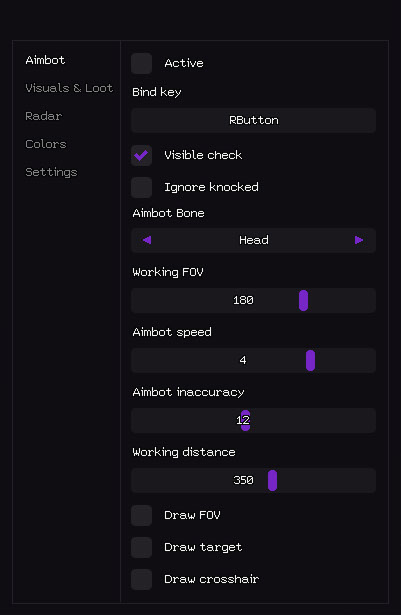
- 활성 – aimbot 활성화/비활성화 // aimbot 활성화/비활성화
- 바인딩 키 – aimbot을 전환하는 단축키(예: RButton) // 활성화 키(누르거나 전환할 수 있음)
- Visible check - 보이는 적만 조준합니다. // 보이는 대상에만 작동합니다(벽을 뚫고 쏘지 않음).
- 노크 무시 – 쓰러진/노크된 플레이어 건너뛰기 // 쓰러진/떨어진 플레이어 건너뛰기
- Aimbot Bone - 대상 우선순위: 머리 / 가슴 / 골반 // Aimbot 우선순위 뼈
- 작동 FOV – 표적 선택을 위한 시야 반경 // 표적 획득 반경(FOV)
- Aimbot 속도 – 조준 스무딩 속도(1–10) // 조준 속도(낮을수록 더 부드럽고 더 적법함)
- Aimbot 부정확성 – 인공 확산 / 인간화 // 인공 확산 (정당성 강화를 위해)
- 작동 거리 – 최대 aimbot 범위(0–600미터) // 최대 aimbot 작동 거리
- FOV 그리기 – 화면에 FOV 원 표시 // 작업 영역의 원 그리기
- 대상 그리기 – 현재 잠긴 대상 강조 표시 // 현재 대상 강조 표시
- 십자선 그리기 – 사용자 정의 정적 십자선 그리기 // 화면에 정적 십자선 그리기
- 전리품의 시각 및 표시 - 벽을 통해 보이는 모든 것:
- 비주얼 및 전리품
시체
- 시체 - 죽은 플레이어 시체 강조 표시 // 시체 강조 표시
- 거리 - 시체까지의 거리 // 시체까지의 거리
- 거리 제한 – 시체 ESP 반경(0–1000m) // 시체 그리기 범위
- 레이더 - 플레이어 및 전리품에 대한 정보가 포함된 미니맵:
레이더
- 활성 – 레이더 활성화 // 레이더 활성화
- 플레이어 표시 – 레이더에 플레이어 표시 // 플레이어 표시
- 플레이어 이름 – 레이더에 닉네임 표시 // 레이더에 플레이어의 닉네임 표시
- 플레이어 방향 - 보기 방향 화살표 표시 // 보기 방향(화살표)
- 플레이어 거리 – 플레이어까지의 거리 // 플레이어까지의 거리
- 전리품 표시 – 레이더에 전리품 표시 // 전리품 표시
- 전리품 이름 – 아이템 이름 표시 // 아이템 이름
- 전리품 거리 – 전리품까지의 거리 // 전리품까지의 거리
- 전리품 최소 LVL – 최소 희귀도 필터 // 전리품 희귀도 필터
- 크기 - 레이더 창 크기(50~200px) // 레이더 창 크기
- 그리기 거리 - 레이더 작동 반경(50~400m) // 레이더 작동 반경
- 색상 사용자 정의 - 원하는 대로 완전히 수행할 수 있습니다.
고객 리뷰
모든 리뷰자주 묻는 질문
Stealth에는 어떤 기능이 포함되어 있나요?
어떤 결제 수단을 사용할 수 있나요?
고객 지원은 어떻게 문의하나요?
결제 후 소프트웨어의 활성화, 실행 및 사용에 대한 자세한 안내를 받으실 수 있습니다.
안내는 결제 전 제공한 이메일 주소로 전송됩니다.
다운로드 링크와 필요한 구성 요소도 함께 제공됩니다.
치트 커뮤니티
치트 업데이트, 탐지 상태, 다른 플레이어의 도움 — 텔레그램과 디스코드에서.