Stealth の Apex Legends
ステルスは、Apex Legends 2026 の最も安定したプライベート チートです
ステルスは、最大限のステルス性と堅固な安定性を実現するために構築された、Apex Legends のプライベート外部チートです。 外部注入方式のおかげで、アンチチートはそれを検出する方法が事実上なく、シーズンごとの定期的なアップデートにより、中断のないパフォーマンスが保証されます。
ソフトウェアを使用すると、銃撃戦を完全に制御できます。微調整されたスムージングと人間のような動作シミュレーションを備えたインテリジェントな照準システムにより、疑いを抱かずに合法的にプレイできます。 同時に、常に状況を完全に認識し、すべての敵の位置、体力、武器、障害物を通した移動方向を確認できます。
高度な戦利品システムは特に注目に値します。アイテムをレア度でフィルタリングすることで、最高の装備を即座に見つけることができます。 半径とスケールを調整できる内蔵レーダーが画像を完成させ、周囲のすべての情報をミニマップ上に表示します。
柔軟なプロファイル システムにより、キーを 1 回押すだけで、穏やかなプレイスタイルと攻撃的なプレイスタイルを瞬時に切り替えることができます。 フルカラー スキームのカスタマイズ、英語とロシア語のインターフェイス、すべてのアクションのホットキー - これらすべてにより、ステルスは Apex Legends にとって最も便利なソリューションの 1 つになります。
システム要件
🔔 チートの状態は開発者の通知に基づき当社のTelegramボットから自動更新されます — そちらで最新情報をフォローしてください。多くのチートはゲームの変更後に自動更新されるため、「確認中」の状態はチートが動作しないという意味ではなく、確認までの不確実性にすぎません。不安ですか?サイトのチャットで質問するかお問い合わせをご確認ください。
グローバルキー — 世界中で使用可能。
一部の商品ではBinanceカードで支払える場合があります。購入前に個別メッセージで利用可否と詳細を確認してください。
機能
一般
- Aimbot は自動照準の主な機能です。
選手
- ボックス – プレーヤーの周りの 2D ボックス // プレーヤーの周りのクラシックなボックス
- 名前 – プレイヤーのニックネームを表示 // ニックネームを表示
- 体力 – 体力値または体力バー // 数字または縞模様の HP
- Weapon – 現在の武器名 // 手に持っている武器
- スケルトン – プレイヤーの完全なスケルトンを描画 // フル スケルトン
- ヒットボックス – ヒットボックスの位置を表示 // ヒットボックスを表示します
- 距離 – プレーヤーまでの距離 // プレーヤーまでの距離
- 距離制限 – 最大レンダリング距離 (0–1000 m) // ESP プレーヤーの最大レンダリング距離
戦利品
- 武器 – 落ちた武器を強調表示 // 地面にある武器を強調表示
- 弾薬 – 弾薬を表示 // 弾薬
- Heal – ハイライトの薬 / 治癒 // 薬と治癒
- 装備 – 鎧と衣服 // 鎧、兜、衣服
- 手榴弾 – 爆発物 // 手榴弾、アークなど
- アタッチメント – 武器アタッチメント // ボディキットおよびモジュール
- 最小 LVL – 最小希少性フィルター // 最小希少性レベルでフィルターします
- 距離 – アイテムまでの距離を表示 // アイテムまでの距離
- 距離制限 – 戦利品 ESP 半径 (0 ~ 1000 m) // 戦利品の最大範囲
色
- ボックス表示 – 表示されているプレーヤーの色 (RGB) // 表示されているプレーヤーのフレームの色
- ボックス非表示 – 遮蔽された (壁の後ろ) プレーヤーの色 // 壁の後ろの色
- ボックスノック – ノックされたプレイヤーの色 // 倒れたプレイヤーの色
- スケルトン – スケルトンカラー // スケルトンカラー
- Corpse – 死体のハイライトカラー // 死体の色
- エイムボットのビジュアル – FOV / クロスヘア / ターゲット マーカーの色 // エイムボット要素の色
- ヒットボックス アルファ – ヒットボックスの透明度 (0–255) // ヒットボックスの透明度
設定
- 言語 – インターフェース: 英語 / ロシア語 // メニュー言語
- メニュー キー – メニューを開く/閉じるためのホットキー // メニューを開くためのキー
- アンロード キー – チートを完全にアンロードするホットキー // チートを完全にアンロードするキー
- 戦闘モード – 個別のアグレッシブ構成モード // 個別の戦闘モード (すぐに切り替えることができます)
- 戦闘モード キー – 戦闘モードを切り替えるホットキー // 戦闘モードを有効にするキー
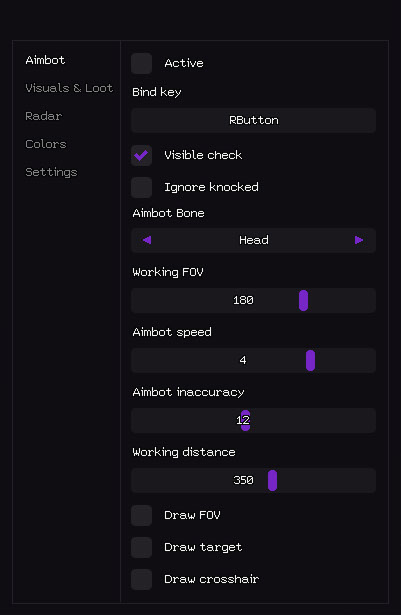
エイムボット
- アクティブ – エイムボットを有効 / 無効にする // エイムボットを有効 / 無効にする
- バインド キー – エイムボットを切り替えるホットキー (例: RButton) // アクティベーション キー (長押しまたは切り替え可能)
- 可視チェック – 目に見える敵のみを狙います // 目に見えるターゲットにのみ機能します (壁を撃ち抜きません)
- ノックを無視 – ダウン/ノックされたプレイヤーをスキップ // ダウン/転倒したプレイヤーをスキップ
- エイムボット ボーン – ターゲットの優先順位: 頭 / 胸部 / 骨盤 // エイムボットの優先順位ボーン
- 作業 FOV – ターゲット選択の視野半径 // ターゲット取得半径 (FOV)
- エイムボット速度 – エイムスムージング速度 (1–10) // エイム速度 (低いほどスムーズで正当なものになります)
- Aimbot の不正確さ – 人為的な拡散 / 擬人化 // 人為的な拡散 (正当性を高めるため)
- 作動距離 – エイムボットの最大範囲 (0 ~ 600 メートル) // エイムボットの最大作動距離
- Draw FOV – 画面上に FOV 円を表示 // 作業領域の円を描画します
- ターゲットを描画 – 現在ロックされているターゲットを強調表示します // 現在のターゲットを強調表示します
- 十字線を描く – カスタム静的十字線を描画します // 画面上に静的十字線を描画します
- 戦利品のビジュアルと表示 - 壁を通して見えるものすべて:
- ビジュアルと戦利品
死体
- Corpse – プレイヤーの死体をハイライトします // 死体をハイライトします
- 距離 – 死体までの距離 // 死体までの距離
- 距離制限 – 死体 ESP 半径 (0 ~ 1000 m) // 死体描画範囲
- レーダー - プレイヤーと戦利品に関する情報を含むミニマップ:
レーダー
- アクティブ - レーダーを有効にする // レーダーを有効にする
- 選手を表示 – レーダーに選手を表示 // 選手を表示
- プレイヤー名 – レーダーにニックネームを表示 // レーダーに表示されるプレイヤーのニックネーム
- プレーヤーの方向 – ビュー方向矢印を表示 // ビュー方向 (矢印)
- プレーヤーの距離 – プレーヤーまでの距離 // プレーヤーまでの距離
- 戦利品を表示 – 戦利品をレーダーに表示 // 戦利品を表示
- 戦利品名 – アイテム名を表示 // アイテム名
- 戦利品の距離 – 戦利品までの距離 // 戦利品までの距離
- 戦利品の最小 LVL – 最小レア度フィルター // 戦利品のレア度フィルター
- サイズ – レーダー ウィンドウ サイズ (50 ~ 200 ピクセル) // レーダー ウィンドウ サイズ
- 描画距離 – レーダー作動半径 (50–400 m) // レーダー作動半径
- 色のカスタマイズ - 完全に好みに合わせてカスタマイズできます。
カスタマーレビュー
すべてのレビューよくある質問
Stealthにはどんな機能が含まれていますか?
どの支払い方法が利用できますか?
サポートにはどう連絡しますか?
お支払い後、ソフトウェアのアクティベーション、起動、使用方法の詳細な説明をお届けします。
説明はお支払い前に指定されたメールアドレスに送信されます。
ダウンロードリンクと必要なコンポーネントもそちらでご確認いただけます。
チートコミュニティ
チートのアップデート、検出ステータス、他プレイヤーからのサポート — TelegramとDiscordで。