Stealth dla Apex Legends
Stealth to najbardziej stabilny prywatny kod do Apex Legends 2026
Stealth to prywatny, zewnętrzny kod do gry Apex Legends, stworzony z myślą o maksymalnej dyskrecji i solidnej stabilności. Dzięki zewnętrznej metodzie wtrysku anty-cheat praktycznie nie ma możliwości jego wykrycia, a regularne aktualizacje na każdy sezon zapewniają nieprzerwane działanie.
Oprogramowanie zapewnia pełną kontrolę nad strzelaninami: inteligentny system celowania z precyzyjnie dostrojonym wygładzaniem i symulacją ludzkiego zachowania pozwala grać legalnie, nie wzbudzając żadnych podejrzeń. Jednocześnie zawsze masz pełną świadomość sytuacyjną — widzisz pozycję, zdrowie, broń i kierunek ruchu każdego przeciwnika przez każdą przeszkodę.
Na szczególną uwagę zasługuje zaawansowany system łupów — najlepszy sprzęt znajdziesz natychmiast, filtrując przedmioty według rzadkości. Wbudowany radar z regulowanym promieniem i skalą uzupełnia obraz, wyświetlając wszystkie informacje o otoczeniu na minimapie.
Elastyczny system profili umożliwia natychmiastowe przełączanie pomiędzy spokojnym i agresywnym stylem gry za pomocą jednego naciśnięcia klawisza. Pełna personalizacja schematu kolorów, interfejs w języku angielskim i rosyjskim, klawisze skrótu do każdej akcji – wszystko to sprawia, że Stealth jest jednym z najwygodniejszych rozwiązań dla Apex Legends.
Wymagania systemowe
🔔 Statusy cheatów aktualizują się automatycznie z naszego bota Telegram na podstawie powiadomień deweloperów — śledź tam nowości. Wiele cheatów aktualizuje się samo po zmianach w grze, więc status «Sprawdzanie» nie oznacza, że cheat nie działa — to tylko niepewność do potwierdzenia. Nie masz pewności? Zapytaj na czacie na stronie lub sprawdź Kontakt.
Klucze globalne — działają na całym świecie.
Dla wybranych produktów może być dostępna płatność kartą Binance. Napisz do nas prywatnie przed zakupem, aby sprawdzić dostępność i uzgodnić szczegóły.
Funkcje
Generał
- Aimbot to główna funkcja automatycznego celowania:
Gracze
- Pudełko – pudełko 2D wokół graczy // Klasyczne pudełko wokół graczy
- Nazwa – pokaż pseudonim gracza // Wyświetl pseudonim
- Zdrowie – wartość zdrowia lub pasek zdrowia // HP w liczbach lub paskach
- Broń – aktualna nazwa broni // Jaka broń jest w twoich rękach
- Szkielet – narysuj pełny szkielet gracza // Pełny szkielet
- Hitbox – Pokaż pozycje hitboxów // Wyświetlaj hitboxy
- Odległość – Odległość do gracza // Odległość do gracza
- Limit odległości – maksymalna odległość renderowania (0–1000 m) // Maksymalna odległość renderowania graczy ESP
Łup
- Broń – Podświetl upuszczoną broń // Podświetl broń na ziemi
- Amunicja – pokaż amunicję // Amunicja
- Uzdrawianie – podświetl leki / leczy // Leki i leczenie
- Ekwipunek – Zbroja i odzież // Zbroje, hełmy, odzież
- Granaty – Przedmioty wybuchowe // Granaty, łuki itp.
- Załącznik – Dodatki do broni // Zestawy i moduły nadwozia
- Minimalny LVL – filtr minimalnej rzadkości // Filtruj według minimalnego poziomu rzadkości
- Odległość – pokazuje odległość do przedmiotu // Odległość do przedmiotu
- Limit odległości – promień ESP łupów (0–1000 m) // Maksymalny zasięg łupów
Kolory
- Pole widoczne – Kolor widocznych graczy (RGB) // Kolor ramki widocznych graczy
- Box invisible – Kolor dla graczy zasłoniętych (za ścianą) // Kolor za ścianą
- Pudełko powalone – Kolor dla powalonych graczy // Kolor poległych
- Szkielet – Kolor szkieletu // Kolor szkieletu
- Zwłoki – kolor podświetlenia zwłok // Kolor zwłok
- Wizualizacja Aimbota – Kolor pola widzenia / celownika / znacznika celu // Kolory elementów aimbota
- Hitbox alfa – Przezroczystość hitboxa (0–255) // Przezroczystość hitboxa
Ustawienia
- Język – interfejs: angielski / rosyjski // Język menu
- Klawisz menu – Klawisz skrótu do otwierania/zamykania menu // Klawisz do otwierania menu
- Klawisz rozładowywania – klawisz skrótu do całkowitego wyładowania cheatów // Klawisz do całkowitego wyładowania cheatów
- Tryb bitwy – Oddzielny agresywny tryb konfiguracji // Oddzielny tryb walki (można szybko przełączać)
- Klawisz trybu bitwy – klawisz skrótu do przełączania trybu bitwy. // Klawisz włączania trybu bitwy
Aimbot
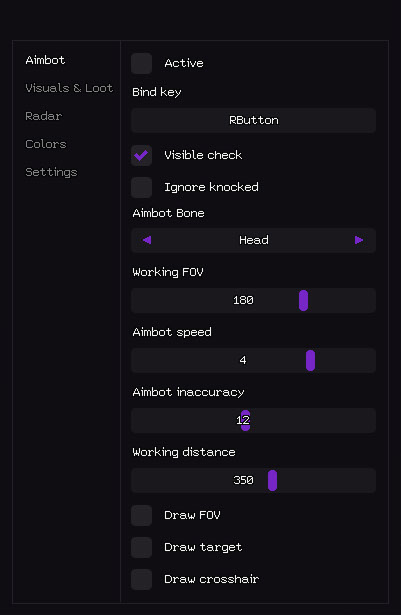
- Aktywny – Włącz / wyłącz aimbota // Włącz / wyłącz aimbota
- Klawisz powiązania – klawisz skrótu do przełączania aimbota (przykład: RButton) // Klawisz aktywacyjny (można przytrzymać lub przełączyć)
- Widoczny test – celuj tylko w widocznych wrogów // Działa tylko na widoczne cele (nie strzela przez ściany)
- Ignoruj powalonych – pomija powalonych/powalonych graczy. // Pomija powalonych/powalonych graczy
- Kość Aimbota – Priorytet celu: Głowa / Klatka piersiowa / Miednica // Kość priorytetowa Aimbota
- Robocze pole widzenia – promień pola widzenia przy wyborze celu // Promień pozyskiwania celu (FOV)
- Szybkość Aimbota – Szybkość wygładzania celowania (1–10) // Szybkość celowania (im niższa, tym płynniejsza i bardziej uzasadniona)
- Niedokładność Aimbota – Sztuczne rozprzestrzenianie / humanizacja // Sztuczne rozprzestrzenianie (dla większej legitymizacji)
- Odległość robocza – Maksymalny zasięg aimbota (0–600 metrów) // Maksymalna odległość robocza aimbota
- Rysuj FOV – Pokaż okrąg FOV na ekranie // Rysowanie okręgu obszaru roboczego
- Draw target – Podświetl aktualnie zablokowany cel. // Podświetla aktualny cel
- Rysuj celownik – rysuje niestandardowy statyczny celownik // Statyczny celownik na ekranie
- Wizualizacje i wyświetlanie łupów - wszystkiego, co jest widoczne przez ściany:
- Grafika i łupy
Zwłoki
- Zwłoki – Podświetl ciała martwych graczy // Podświetl zwłoki
- Odległość – Odległość do zwłok // Odległość do ciała
- Limit odległości – promień ESP zwłok (0–1000 m) // Zasięg rysowania zwłok
- Radar - mini-mapa z informacjami o graczach i łupach:
Radar
- Aktywny – Włącz radar // Włącz radar
- Pokaż graczy – Wyświetla graczy na radarze. // Pokaż graczy
- Nazwy graczy – Pokaż pseudonimy na radarze // Pseudonimy graczy na radarze
- Kierunek gracza – pokaż strzałkę kierunku widoku // Kierunek widoku (strzałka)
- Odległość gracza – Odległość do gracza // Odległość do gracza
- Pokaż łupy – Wyświetl łupy na radarze. // Pokaż łupy
- Nazwa łupu – pokaż nazwę przedmiotu // Nazwa przedmiotu
- Odległość łupów – Odległość do łupów // Odległość do łupów
- Minimalny lvl łupów – Filtr minimalnej rzadkości // Filtr rzadkości łupów
- Rozmiar – rozmiar okna radaru (50–200 px) // Rozmiar okna radaru
- Odległość rysowania – promień działania radaru (50–400 m) // Promień działania radaru
- Personalizacja kolorów - możesz to zrobić całkowicie według własnych upodobań:
Recenzje klientów
Wszystkie recenzjeCzęsto zadawane pytania
Jakie funkcje zawiera Stealth?
Jakie metody płatności są akceptowane?
Jak skontaktować się z pomocą?
Po opłacie otrzymasz szczegółowe instrukcje dotyczące aktywacji, uruchomienia i użytkowania oprogramowania.
Instrukcje zostaną wysłane na adres e-mail podany przed płatnością.
Znajdziesz tam również link do pobrania i niezbędne komponenty.
Społeczność cheatów
Aktualizacje cheatów, status wykrywania i pomoc od innych graczy — na naszym Telegramie i Discordzie.