Stealth สำหรับ Apex Legends
Stealth เป็นการโกงส่วนตัวที่เสถียรที่สุดสำหรับ Apex Legends 2026
Stealth เป็นการโกงภายนอกส่วนตัวสำหรับ Apex Legends ที่สร้างขึ้นเพื่อการลักลอบสูงสุดและความเสถียรที่แข็งแกร่ง ด้วยวิธีการฉีดภายนอก ทำให้การต่อต้านการโกงแทบจะไม่มีทางตรวจพบได้ และการอัปเดตเป็นประจำสำหรับทุกฤดูกาลทำให้มั่นใจได้ถึงประสิทธิภาพที่ไม่หยุดชะงัก
ซอฟต์แวร์นี้ช่วยให้คุณควบคุมการดวลปืนได้อย่างสมบูรณ์: ระบบเล็งอัจฉริยะพร้อมการปรับให้ราบรื่นและการจำลองพฤติกรรมเหมือนมนุษย์ช่วยให้คุณเล่นได้อย่างถูกกฎหมายโดยไม่เพิ่มความสงสัยใด ๆ ในเวลาเดียวกัน คุณจะมีความตระหนักรู้ในสถานการณ์อย่างเต็มที่อยู่เสมอ — มองเห็นตำแหน่ง สุขภาพ อาวุธ และทิศทางการเคลื่อนไหวของคู่ต่อสู้ทุกคนผ่านอุปสรรคใดๆ
ระบบปล้นขั้นสูงสมควรได้รับความสนใจเป็นพิเศษ — คุณจะพบอุปกรณ์ที่ดีที่สุดได้ทันทีโดยการกรองไอเท็มตามความหายาก เรดาร์ในตัวพร้อมรัศมีและมาตราส่วนที่ปรับได้ทำให้ภาพสมบูรณ์ โดยแสดงข้อมูลโดยรอบทั้งหมดบนแผนที่ขนาดเล็ก
ระบบโปรไฟล์ที่ยืดหยุ่นช่วยให้คุณสลับระหว่างสไตล์การเล่นที่สงบและดุดันได้ทันทีด้วยการกดปุ่มเพียงครั้งเดียว การปรับแต่งโทนสีเต็มรูปแบบ อินเทอร์เฟซภาษาอังกฤษและรัสเซีย ปุ่มลัดสำหรับทุกการกระทำ ทั้งหมดนี้ทำให้ Stealth เป็นหนึ่งในโซลูชั่นที่สะดวกที่สุดสำหรับ Apex Legends
ข้อกำหนดระบบ
🔔 สถานะของโปรแกรมอัปเดตอัตโนมัติจาก บอต Telegram ของเรา ตามการแจ้งเตือนของผู้พัฒนา — ติดตามข่าวได้ที่นั่น โปรแกรมหลายตัวอัปเดตตัวเองหลังเกมเปลี่ยนแปลง ดังนั้นสถานะ «กำลังตรวจสอบ» ไม่ได้แปลว่าใช้งานไม่ได้ เป็นเพียงความไม่แน่นอนจนกว่าจะยืนยัน ไม่แน่ใจ? สอบถามที่ แชทบนเว็บไซต์ หรือดู ติดต่อ
คีย์ Global — ใช้ได้ทั่วโลก
สินค้าบางรายการอาจชำระด้วยบัตร Binance ได้ โปรดส่งข้อความส่วนตัวหาเราก่อนซื้อเพื่อตรวจสอบและตกลงรายละเอียด
คุณสมบัติ
ทั่วไป
- Aimbot เป็นหน้าที่หลักของการเล็งอัตโนมัติ:
ผู้เล่น
- Box – กล่อง 2D รอบผู้เล่น // กล่องคลาสสิกรอบผู้เล่น
- ชื่อ – แสดงชื่อเล่นของผู้เล่น // แสดงชื่อเล่น
- สุขภาพ – ค่าสุขภาพหรือแถบสุขภาพ // HP เป็นตัวเลขหรือแถบ
- อาวุธ – ชื่ออาวุธปัจจุบัน // อาวุธอะไรอยู่ในมือคุณ
- Skeleton – วาดโครงกระดูกผู้เล่นเต็ม // โครงกระดูกเต็ม
- Hitbox – แสดงตำแหน่ง Hitbox // แสดง Hitbox
- Distance – ระยะทางถึงผู้เล่น // ระยะทางถึงผู้เล่น
- ขีดจำกัดระยะทาง – ระยะเรนเดอร์สูงสุด (0–1,000 ม.) // ระยะเรนเดอร์สูงสุดของผู้เล่น ESP
ยกเค้า
- อาวุธ – ไฮไลท์อาวุธที่ตก // ไฮไลท์อาวุธบนพื้น
- กระสุน – แสดงกระสุน // กระสุน
- การรักษา – เน้นยา/การรักษา // ยาและการรักษาโรค
- อุปกรณ์ – ชุดเกราะและเสื้อผ้า // ชุดเกราะ หมวก เสื้อผ้า
- ระเบิดมือ – วัตถุระเบิด // ระเบิดมือ ส่วนโค้ง ฯลฯ
- เอกสารแนบ – เอกสารแนบอาวุธ // ชุดตัวถังและโมดูล
- เลเวลขั้นต่ำ – ตัวกรองความหายากขั้นต่ำ // กรองตามระดับความหายากขั้นต่ำ
- Distance – แสดงระยะทางถึงรายการ // ระยะทางถึงรายการ
- ขีดจำกัดระยะทาง – รัศมีปล้น ESP (0–1,000 ม.) // ระยะปล้นสูงสุด
สี
- กล่องที่มองเห็นได้ – สีสำหรับผู้เล่นที่มองเห็นได้ (RGB) // สีของกรอบของผู้เล่นที่มองเห็นได้
- กล่องล่องหน – สีสำหรับผู้เล่นที่ถูกกีดกัน (หลังกำแพง) // สีหลังกำแพง
- กล่องเคาะ – สีสำหรับผู้เล่นที่ถูกเคาะ // สีของผู้ล้ม
- โครงกระดูก – สีโครงกระดูก // สีโครงกระดูก
- Corpse – สีไฮไลท์ศพ // สีศพ
- ภาพ Aimbot – สีของ FOV / เป้าเล็ง / เครื่องหมายเป้าหมาย // สีขององค์ประกอบ Aimbot
- Hitbox alpha – ความโปร่งใสของ Hitbox (0–255) // ความโปร่งใสของ Hitbox
การตั้งค่า
- ภาษา – อินเทอร์เฟซ: อังกฤษ / รัสเซีย // ภาษาของเมนู
- ปุ่มเมนู – ปุ่มลัดเพื่อเปิด/ปิดเมนู // ปุ่มเพื่อเปิดเมนู
- ปุ่มยกเลิกการโหลด - ปุ่มลัดเพื่อยกเลิกการโหลดการโกงโดยสมบูรณ์ // ปุ่มเพื่อยกเลิกการโหลดการโกงโดยสมบูรณ์
- โหมดการต่อสู้ – แยกโหมดการกำหนดค่าเชิงรุก // แยกโหมดการต่อสู้ (สามารถเปลี่ยนได้อย่างรวดเร็ว)
- ปุ่มโหมดการต่อสู้ – ปุ่มลัดเพื่อสลับโหมดการต่อสู้ // ปุ่มเพื่อเปิดใช้งานโหมดการต่อสู้
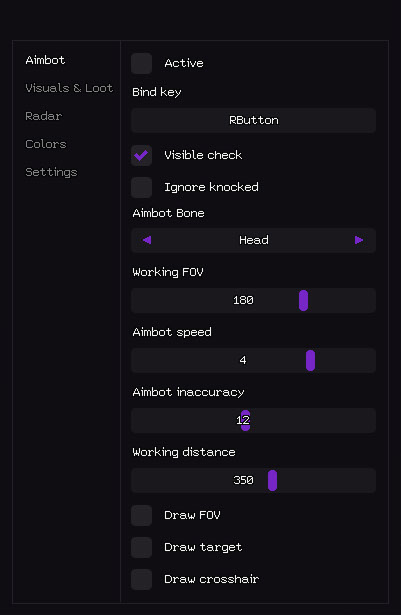
เอมบอต
- ใช้งานอยู่ – เปิด / ปิดการใช้งาน Aimbot // เปิด / ปิดการใช้งาน Aimbot
- ปุ่มผูก - ปุ่มลัดเพื่อสลับ Aimbot (ตัวอย่าง: RButton) // รหัสเปิดใช้งาน (สามารถกดค้างไว้หรือสลับได้)
- การตรวจสอบที่มองเห็นได้ – เล็งไปที่ศัตรูที่มองเห็นได้เท่านั้น // ใช้งานได้กับเป้าหมายที่มองเห็นได้เท่านั้น (ไม่ยิงทะลุกำแพง)
- ไม่สนใจการล้ม – ข้ามผู้เล่นที่ล้ม/ล้ม // ข้ามผู้เล่นที่ล้ม/ล้ม
- Aimbot Bone – ลำดับความสำคัญตามเป้าหมาย: ศีรษะ / หน้าอก / กระดูกเชิงกราน // กระดูก Aimbot สำคัญ
- FOV ทำงาน – รัศมีการมองเห็นสำหรับการเลือกเป้าหมาย // รัศมีการได้มาซึ่งเป้าหมาย (FOV)
- ความเร็ว Aimbot – ความเร็วการเล็งที่ราบรื่น (1–10) // ความเร็วการเล็ง (ยิ่งต่ำ ยิ่งราบรื่นและถูกต้องมากขึ้น)
- ความไม่ถูกต้องของ Aimbot – การแพร่กระจายแบบประดิษฐ์ / การทำให้เป็นมนุษย์ // การแพร่กระจายแบบประดิษฐ์ (เพื่อความชอบธรรมที่มากขึ้น)
- ระยะการทำงาน – ระยะ Aimbot สูงสุด (0–600 เมตร) // ระยะ Aimbot สูงสุดในการทำงานของ
- วาด FOV – แสดงวงกลม FOV บนหน้าจอ // วาดวงกลมของพื้นที่ทำงาน
- วาดเป้าหมาย – เน้นเป้าหมายที่ถูกล็อคในปัจจุบัน // เน้นเป้าหมายปัจจุบัน
- วาดเป้าเล็ง – วาดเป้าเล็งแบบคงที่แบบกำหนดเอง // เป้าเล็งแบบคงที่บนหน้าจอ
- ภาพและการจัดแสดงสิ่งของที่ปล้นสะดม - ทุกสิ่งที่มองเห็นผ่านผนัง:
- ภาพและการปล้น
ศพ
- Corpse – เน้นศพผู้เล่นที่ตาย // เน้นศพ
- ระยะทาง – ระยะห่างถึงศพ // ระยะห่างถึงร่างกาย
- ขีดจำกัดระยะทาง – รัศมี Corpse ESP (0–1,000 ม.) // ระยะการวาดศพ
- Radar - แผนที่ขนาดเล็กพร้อมข้อมูลเกี่ยวกับผู้เล่นและของขวัญ:
เรดาร์
- ใช้งานอยู่ – เปิดใช้งานเรดาร์ // เปิดใช้งานเรดาร์
- แสดงผู้เล่น – แสดงผู้เล่นบนเรดาร์ // แสดงผู้เล่น
- ชื่อผู้เล่น – แสดงชื่อเล่นบนเรดาร์ // ชื่อเล่นของผู้เล่นบนเรดาร์
- ทิศทางของผู้เล่น – แสดงลูกศรทิศทางการดู // ทิศทางการดู (ลูกศร)
- ระยะทางของผู้เล่น – ระยะห่างจากผู้เล่น // ระยะห่างจากผู้เล่น
- แสดงของขวัญ – แสดงของขวัญบนเรดาร์ // แสดงของขวัญ
- ชื่อไอเทม – แสดงชื่อไอเทม // ชื่อไอเทม
- ระยะทางในการปล้น – ระยะทางในการปล้น // ระยะทางในการปล้น
- ไอเทม LVL ขั้นต่ำ - ตัวกรองความหายากขั้นต่ำ // ตัวกรองความหายากของไอเทม
- ขนาด – ขนาดหน้าต่างเรดาร์ (50–200 px) // ขนาดหน้าต่างเรดาร์
- ระยะการวาด – รัศมีการทำงานของเรดาร์ (50–400 ม.) // รัศมีการทำงานของเรดาร์
- การปรับแต่งสี - คุณสามารถทำได้ตามที่คุณต้องการ:
รีวิวจากลูกค้า
รีวิวทั้งหมดคำถามที่พบบ่อย
Stealth มีฟีเจอร์อะไรบ้าง?
รับชำระเงินด้วยวิธีใดบ้าง?
ติดต่อฝ่ายสนับสนุนอย่างไร?
หลังชำระเงิน คุณจะได้รับคำแนะนำละเอียดเกี่ยวกับการเปิดใช้งาน เริ่มต้น และใช้งานซอฟต์แวร์
คำแนะนำจะถูกส่งไปยังอีเมลที่ระบุก่อนชำระเงิน
คุณยังจะพบลิงก์ดาวน์โหลดและส่วนประกอบที่จำเป็น
ชุมชนผู้ใช้ตัวช่วย
อัปเดตตัวช่วย สถานะการตรวจจับ และความช่วยเหลือจากผู้เล่นคนอื่น — ใน Telegram และ Discord ของเรา