Shack for ARC Raiders
Shack Private - Private cheat for ARC Raiders
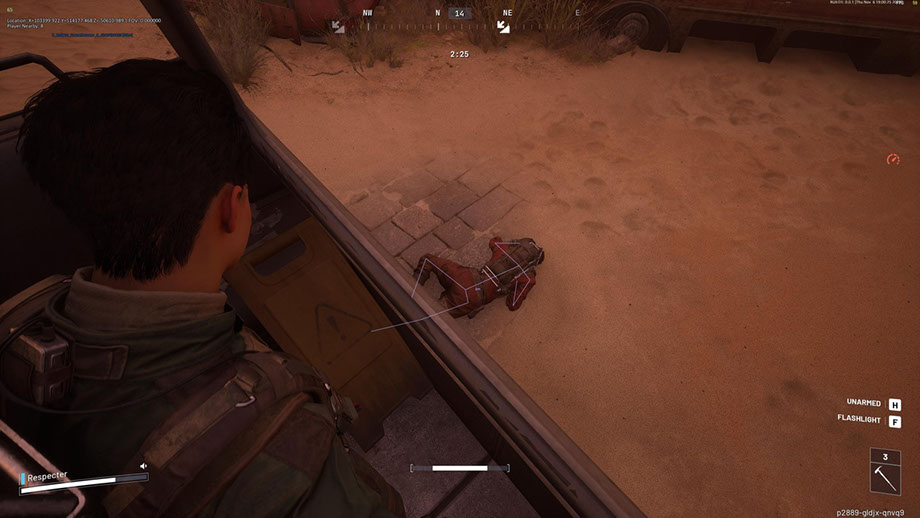
Shack Private is a powerful private cheat for ARC Raiders, created for those who want to play at the next level. The cheat for ARC Raiders combines a professional Aimbot with smooth FOV adjustment, precise bone selection and Silent Aim mode, as well as a flexible ESP that displays players, ARCs, items and containers with filtering by distance.
The ARC Raiders cheat offers a well-thought-out radar, a color customization system, full support for Xbox controllers, and a modern interface with a dark theme and animations. All parameters - from visualization to control - can be flexibly adjusted to suit you.
Shack Private works stably without bans and provides maximum stealth in the game. A private cheat for ARC Raiders with anti-cheat bypass guarantees safe use. Easy installation, user-friendly configuration and support from our team make it a great choice for both beginners and experienced players. Get the advantage now - at low cost and without risk.
System Requirements
Global keys — work worldwide.
Payment with a Binance card may be available for selected products. Contact us privately before buying to check availability and agree the details.
Features
General
- Aimbot for ARC Raiders - Core Settings
- Aimbot for ARC Raiders is a professional automatic aiming system with advanced customization options:
- Adjustable FOV (1-180°) - adjusts the viewing angle for target acquisition
- Maximum distance control (0–1000 m) - operating range limitation
- Bone selection - Precisely target the head, neck, chest and other body parts
- Visibility check - several modes for determining target visibility
- FOV circle display - visual indication of the capture area
- Illumination of a captured target - visual highlighting of the current target
- Flexible system for selecting and prioritizing goals:
- Player targeting - automatic tracking of opponents
- Targeting ARCs - targeting enemy robots
- Smooth aiming (0–100%)—adjusts the speed of sight movement
- Target priority - choose between players or targets with the lowest HP
- Target switch delay (0–1000 ms) - control the speed of target switching
- Automatic selection of visible bone - smart selection of the optimal aiming point
- Setting maximum target speed - filtering out fast moving objects
Filters and settings
- Ally ESP switch - show/hide allied players
- Show/hide bodies - control the visibility of corpses
- Distance filter (0–1000 m)—limit display range
- Font size adjustment (8–30) - adjust text readability
Configuration
- Distance filter (0–1000 m) - range limitation
- Font Size Adjustment (8-30) - Text Adjustment
- Items & Containers ESP (ESP of items and containers)
Container types
- Resupply Drop - containers with supplies
- Salvage Container - containers with salvage
- Spacer Tech - technology containers
- ARC Cargo Drop - ARCs cargo containers
- Other containers - other types
Main features
- Mini-circular radar - compact display of surroundings
- Player Tracking - Monitoring Opponents
- ARCs Tracking - Robot Tracking
- Display of items - visualization of loot
- Container display - display containers on the radar
- Other objects - additional elements
Auxiliary tools for a comfortable game
- Custom Reticle (1-30) - Custom scope with adjustable size
- FPS Display - Performance Monitoring
- Player counter - number of opponents in the zone
- VSync switch - vertical sync control
- Multilingual font support - correct text display
- Font stroke settings - improving readability
- Global font size (8-30) - universal text setting
- Display all objects (Debug) - debugging mode for developers
Convenient settings management system
- Manage profiles - create and switch between configurations
- Saving and loading configurations - quick access to settings
- JSON config system - a convenient storage format
- Xbox controller support - full gamepad integration
- Setting up hot keys - individual key combinations
ADVANTAGES OF SHACK PRIVATE
- 1. Maximum stealth - bypassing in-game anti-cheat and OBS
- 2. Stability - work without bans or crashes
- 3. Flexibility of configuration - full control over all parameters
- 4. Versatility - supports various input devices
- 5. Professional level - advanced algorithms and optimization
- 6. Ease of use - intuitive interface for beginners and professionals
Universal control system
- Xbox controller support - full operation with a gamepad
- Key Customization - Custom Configuration for PC and Xbox
- Mouse, keyboard and controller support - multi-platform control
- Silent Aim FOV - Rage mode for aggressive play
ESP SYSTEMS FOR ARC RAIDERS
- Player ESP (player ESP) - visualization of opponents
Main parameters
- Display of player names - display nicknames above heads
- Distance display - distance to each player
- Boxes (2D / 3D) - visual highlighting of opponents
- Snaplines—direction lines to targets
- Player Skeleton - Bone Structure Display
- Visibility check - visible/hidden target indication
- Health bar - displays enemy HP
- Custom Colors - Separate colors for visible and hidden purposes
- ARC Name Display - Robot Identification
- Distance display - distance to each ARC
- Boxes (2D / 3D) - visual highlighting
- Lines (Snaplines) - guides to robots
- Skeleton - ARC Structure Mapping
- Visibility check - visibility indication
- Health bar - display of robot HP
- Custom colors - colors for visible/hidden ARCs
Display options
- Item names—shows the names of all objects
- Distance to objects - distance to each object
- Quantities and stacks - information about the number of items
- Showing selected objects - displaying already collected items
- Container display - visualization of all containers
Filters and configuration
- Show open/closed containers - filter by status
- Filter only for those available for loot - showing only available containers
- Distance filter (0–1000 m) - range limitation
- Font Size Adjustment (8-30) - Text Adjustment
- RADAR SYSTEM (Radar system for ARC Raiders)
- Intelligent Mini Radar for Tactical Advantage in ARC Raiders:
Radar setup
- Size (50–200 px) – adjust the size of the radar
- Range (100–2000 m) - scanning radius
- Transparency (20–100%) – visibility level
- X/Y Position - Screen Placement
- Icon size (1–8)—scale of radar elements
Color system
- Individual colors for each element - full control of the palette
- RGBA color selection - fine tuning with transparency
- Colors for visible/hidden objects - separate settings
- FOV color setting - capture area color
- Sight Color - Sight Personalization
- Player Color - Player ESP Settings
- Color ARCs - setting up ESP robots
- Color of items and containers - visualization of loot
Modern and intuitive interface
- Modern design - current interface style
- Dark theme - comfortable for the eyes during long games
- Tab structure - organized navigation
- Smooth animations - nice visual effects
- Information tips - help with setup
- Resizable window - adaptation to the screen
- Adaptive design - correct display at different resolutions
Frequently Asked Questions
What features are included in Shack?
What payment methods are accepted?
How to contact support?
Payment is confirmed, but the product is missing. How long should I wait?
I have a key. Where are the download and instructions?
After payment you will receive detailed instructions on activation, launch and use of the software.
Instructions will be sent to the email address specified before payment.
You will also find a download link and necessary components for the software.
Cheat community
Cheat updates, detection status and help from other players — in our Telegram and Discord.