Shack の ARC Raiders
Shack Private - ARC Raiders 用のプライベート チート
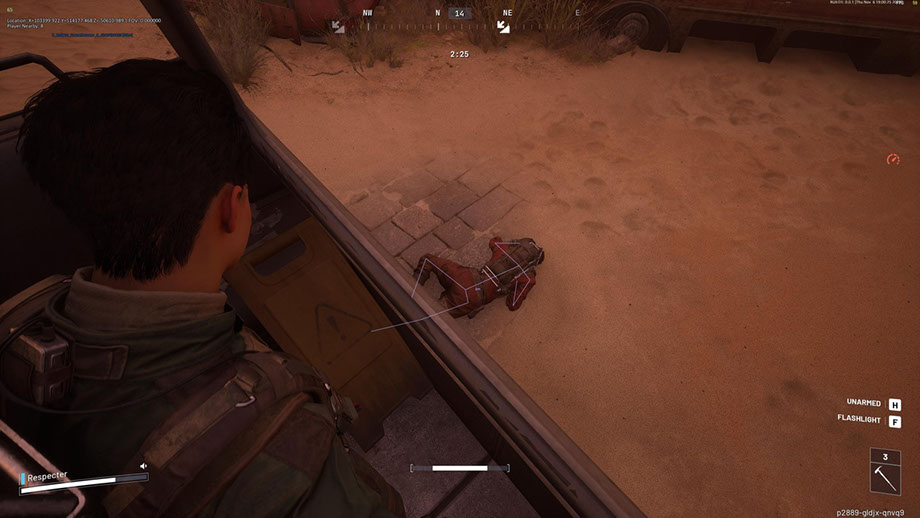
Shack Private は、ARC Raider 用の強力なプライベート チートで、次のレベルでプレイしたい人のために作成されました。 ARC Raiders のチートは、スムーズな FOV 調整、正確なボーン選択、サイレント エイム モードを備えたプロフェッショナルなエイムボットに加え、距離によるフィルタリングでプレーヤー、ARC、アイテム、コンテナを表示する柔軟な ESP を組み合わせています。
The ARC Raiders cheat offers a well-thought-out radar, a color customization system, full support for Xbox controllers, and a modern interface with a dark theme and animations. 視覚化から制御まで、すべてのパラメータは、お客様に合わせて柔軟に調整できます。
Shack Private は禁止なしで安定して動作し、ゲーム内で最大限のステルスを提供します。 アンチチートバイパスを備えたARC Raidersのプライベートチートにより、安全な使用が保証されます。 簡単なインストール、ユーザーフレンドリーな構成、そして私たちのチームによるサポートにより、初心者と経験豊富なプレーヤーの両方にとって素晴らしい選択肢になります。 低コストでリスクなしで、今すぐメリットを享受してください。
システム要件
グローバルキー — 世界中で使用可能。
一部の商品ではBinanceカードで支払える場合があります。購入前に個別メッセージで利用可否と詳細を確認してください。
機能
一般
- Aimbot for ARC Raiders - コア設定
- Aimbot for ARC Raiders は、高度なカスタマイズ オプションを備えたプロフェッショナルな自動照準システムです。
- 調整可能なFOV (1-180°) - ターゲット捕捉の視野角を調整します。
- 最大距離制御 (0 ~ 1000 m) - 動作範囲の制限
- 骨の選択 - 頭、首、胸、その他の体の部分を正確にターゲットにします
- 可視性チェック - ターゲットの可視性を決定するためのいくつかのモード
- FOV サークル表示 - キャプチャ領域の視覚的表示
- 捕捉されたターゲットの照明 - 現在のターゲットを視覚的に強調表示します。
- 目標を選択して優先順位を付けるための柔軟なシステム:
- プレーヤーのターゲティング - 対戦相手の自動追跡
- ARC をターゲットにする - 敵のロボットをターゲットにする
- スムーズな照準 (0 ~ 100%) - 照準の移動速度を調整します。
- ターゲットの優先順位 - 最もHPの低いプレイヤーまたはターゲットを選択します。
- ターゲット切り替え遅延 (0 ~ 1000 ミリ秒) - ターゲット切り替えの速度を制御します
- 可視骨の自動選択 - 最適な照準点のスマートな選択
- 最大目標速度の設定 - 高速で移動するオブジェクトをフィルタリングする
フィルターと設定
- 味方 ESP スイッチ - 味方プレイヤーの表示/非表示
- 死体の表示/非表示 - 死体の可視性を制御します
- 距離フィルター (0 ~ 1000 m) - 表示範囲を制限します
- フォント サイズ調整 (8 ~ 30) - テキストの読みやすさを調整します。
構成
- 距離フィルター (0 ~ 1000 m) - 範囲制限
- 文字サイズ調整(8-30) - 文字調整
- アイテムとコンテナの ESP (アイテムとコンテナの ESP)
コンテナの種類
- 補給ドロップ - 補給品が入ったコンテナ
- サルベージコンテナ - サルベージのあるコンテナ
- Spacer Tech - テクノロジーコンテナ
- ARC Cargo Drop - ARC の貨物コンテナ
- その他のコンテナ - その他のタイプ
主な特長
- ミニ円形レーダー - 周囲の状況をコンパクトに表示
- プレーヤーの追跡 - 対戦相手の監視
- ARC 追跡 - ロボット追跡
- アイテムの表示 - 戦利品の可視化
- コンテナ表示 - レーダー上にコンテナを表示します
- その他のオブジェクト - 追加要素
快適なゲームのための補助ツール
- カスタム レティクル (1-30) - サイズ調整可能なカスタム スコープ
- FPS 表示 - パフォーマンス監視
- プレイヤーカウンター - ゾーン内の対戦相手の数
- VSync スイッチ - 垂直同期制御
- 多言語フォントのサポート - 正しいテキスト表示
- フォント ストロークの設定 - 読みやすさの向上
- グローバル フォント サイズ (8-30) - ユニバーサル テキスト設定
- すべてのオブジェクトを表示 (デバッグ) - 開発者向けのデバッグ モード
便利な設定管理システム
- プロファイルの管理 - 構成の作成と切り替え
- 構成の保存とロード - 設定への素早いアクセス
- JSON 構成システム - 便利な保存形式
- Xbox コントローラーのサポート - ゲームパッドの完全な統合
- ホットキーの設定 - 個々のキーの組み合わせ
シャックプライベートのメリット
- 1. 最大限のステルス - ゲーム内のアンチチートと OBS をバイパスします
- 2. 安定性 - 禁止やクラッシュなく動作します
- 3. 構成の柔軟性 - すべてのパラメータを完全に制御
- 4. 多用途性 - さまざまな入力デバイスをサポート
- 5. プロフェッショナルレベル - 高度なアルゴリズムと最適化
- 6. 使いやすさ - 初心者から専門家まで使える直感的なインターフェイス
ユニバーサル制御システム
- Xbox コントローラーのサポート - ゲームパッドでの完全な操作
- キーのカスタマイズ - PC および Xbox のカスタム構成
- マウス、キーボード、コントローラーのサポート - マルチプラットフォーム制御
- Silent Aim FOV - アグレッシブなプレイのための Rage モード
アークレイダー用のESPシステム
- Player ESP (プレイヤー ESP) - 対戦相手の視覚化
主なパラメータ
- プレイヤー名の表示 - 頭の上にニックネームを表示します
- 距離表示 - 各プレイヤーまでの距離
- ボックス (2D / 3D) - 対戦相手の視覚的なハイライト
- スナップライン - ターゲットへの方向線
- プレーヤーのスケルトン - 骨構造の表示
- 可視性チェック - ターゲットの可視/非表示の表示
- ヘルスバー - 敵のHPを表示します
- カスタムカラー - 表示目的と非表示目的で色を分けます。
- ARC 名表示 - ロボットの識別
- 距離表示 - 各ARCまでの距離
- ボックス (2D / 3D) - 視覚的な強調表示
- ライン (スナップライン) - ロボットへのガイド
- スケルトン - ARC 構造マッピング
- 可視性チェック - 可視性の表示
- ヘルスバー - ロボットのHPの表示
- カスタムカラー - 表示/非表示のARCの色
表示オプション
- 項目名 - すべてのオブジェクトの名前を表示します。
- オブジェクトまでの距離 - 各オブジェクトまでの距離
- 数量とスタック - アイテムの数に関する情報
- 選択したオブジェクトの表示 - すでに収集されたアイテムの表示
- コンテナ表示 - すべてのコンテナの視覚化
フィルターと構成
- 開いた/閉じたコンテナを表示 - ステータスによるフィルタリング
- 戦利品に利用可能なコンテナのみをフィルタリング - 利用可能なコンテナのみを表示
- 距離フィルター (0 ~ 1000 m) - 範囲制限
- 文字サイズ調整(8-30) - 文字調整
- RADAR SYSTEM(ARCレイダー用レーダーシステム)
- ARC レイダーの戦術的優位性を高めるインテリジェント ミニ レーダー:
レーダーのセットアップ
- サイズ (50 ~ 200 ピクセル) – レーダーのサイズを調整します
- 範囲 (100 ~ 2000 m) - スキャン半径
- 透明度 (20 ~ 100%) – 可視性レベル
- X/Y 位置 - スクリーンの配置
- アイコン サイズ (1 ~ 8) - レーダー要素のスケール
カラーシステム
- 各要素の個別の色 - パレットを完全に制御
- RGBA カラー選択 - 透明度の微調整
- 表示/非表示オブジェクトの色 - 個別の設定
- FOV カラー設定 - キャプチャ領域のカラー
- 視覚の色 - 視覚のパーソナライゼーション
- プレーヤーの色 - プレーヤーの ESP 設定
- カラー ARC - ESP ロボットのセットアップ
- アイテムとコンテナの色 - 戦利品の視覚化
モダンで直感的なインターフェイス
- モダンなデザイン - 現在のインターフェイス スタイル
- ダークテーマ - 長時間のゲームでも目に優しい
- タブ構造 - 整理されたナビゲーション
- スムーズなアニメーション - 素晴らしい視覚効果
- 情報のヒント - セットアップのヘルプ
- サイズ変更可能なウィンドウ - 画面への適応
- アダプティブ デザイン - さまざまな解像度での正しい表示
よくある質問
Shackにはどんな機能が含まれていますか?
どの支払い方法が利用できますか?
サポートにはどう連絡しますか?
支払いは確認済みですが商品がありません。どのくらい待ちますか?
キーはあります。ダウンロードと手順書はどこですか?
お支払い後、ソフトウェアのアクティベーション、起動、使用方法の詳細な説明をお届けします。
説明はお支払い前に指定されたメールアドレスに送信されます。
ダウンロードリンクと必要なコンポーネントもそちらでご確認いただけます。
チートコミュニティ
チートのアップデート、検出ステータス、他プレイヤーからのサポート — TelegramとDiscordで。