Shack cho ARC Raiders
Shack Private - Trò gian lận riêng tư dành cho ARC Raiders
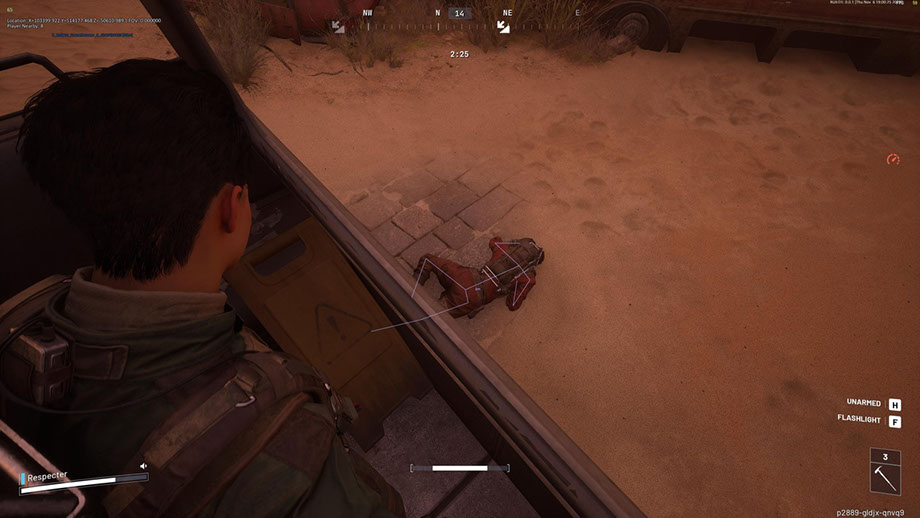
Shack Private là một trò gian lận riêng tư mạnh mẽ dành cho ARC Raiders, được tạo ra cho những ai muốn chơi ở cấp độ tiếp theo. Trò gian lận dành cho ARC Raiders kết hợp Aimbot chuyên nghiệp với khả năng điều chỉnh FOV mượt mà, lựa chọn xương chính xác và chế độ Silent Aim, cũng như ESP linh hoạt hiển thị người chơi, ARC, vật phẩm và thùng chứa với khả năng lọc theo khoảng cách.
Trò gian lận ARC Raiders cung cấp một radar được cân nhắc kỹ lưỡng, hệ thống tùy chỉnh màu sắc, hỗ trợ đầy đủ cho bộ điều khiển Xbox và giao diện hiện đại với chủ đề tối và hoạt ảnh. Tất cả các thông số - từ trực quan hóa đến điều khiển - đều có thể được điều chỉnh linh hoạt để phù hợp với bạn.
Shack Private hoạt động ổn định mà không bị cấm và mang lại khả năng tàng hình tối đa trong trò chơi. Một mánh gian lận riêng dành cho ARC Raiders với khả năng bỏ qua chống gian lận đảm bảo sử dụng an toàn. Cài đặt dễ dàng, cấu hình thân thiện với người dùng và sự hỗ trợ từ nhóm của chúng tôi khiến nó trở thành lựa chọn tuyệt vời cho cả người mới bắt đầu và người chơi có kinh nghiệm. Tận dụng lợi thế ngay bây giờ - với chi phí thấp và không có rủi ro.
Yêu cầu hệ thống
Key toàn cầu — hoạt động trên toàn thế giới.
Một số sản phẩm có thể hỗ trợ thanh toán bằng thẻ Binance. Hãy nhắn riêng cho chúng tôi trước khi mua để kiểm tra và thống nhất chi tiết.
Tính năng
chung
- Aimbot dành cho ARC Raiders - Cài đặt cốt lõi
- Aimbot cho ARC Raiders là hệ thống nhắm mục tiêu tự động chuyên nghiệp với các tùy chọn tùy chỉnh nâng cao:
- FOV có thể điều chỉnh (1-180°) - điều chỉnh góc nhìn để thu được mục tiêu
- Kiểm soát khoảng cách tối đa (0–1000 m) - giới hạn phạm vi hoạt động
- Lựa chọn xương - Nhắm mục tiêu chính xác vào đầu, cổ, ngực và các bộ phận cơ thể khác
- Kiểm tra khả năng hiển thị - một số chế độ để xác định khả năng hiển thị của mục tiêu
- Hiển thị vòng tròn FOV - chỉ báo trực quan của khu vực chụp
- Chiếu sáng mục tiêu bị bắt - làm nổi bật trực quan mục tiêu hiện tại
- Hệ thống linh hoạt trong việc lựa chọn và ưu tiên các mục tiêu:
- Nhắm mục tiêu người chơi - tự động theo dõi đối thủ
- Nhắm mục tiêu ARC - nhắm mục tiêu vào robot của đối phương
- Nhắm mục tiêu mượt mà (0–100%)—điều chỉnh tốc độ di chuyển của tầm nhìn
- Ưu tiên mục tiêu - chọn giữa người chơi hoặc mục tiêu có HP thấp nhất
- Độ trễ chuyển đổi mục tiêu (0–1000 ms) - kiểm soát tốc độ chuyển đổi mục tiêu
- Tự động lựa chọn xương có thể nhìn thấy - lựa chọn thông minh điểm ngắm tối ưu
- Đặt tốc độ mục tiêu tối đa - lọc các vật thể chuyển động nhanh
Bộ lọc và cài đặt
- Công tắc Ally ESP - hiển thị/ẩn người chơi đồng minh
- Hiển thị/ẩn xác - kiểm soát khả năng hiển thị của xác chết
- Bộ lọc khoảng cách (0–1000 m)—phạm vi hiển thị giới hạn
- Điều chỉnh kích thước phông chữ (8–30) - điều chỉnh khả năng đọc văn bản
Cấu hình
- Bộ lọc khoảng cách (0–1000 m) - giới hạn phạm vi
- Điều chỉnh cỡ chữ (8-30) - Điều chỉnh văn bản
- Items & Containers ESP (ESP của vật phẩm và container)
Các loại thùng chứa
- Reupply Drop - thùng chứa vật tư
- Salvage Container - container cứu hộ
- Spacer Tech - container công nghệ
- ARC Cargo Drop - Thùng chở hàng ARCs
- Thùng chứa khác - các loại khác
Các tính năng chính
- Radar hình tròn mini - hiển thị nhỏ gọn môi trường xung quanh
- Theo Dõi Người Chơi - Theo Dõi Đối Thủ
- Theo dõi ARC - Theo dõi robot
- Hiển thị vật phẩm - trực quan hóa chiến lợi phẩm
- Hiển thị container - hiển thị container trên radar
- Các đối tượng khác - các yếu tố bổ sung
Công cụ phụ trợ để chơi game thoải mái
- Kẻ ô tùy chỉnh (1-30) - Phạm vi tùy chỉnh với kích thước có thể điều chỉnh
- Hiển thị FPS - Giám sát hiệu suất
- Bộ đếm người chơi - số lượng đối thủ trong khu vực
- Công tắc VSync - điều khiển đồng bộ dọc
- Hỗ trợ phông chữ đa ngôn ngữ - hiển thị văn bản chính xác
- Cài đặt nét chữ - cải thiện khả năng đọc
- Cỡ chữ chung (8-30) - cài đặt văn bản phổ quát
- Hiển thị tất cả các đối tượng (Debug) - chế độ gỡ lỗi dành cho nhà phát triển
Hệ thống quản lý cài đặt thuận tiện
- Quản lý hồ sơ - tạo và chuyển đổi giữa các cấu hình
- Lưu và tải cấu hình - truy cập nhanh vào cài đặt
- Hệ thống cấu hình JSON - một định dạng lưu trữ thuận tiện
- Hỗ trợ bộ điều khiển Xbox - tích hợp gamepad đầy đủ
- Thiết lập phím nóng - tổ hợp phím riêng lẻ
ƯU ĐIỂM CỦA SHACK RIÊNG
- 1. Tàng hình tối đa - vượt qua hệ thống chống gian lận và OBS trong game
- 2. Tính ổn định - hoạt động không bị cấm hoặc gặp sự cố
- 3. Cấu hình linh hoạt - toàn quyền kiểm soát mọi thông số
- 4. Tính linh hoạt - hỗ trợ nhiều thiết bị đầu vào khác nhau
- 5. Cấp độ chuyên nghiệp - thuật toán nâng cao và tối ưu hóa
- 6. Dễ sử dụng - giao diện trực quan cho người mới bắt đầu và chuyên gia
Hệ thống điều khiển phổ quát
- Hỗ trợ bộ điều khiển Xbox - hoạt động hoàn toàn với gamepad
- Tùy chỉnh khóa - Cấu hình tùy chỉnh cho PC và Xbox
- Hỗ trợ chuột, bàn phím và bộ điều khiển - điều khiển đa nền tảng
- Silent Aim FOV - Chế độ thịnh nộ để chơi tích cực
HỆ THỐNG ESP CHO ARC RAIDER
- Player ESP (người chơi ESP) - trực quan hóa đối thủ
Thông số chính
- Hiển thị tên người chơi - hiển thị biệt danh trên đầu
- Hiển thị khoảng cách - khoảng cách đến mỗi người chơi
- Hộp (2D / 3D) - làm nổi bật hình ảnh của đối thủ
- Snaplines—đường dẫn tới mục tiêu
- Bộ Xương Người Chơi - Hiển Thị Cấu Trúc Xương
- Kiểm tra khả năng hiển thị - chỉ báo mục tiêu hiển thị/ẩn
- Thanh sức khỏe - hiển thị HP của kẻ thù
- Màu tùy chỉnh - Màu sắc riêng biệt cho mục đích hiển thị và ẩn
- Hiển thị tên ARC - Nhận dạng robot
- Hiển thị khoảng cách - khoảng cách đến mỗi ARC
- Hộp (2D / 3D) - làm nổi bật hình ảnh
- Lines (Snaplines) - hướng dẫn về robot
- Bộ xương - Bản đồ cấu trúc ARC
- Kiểm tra tầm nhìn - chỉ báo tầm nhìn
- Thanh sức khỏe - hiển thị của robot HP
- Màu tùy chỉnh - màu cho ARC hiển thị/ẩn
Tùy chọn hiển thị
- Tên mục—hiển thị tên của tất cả các đối tượng
- Khoảng cách đến vật thể - khoảng cách đến từng vật thể
- Số lượng và ngăn xếp - thông tin về số lượng mặt hàng
- Hiển thị các đối tượng đã chọn - hiển thị các mục đã được thu thập
- Hiển thị vùng chứa - trực quan hóa tất cả các vùng chứa
Bộ lọc và cấu hình
- Hiển thị các thùng chứa mở/đóng - lọc theo trạng thái
- Chỉ lọc những thứ có sẵn để cướp - chỉ hiển thị các thùng chứa có sẵn
- Bộ lọc khoảng cách (0–1000 m) - giới hạn phạm vi
- Điều chỉnh cỡ chữ (8-30) - Điều chỉnh văn bản
- HỆ THỐNG RADAR (Hệ thống radar dành cho ARC Raiders)
- Radar mini thông minh mang lại lợi thế chiến thuật trong ARC Raiders:
Thiết lập radar
- Kích thước (50–200 px) – điều chỉnh kích thước của radar
- Phạm vi (100–2000 m) - bán kính quét
- Tính minh bạch (20–100%) – mức độ hiển thị
- Vị trí X/Y - Vị trí màn hình
- Kích thước biểu tượng (1–8)—tỷ lệ của các phần tử radar
Hệ màu
- Màu riêng cho từng thành phần - toàn quyền kiểm soát bảng màu
- Lựa chọn màu RGBA - tinh chỉnh với độ trong suốt
- Màu sắc cho các đối tượng hiển thị/ẩn - cài đặt riêng
- Cài đặt màu FOV - màu vùng chụp
- Màu thị giác - Cá nhân hóa thị giác
- Màu của trình phát - Cài đặt ESP của trình phát
- ARC màu - thiết lập robot ESP
- Màu sắc của vật phẩm và thùng chứa - trực quan hóa chiến lợi phẩm
Giao diện hiện đại và trực quan
- Thiết kế hiện đại - phong cách giao diện hiện tại
- Chủ đề tối - thoải mái cho mắt khi chơi game lâu
- Cấu trúc tab - điều hướng có tổ chức
- Hình ảnh động mượt mà - hiệu ứng hình ảnh đẹp mắt
- Mẹo thông tin - trợ giúp thiết lập
- Cửa sổ có thể thay đổi kích thước - thích ứng với màn hình
- Thiết kế thích ứng - hiển thị chính xác ở các độ phân giải khác nhau
Câu hỏi thường gặp
Shack bao gồm những tính năng gì?
Những phương thức thanh toán nào được chấp nhận?
Làm sao liên hệ hỗ trợ?
Thanh toán đã xác nhận nhưng chưa nhận sản phẩm. Chờ bao lâu?
Đã có khóa. Tải chương trình và tìm hướng dẫn ở đâu?
Sau khi thanh toán, bạn sẽ nhận được hướng dẫn chi tiết về kích hoạt, khởi chạy và sử dụng phần mềm.
Hướng dẫn sẽ được gửi đến email đã cung cấp trước khi thanh toán.
Bạn cũng sẽ tìm thấy link tải xuống và các thành phần cần thiết.
Cộng đồng cheat
Cập nhật cheat, trạng thái phát hiện và hỗ trợ từ người chơi khác — trên Telegram và Discord của chúng tôi.