Shack für ARC Raiders
Shack Private – Privater Cheat für ARC Raiders
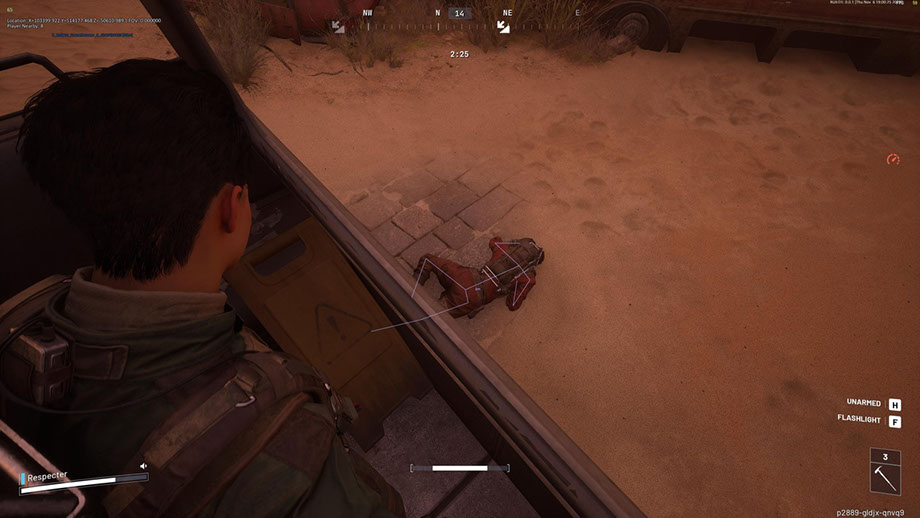
Shack Private ist ein leistungsstarker privater Cheat für ARC Raiders, der für diejenigen entwickelt wurde, die auf dem nächsten Level spielen möchten. Der Cheat für ARC Raiders kombiniert einen professionellen Aimbot mit sanfter FOV-Anpassung, präziser Knochenauswahl und Silent Aim-Modus sowie einem flexiblen ESP, das Spieler, ARCs, Gegenstände und Container mit Filterung nach Entfernung anzeigt.
Der ARC Raiders-Cheat bietet ein gut durchdachtes Radar, ein Farbanpassungssystem, volle Unterstützung für Xbox-Controller und eine moderne Benutzeroberfläche mit einem dunklen Thema und Animationen. Alle Parameter – von der Visualisierung bis zur Steuerung – können flexibel an Ihre Bedürfnisse angepasst werden.
Shack Private funktioniert stabil ohne Verbote und sorgt für maximale Tarnung im Spiel. Ein privater Cheat für ARC Raiders mit Anti-Cheat-Bypass garantiert eine sichere Nutzung. Einfache Installation, benutzerfreundliche Konfiguration und Support durch unser Team machen es zu einer großartigen Wahl sowohl für Anfänger als auch für erfahrene Spieler. Sichern Sie sich jetzt den Vorteil – günstig und ohne Risiko.
Systemanforderungen
Globale Schlüssel — funktionieren weltweit.
Für ausgewählte Produkte kann die Zahlung mit einer Binance-Karte verfügbar sein. Schreiben Sie uns vor dem Kauf privat, um Verfügbarkeit und Details zu klären.
Funktionen
Allgemein
- Aimbot für ARC Raiders – Grundeinstellungen
- Aimbot für ARC Raiders ist ein professionelles automatisches Zielsystem mit erweiterten Anpassungsoptionen:
- Einstellbares Sichtfeld (1–180°) – passt den Betrachtungswinkel für die Zielerfassung an
- Maximale Distanzkontrolle (0–1000 m) – Reichweitenbegrenzung
- Knochenauswahl – Zielen Sie präzise auf Kopf, Hals, Brust und andere Körperteile
- Sichtbarkeitsprüfung – mehrere Modi zur Bestimmung der Zielsichtbarkeit
- FOV-Kreisanzeige – visuelle Anzeige des Erfassungsbereichs
- Beleuchtung eines erfassten Ziels – visuelle Hervorhebung des aktuellen Ziels
- Flexibles System zur Auswahl und Priorisierung von Zielen:
- Spieler-Targeting – automatische Verfolgung von Gegnern
- ARCs anvisieren – feindliche Roboter anvisieren
- Sanftes Zielen (0–100 %) – passt die Geschwindigkeit der Visierbewegung an
- Zielpriorität – Wählen Sie zwischen Spielern oder Zielen mit den niedrigsten HP
- Verzögerung des Zielwechsels (0–1000 ms) – Steuern Sie die Geschwindigkeit des Zielwechsels
- Automatische Auswahl des sichtbaren Knochens – intelligente Auswahl des optimalen Zielpunkts
- Maximale Zielgeschwindigkeit einstellen – sich schnell bewegende Objekte herausfiltern
Filter und Einstellungen
- Ally ESP-Schalter – verbündete Spieler ein-/ausblenden
- Leichen ein-/ausblenden – Steuern Sie die Sichtbarkeit von Leichen
- Entfernungsfilter (0–1000 m) – Anzeigebereich einschränken
- Anpassung der Schriftgröße (8–30) – Passen Sie die Lesbarkeit des Textes an
Konfiguration
- Distanzfilter (0–1000 m) – Reichweitenbegrenzung
- Anpassung der Schriftgröße (8-30) – Textanpassung
- Items & Containers ESP (ESP von Artikeln und Containern)
Containertypen
- Nachschublieferung – Behälter mit Vorräten
- Bergungscontainer – Container mit Bergungsgut
- Spacer Tech – Technologiecontainer
- ARC Cargo Drop – ARCs Frachtcontainer
- Andere Behälter – andere Typen
Hauptmerkmale
- Mini-Rundradar – kompakte Umgebungsdarstellung
- Spielerverfolgung – Überwachung der Gegner
- ARCs-Tracking – Roboter-Tracking
- Anzeige von Gegenständen – Visualisierung von Beute
- Containeranzeige – Container auf dem Radar anzeigen
- Andere Objekte – zusätzliche Elemente
Hilfswerkzeuge für ein komfortables Spiel
- Benutzerdefiniertes Absehen (1-30) – Benutzerdefiniertes Zielfernrohr mit einstellbarer Größe
- FPS-Anzeige – Leistungsüberwachung
- Spielerzähler – Anzahl der Gegner in der Zone
- VSync-Schalter – vertikale Synchronisierungssteuerung
- Unterstützung mehrsprachiger Schriftarten – korrekte Textanzeige
- Einstellungen für den Schriftstrich – Verbesserung der Lesbarkeit
- Globale Schriftgröße (8–30) – universelle Texteinstellung
- Alle Objekte anzeigen (Debug) – Debugging-Modus für Entwickler
Komfortables Einstellungsverwaltungssystem
- Profile verwalten – Konfigurationen erstellen und zwischen ihnen wechseln
- Konfigurationen speichern und laden – schneller Zugriff auf Einstellungen
- JSON-Konfigurationssystem – ein praktisches Speicherformat
- Unterstützung für Xbox-Controller – vollständige Gamepad-Integration
- Hotkeys einrichten – individuelle Tastenkombinationen
VORTEILE VON SHACK PRIVATE
1. Maximale Tarnung – Umgehung von Anti-Cheat- und OBS-Funktionen im Spiel
2. Stabilität – Arbeiten ohne Verbote oder Abstürze
3. Flexibilität der Konfiguration – volle Kontrolle über alle Parameter
4. Vielseitigkeit – unterstützt verschiedene Eingabegeräte
5. Professionelles Niveau – fortgeschrittene Algorithmen und Optimierung
6. Benutzerfreundlichkeit – intuitive Benutzeroberfläche für Anfänger und Profis
Universelles Steuerungssystem
- Unterstützung für Xbox-Controller – volle Bedienung mit einem Gamepad
- Tastenanpassung – Benutzerdefinierte Konfiguration für PC und Xbox
- Unterstützung für Maus, Tastatur und Controller – plattformübergreifende Steuerung
- Silent Aim FOV – Rage-Modus für aggressives Spiel
ESP-SYSTEME FÜR ARC RAIDER
- Spieler-ESP (Spieler-ESP) – Visualisierung von Gegnern
Hauptparameter
- Anzeige von Spielernamen – Spitznamen über den Köpfen anzeigen
- Distanzanzeige – Distanz zu jedem Spieler
- Boxen (2D / 3D) – visuelle Hervorhebung von Gegnern
- Snaplines – Richtungslinien zu Zielen
- Spielerskelett – Anzeige der Knochenstruktur
- Sichtbarkeitsprüfung – Anzeige sichtbarer/verborgener Ziele
- Gesundheitsleiste – zeigt die HP des Feindes an
- Benutzerdefinierte Farben – Separate Farben für sichtbare und verborgene Zwecke
- ARC-Namensanzeige – Roboteridentifikation
- Distanzanzeige – Distanz zu jedem ARC
- Boxen (2D / 3D) – visuelle Hervorhebung
- Linien (Snaplines) – Leitfäden für Roboter
- Skelett – ARC-Strukturkartierung
- Sichtprüfung – Sichtbarkeitsanzeige
- Gesundheitsleiste – Anzeige der HP des Roboters
- Benutzerdefinierte Farben – Farben für sichtbare/versteckte ARCs
Anzeigeoptionen
- Elementnamen: Zeigt die Namen aller Objekte an
- Abstand zu Objekten – Abstand zu jedem Objekt
- Mengen und Stapel – Informationen zur Anzahl der Artikel
- Ausgewählte Objekte anzeigen - bereits gesammelte Artikel anzeigen
- Containeranzeige – Visualisierung aller Container
Filter und Konfiguration
- Offene/geschlossene Container anzeigen – nach Status filtern
- Filtern Sie nur nach den zur Beute verfügbaren Containern und zeigen Sie nur verfügbare Container an
- Distanzfilter (0–1000 m) – Reichweitenbegrenzung
- Anpassung der Schriftgröße (8-30) – Textanpassung
- RADARSYSTEM (Radarsystem für ARC Raiders)
- Intelligentes Miniradar für taktische Vorteile bei ARC Raiders:
Radar-Setup
- Größe (50–200 px) – Passen Sie die Größe des Radars an
- Reichweite (100–2000 m) – Scanradius
- Transparenz (20–100 %) – Sichtbarkeitsgrad
- X/Y-Position – Bildschirmplatzierung
- Symbolgröße (1–8) – Maßstab der Radarelemente
Farbsystem
- Individuelle Farben für jedes Element – volle Kontrolle über die Palette
- RGBA-Farbauswahl – Feinabstimmung mit Transparenz
- Farben für sichtbare/versteckte Objekte – separate Einstellungen
- FOV-Farbeinstellung – Farbe des Aufnahmebereichs
- Visierfarbe – Personalisierung des Visiers
- Spielerfarbe – Spieler-ESP-Einstellungen
- Farb-ARCs – Aufbau von ESP-Robotern
- Farbe von Gegenständen und Behältern – Visualisierung der Beute
Moderne und intuitive Benutzeroberfläche
- Modernes Design – aktueller Interface-Stil
- Dunkles Thema – angenehm für die Augen bei langen Spielen
- Tab-Struktur – organisierte Navigation
- Flüssige Animationen – schöne visuelle Effekte
- Informationstipps – Hilfe bei der Einrichtung
- Größenveränderbares Fenster – Anpassung an den Bildschirm
- Adaptives Design – korrekte Darstellung bei unterschiedlichen Auflösungen
Häufig gestellte Fragen
Welche Funktionen sind in Shack enthalten?
Welche Zahlungsmethoden werden akzeptiert?
Wie erreiche ich den Support?
Nach der Zahlung erhalten Sie detaillierte Anleitungen zur Aktivierung, zum Start und zur Nutzung der Software.
Die Anleitung wird an die vor der Zahlung angegebene E-Mail-Adresse gesendet.
Dort finden Sie auch den Download-Link und die notwendigen Komponenten.
Cheat-Community
Cheat-Updates, Erkennungsstatus und Hilfe von anderen Spielern — in unserem Telegram und Discord.