Shack 용 ARC Raiders
Shack Private - ARC Raiders를 위한 비공개 치트
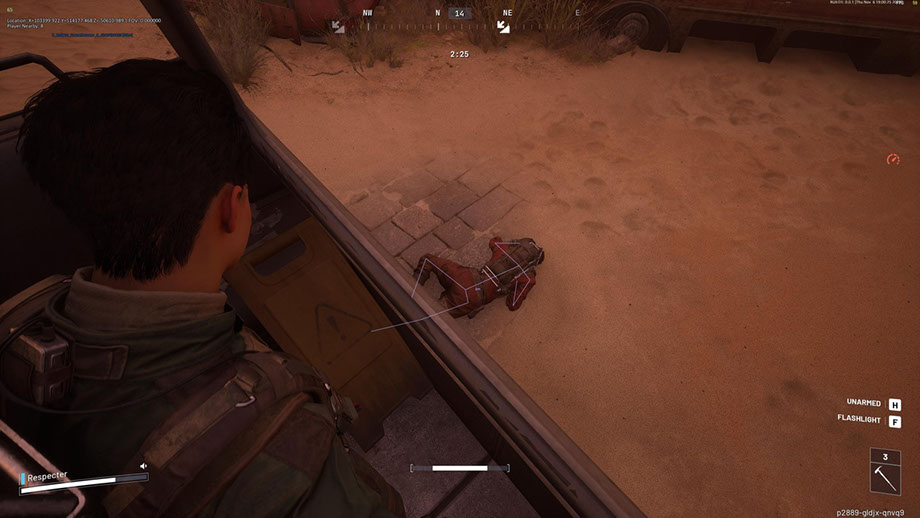
Shack Private은 다음 레벨에서 플레이하고 싶은 사람들을 위해 만들어진 ARC Raiders를 위한 강력한 비공개 치트입니다. ARC Raiders의 치트는 부드러운 FOV 조정, 정밀한 뼈대 선택 및 자동 조준 모드를 갖춘 전문 Aimbot은 물론 거리별로 필터링하여 플레이어, ARC, 아이템 및 컨테이너를 표시하는 유연한 ESP를 결합합니다.
ARC Raiders 치트는 세심한 레이더, 색상 사용자 정의 시스템, Xbox 컨트롤러에 대한 완벽한 지원, 어두운 테마와 애니메이션을 갖춘 현대적인 인터페이스를 제공합니다. 시각화부터 제어까지 모든 매개변수를 귀하에게 맞게 유연하게 조정할 수 있습니다.
Shack Private은 금지 없이 안정적으로 작동하며 게임에서 최대의 스텔스를 제공합니다. 치트 방지 우회 기능을 갖춘 ARC Raiders용 비공개 치트는 안전한 사용을 보장합니다. 쉬운 설치, 사용자 친화적인 구성 및 우리 팀의 지원 덕분에 초보자와 숙련된 플레이어 모두에게 탁월한 선택이 됩니다. 지금 혜택을 누리세요 - 저렴한 비용으로 위험부담 없이.
시스템 요구사항
글로벌 키 — 전 세계에서 사용 가능.
일부 상품은 Binance 카드 결제가 가능할 수 있습니다. 구매 전에 개인 메시지로 이용 가능 여부와 세부 정보를 확인하세요.
기능
일반
- ARC Raiders용 Aimbot - 핵심 설정
- ARC Raiders용 Aimbot은 고급 사용자 정의 옵션을 갖춘 전문 자동 조준 시스템입니다.
- 조정 가능한 FOV(1-180°) - 표적 획득을 위한 시야각을 조정합니다.
- 최대 거리 제어(0~1000m) - 작동 범위 제한
- 뼈 선택 - 머리, 목, 가슴 및 기타 신체 부위를 정확하게 타겟팅합니다.
- 가시성 검사 - 대상 가시성을 결정하기 위한 여러 모드
- FOV 원 디스플레이 - 캡처 영역의 시각적 표시
- 캡처된 대상의 조명 - 현재 대상의 시각적 강조
- 목표 선택 및 우선순위 지정을 위한 유연한 시스템:
- 플레이어 타겟팅 - 상대 자동 추적
- ARC 타겟팅 - 적 로봇 타겟팅
- 부드러운 조준(0~100%) - 조준경 이동 속도를 조정합니다.
- 대상 우선순위 - 플레이어 또는 HP가 가장 낮은 대상 중에서 선택합니다.
- 대상 전환 지연(0~1000ms) - 대상 전환 속도 제어
- 눈에 보이는 뼈의 자동 선택 - 최적의 조준점을 스마트하게 선택
- 최대 목표 속도 설정 - 빠르게 움직이는 물체 필터링
필터 및 설정
- 동맹 ESP 스위치 - 동맹 플레이어 표시/숨기기
- 시체 표시/숨기기 - 시체의 가시성을 제어합니다.
- 거리 필터(0~1000m) - 표시 범위 제한
- 글꼴 크기 조정(8–30) - 텍스트 가독성 조정
구성
- 거리 필터(0~1000m) - 범위 제한
- 글꼴 크기 조정(8-30) - 텍스트 조정
- 아이템 및 컨테이너 ESP(아이템 및 컨테이너의 ESP)
컨테이너 유형
- 재보급 투하 - 보급품이 담긴 컨테이너
- 폐품 컨테이너 - 폐품이 담긴 컨테이너
- Spacer Tech - 기술 컨테이너
- ARC Cargo Drop - ARC 화물 컨테이너
- 기타 용기 - 기타 유형
주요 기능
- 미니 원형 레이더 - 주변 환경을 콤팩트하게 표시
- 플레이어 추적 - 상대 모니터링
- ARC 추적 - 로봇 추적
- 아이템 표시 - 전리품 시각화
- 컨테이너 표시 - 레이더에 컨테이너 표시
- 기타 개체 - 추가 요소
편안한 게임을 위한 보조 도구
- 맞춤형 조준선(1-30) - 크기 조절이 가능한 맞춤형 조준경
- FPS 디스플레이 - 성능 모니터링
- 플레이어 카운터 - 해당 구역에 있는 상대 수
- VSync 스위치 - 수직 동기화 제어
- 다국어 글꼴 지원 - 올바른 텍스트 표시
- 글꼴 획 설정 - 가독성 향상
- 전역 글꼴 크기(8-30) - 범용 텍스트 설정
- 모든 개체 표시(디버그) - 개발자를 위한 디버깅 모드
편리한 설정 관리 시스템
- 프로필 관리 - 구성 생성 및 전환
- 구성 저장 및 로드 - 설정에 대한 빠른 액세스
- JSON 구성 시스템 - 편리한 저장 형식
- Xbox 컨트롤러 지원 - 완전한 게임패드 통합
- 단축키 설정 - 개별 키 조합
SHACK PRIVATE의 장점
- 1. 최대 스텔스 - 게임 내 치트 방지 및 OBS 우회
- 2. 안정성 - 금지나 충돌 없이 작동 가능
- 3. 구성의 유연성 - 모든 매개변수에 대한 완전한 제어
- 4. 다양성 - 다양한 입력 장치 지원
- 5. 전문가 수준 - 고급 알고리즘 및 최적화
- 6. 사용 편의성 - 초보자와 전문가를 위한 직관적인 인터페이스
범용 제어 시스템
- Xbox 컨트롤러 지원 - 게임패드를 통한 전체 작동
- 주요 사용자 정의 - PC 및 Xbox용 사용자 정의 구성
- 마우스, 키보드 및 컨트롤러 지원 - 다중 플랫폼 제어
- Silent Aim FOV - 공격적인 플레이를 위한 분노 모드
ARC RAIDERS용 ESP 시스템
- Player ESP (플레이어 ESP) - 상대 시각화
주요 매개변수
- 플레이어 이름 표시 - 머리 위에 별명 표시
- 거리 표시 - 각 플레이어까지의 거리
- 상자(2D/3D) - 상대방을 시각적으로 강조
- 맞춤선 - 대상에 대한 방향선
- 플레이어 스켈레톤 - 뼈 구조 표시
- 가시성 검사 - 가시적/숨겨진 표적 표시
- 체력 표시줄 - 적 HP를 표시합니다.
- 사용자 정의 색상 - 눈에 보이는 목적과 숨겨진 목적을 위한 별도의 색상
- ARC 이름 표시 - 로봇 식별
- 거리 표시 - 각 ARC까지의 거리
- 상자(2D/3D) - 시각적 강조
- 선(스냅라인) - 로봇에 대한 안내
- 뼈대 - ARC 구조 매핑
- 가시성 검사 - 가시성 표시
- 체력 바 - 로봇 HP 표시
- 사용자 정의 색상 - 표시/숨겨진 ARC 색상
디스플레이 옵션
- 항목 이름 - 모든 개체의 이름을 표시합니다.
- 물체까지의 거리 - 각 물체까지의 거리
- 수량 및 스택 - 항목 수에 대한 정보
- 선택한 개체 표시 - 이미 수집된 항목 표시
- 컨테이너 표시 - 모든 컨테이너의 시각화
필터 및 구성
- 열린/닫힌 컨테이너 표시 - 상태별로 필터링
- 전리품을 얻을 수 있는 항목만 필터링 - 사용 가능한 컨테이너만 표시
- 거리 필터(0~1000m) - 범위 제한
- 글꼴 크기 조정(8-30) - 텍스트 조정
- RADAR SYSTEM (ARC Raiders용 레이더 시스템)
- ARC 레이더의 전술적 이점을 위한 지능형 미니 레이더:
레이더 설정
- 크기(50~200px) - 레이더의 크기를 조정합니다.
- 범위(100~2000m) - 스캔 반경
- 투명성(20~100%) – 가시성 수준
- X/Y 위치 - 화면 배치
- 아이콘 크기(1~8) - 레이더 요소의 크기
컬러 시스템
- 각 요소의 개별 색상 - 팔레트를 완벽하게 제어
- RGBA 색상 선택 - 투명도를 통한 미세 조정
- 보이는/숨겨진 개체의 색상 - 별도 설정
- FOV 색상 설정 - 캡처 영역 색상
- 시력 색상 - 시력 개인화
- 플레이어 색상 - 플레이어 ESP 설정
- 컬러 ARC - ESP 로봇 설정
- 아이템 및 용기 색상 - 전리품 시각화
현대적이고 직관적인 인터페이스
- 현대적인 디자인 - 현재 인터페이스 스타일
- 어두운 테마 - 장시간 게임 중에도 눈이 편안합니다.
- 탭 구조 - 체계적인 탐색
- 부드러운 애니메이션 - 멋진 시각 효과
- 정보 팁 - 설정 도움말
- 크기 조정 가능한 창 - 화면에 맞게 조정
- 적응형 디자인 - 다양한 해상도에서 올바른 디스플레이
자주 묻는 질문
Shack에는 어떤 기능이 포함되어 있나요?
어떤 결제 수단을 사용할 수 있나요?
고객 지원은 어떻게 문의하나요?
결제 후 소프트웨어의 활성화, 실행 및 사용에 대한 자세한 안내를 받으실 수 있습니다.
안내는 결제 전 제공한 이메일 주소로 전송됩니다.
다운로드 링크와 필요한 구성 요소도 함께 제공됩니다.
치트 커뮤니티
치트 업데이트, 탐지 상태, 다른 플레이어의 도움 — 텔레그램과 디스코드에서.