Shack สำหรับ ARC Raiders
Shack Private - สูตรโกงส่วนตัวสำหรับ ARC Raiders
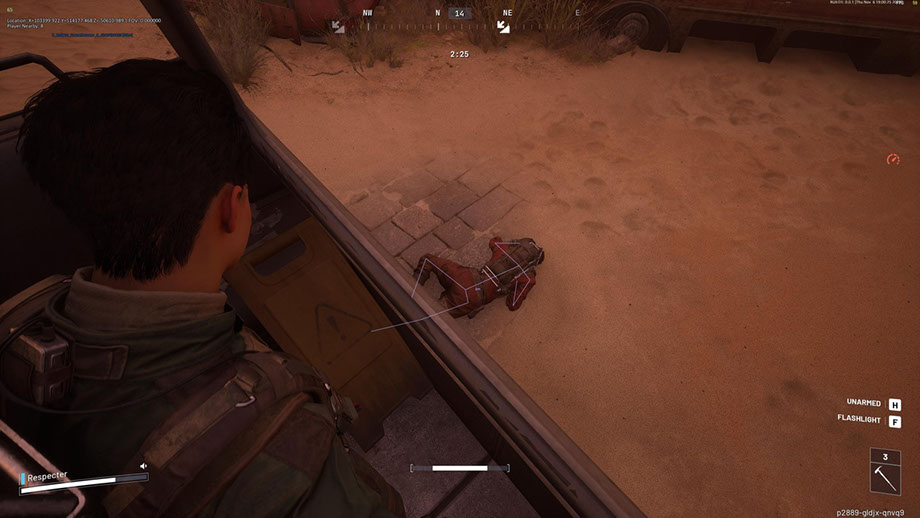
Shack Private คือสูตรโกงส่วนตัวที่ทรงพลังสำหรับ ARC Raiders สร้างขึ้นสำหรับผู้ที่ต้องการเล่นในระดับต่อไป สูตรโกงสำหรับ ARC Raiders ผสมผสาน Aimbot มืออาชีพเข้ากับการปรับ FOV ที่ราบรื่น การเลือกกระดูกที่แม่นยำ และโหมด Silent Aim รวมถึง ESP ที่ยืดหยุ่นซึ่งแสดงผู้เล่น ARC ไอเท็ม และคอนเทนเนอร์พร้อมการกรองตามระยะทาง
The ARC Raiders cheat offers a well-thought-out radar, a color customization system, full support for Xbox controllers, and a modern interface with a dark theme and animations. พารามิเตอร์ทั้งหมดตั้งแต่การแสดงภาพไปจนถึงการควบคุม สามารถปรับได้อย่างยืดหยุ่นเพื่อให้เหมาะกับคุณ
Shack Private ทำงานได้อย่างเสถียรโดยไม่มีการแบนและให้การลอบเร้นสูงสุดในเกม A private cheat for ARC Raiders with anti-cheat bypass guarantees safe use. ติดตั้งง่าย การกำหนดค่าที่เป็นมิตรต่อผู้ใช้ และการสนับสนุนจากทีมงานของเรา ทำให้เป็นตัวเลือกที่ยอดเยี่ยมสำหรับทั้งผู้เล่นมือใหม่และผู้เล่นที่มีประสบการณ์ รับข้อได้เปรียบตอนนี้ - ด้วยต้นทุนที่ต่ำและไม่มีความเสี่ยง
ข้อกำหนดระบบ
คีย์ Global — ใช้ได้ทั่วโลก
สินค้าบางรายการอาจชำระด้วยบัตร Binance ได้ โปรดส่งข้อความส่วนตัวหาเราก่อนซื้อเพื่อตรวจสอบและตกลงรายละเอียด
คุณสมบัติ
ทั่วไป
- Aimbot สำหรับ ARC Raiders - การตั้งค่าหลัก
- Aimbot สำหรับ ARC Raiders เป็นระบบเล็งอัตโนมัติระดับมืออาชีพพร้อมตัวเลือกการปรับแต่งขั้นสูง:
- FOV ที่ปรับได้ (1-180°) - ปรับมุมมองสำหรับการได้มาซึ่งเป้าหมาย
- การควบคุมระยะห่างสูงสุด (0–1000 ม.) - ขีดจำกัดช่วงการทำงาน
- การเลือกกระดูก - กำหนดเป้าหมายที่ศีรษะ คอ หน้าอก และส่วนอื่นๆ ของร่างกายอย่างแม่นยำ
- การตรวจสอบการมองเห็น - หลายโหมดสำหรับกำหนดการมองเห็นเป้าหมาย
- การแสดงวงกลม FOV - การแสดงภาพของพื้นที่จับภาพ
- การส่องสว่างของเป้าหมายที่จับได้ - การเน้นด้วยภาพของเป้าหมายปัจจุบัน
- ระบบที่ยืดหยุ่นสำหรับการเลือกและจัดลำดับความสำคัญของเป้าหมาย:
- การกำหนดเป้าหมายผู้เล่น - ติดตามคู่ต่อสู้อัตโนมัติ
- การกำหนดเป้าหมาย ARC - การกำหนดเป้าหมายหุ่นยนต์ศัตรู
- การเล็งที่ราบรื่น (0–100%)—ปรับความเร็วในการเคลื่อนที่ของการมองเห็น
- ลำดับความสำคัญของเป้าหมาย - เลือกระหว่างผู้เล่นหรือเป้าหมายที่มี HP ต่ำที่สุด
- ความล่าช้าของสวิตช์เป้าหมาย (0–1,000 ms) - ควบคุมความเร็วของการสลับเป้าหมาย
- การเลือกกระดูกที่มองเห็นได้โดยอัตโนมัติ - การเลือกจุดเล็งที่เหมาะสมที่สุดอย่างชาญฉลาด
- การตั้งค่าความเร็วเป้าหมายสูงสุด - กรองวัตถุที่เคลื่อนที่เร็วออก
ตัวกรองและการตั้งค่า
- สวิตช์ Ally ESP - แสดง/ซ่อนผู้เล่นฝ่ายเดียวกัน
- แสดง/ซ่อนศพ - ควบคุมการมองเห็นศพ
- ตัวกรองระยะห่าง (0–1000 ม.)—จำกัดช่วงการแสดงผล
- การปรับขนาดตัวอักษร (8–30) - ปรับความสามารถในการอ่านข้อความ
การกำหนดค่า
- ตัวกรองระยะห่าง (0–1000 ม.) - ข้อจำกัดช่วง
- การปรับขนาดตัวอักษร (8-30) - การปรับขนาดข้อความ
- รายการและคอนเทนเนอร์ ESP (ESP ของรายการและคอนเทนเนอร์)
ประเภทคอนเทนเนอร์
- Resupply Drop - คอนเทนเนอร์พร้อมเสบียง
- Salvage Container - คอนเทนเนอร์พร้อมกอบกู้
- Spacer Tech - คอนเทนเนอร์เทคโนโลยี
- ARC Cargo Drop - ตู้สินค้า ARCs
- ภาชนะอื่นๆ-ประเภทอื่นๆ
คุณสมบัติหลัก
- เรดาร์แบบวงกลมขนาดเล็ก - การแสดงสภาพแวดล้อมแบบกะทัดรัด
- การติดตามผู้เล่น - การติดตามฝ่ายตรงข้าม
- การติดตาม ARC - การติดตามหุ่นยนต์
- การแสดงรายการ - การแสดงภาพการปล้น
- Container display - แสดงคอนเทนเนอร์บนเรดาร์
- วัตถุอื่น ๆ - องค์ประกอบเพิ่มเติม
เครื่องมือเสริมสำหรับเกมที่สะดวกสบาย
- Custom Reticle (1-30) - ขอบเขตแบบกำหนดเองพร้อมขนาดที่ปรับได้
- จอแสดงผล FPS - การตรวจสอบประสิทธิภาพ
- ตัวนับผู้เล่น - จำนวนคู่ต่อสู้ในโซน
- สวิตช์ VSync - การควบคุมการซิงค์แนวตั้ง
- รองรับแบบอักษรหลายภาษา - การแสดงข้อความที่ถูกต้อง
- การตั้งค่าเส้นขีดแบบอักษร - ปรับปรุงความสามารถในการอ่าน
- ขนาดตัวอักษรสากล (8-30) - การตั้งค่าข้อความสากล
- แสดงออบเจ็กต์ทั้งหมด (Debug) - โหมดการดีบักสำหรับนักพัฒนา
ระบบจัดการการตั้งค่าที่สะดวก
- จัดการโปรไฟล์ - สร้างและสลับระหว่างการกำหนดค่า
- การบันทึกและการโหลดการกำหนดค่า - เข้าถึงการตั้งค่าอย่างรวดเร็ว
- ระบบกำหนดค่า JSON - รูปแบบการจัดเก็บข้อมูลที่สะดวก
- รองรับคอนโทรลเลอร์ Xbox - บูรณาการเกมแพดเต็มรูปแบบ
- การตั้งค่าปุ่มลัด - การกดปุ่มร่วมกัน
ข้อดีของ Shack ส่วนตัว
- 1. การลักลอบสูงสุด - ข้ามการป้องกันการโกงและ OBS ในเกม
- 2. ความเสถียร - ทำงานโดยไม่มีการแบนหรือขัดข้อง
- 3. ความยืดหยุ่นในการกำหนดค่า - ควบคุมพารามิเตอร์ทั้งหมดได้เต็มรูปแบบ
- 4. ความเก่งกาจ - รองรับอุปกรณ์อินพุตต่างๆ
- 5. ระดับมืออาชีพ - อัลกอริธึมขั้นสูงและการเพิ่มประสิทธิภาพ
- 6. ใช้งานง่าย - อินเทอร์เฟซที่ใช้งานง่ายสำหรับผู้เริ่มต้นและมืออาชีพ
ระบบควบคุมแบบสากล
- รองรับคอนโทรลเลอร์ Xbox - ใช้งานได้เต็มรูปแบบด้วยแป้นเกม
- การปรับแต่งคีย์ - การกำหนดค่าแบบกำหนดเองสำหรับพีซีและ Xbox
- รองรับเมาส์ คีย์บอร์ด และคอนโทรลเลอร์ - การควบคุมหลายแพลตฟอร์ม
- Silent Aim FOV - โหมด Rage สำหรับการเล่นที่ดุดัน
ระบบ ESP สำหรับ ARC RAIDERS
- ผู้เล่น ESP (ผู้เล่น ESP) - การแสดงภาพของคู่ต่อสู้
พารามิเตอร์หลัก
- การแสดงชื่อผู้เล่น - แสดงชื่อเล่นเหนือศีรษะ
- การแสดงระยะทาง - ระยะทางถึงผู้เล่นแต่ละคน
- กล่อง (2D / 3D) - การเน้นภาพของคู่ต่อสู้
- Snaplines—เส้นบอกทิศทางไปยังเป้าหมาย
- ผู้เล่นโครงกระดูก - การแสดงโครงสร้างกระดูก
- การตรวจสอบการมองเห็น - การบ่งชี้เป้าหมายที่มองเห็นได้/ซ่อนอยู่
- แถบสุขภาพ - แสดง HP ของศัตรู
- สีที่กำหนดเอง - แยกสีเพื่อจุดประสงค์ที่มองเห็นและซ่อนเร้น
- การแสดงชื่อ ARC - การระบุหุ่นยนต์
- การแสดงระยะทาง - ระยะทางไปยังแต่ละ ARC
- กล่อง (2D / 3D) - การเน้นด้วยภาพ
- Lines (Snaplines) - คำแนะนำเกี่ยวกับหุ่นยนต์
- โครงกระดูก - การทำแผนที่โครงสร้าง ARC
- การตรวจสอบทัศนวิสัย - ข้อบ่งชี้การมองเห็น
- แถบสุขภาพ - การแสดง HP ของหุ่นยนต์
- สีที่กำหนดเอง - สีสำหรับ ARC ที่มองเห็น/ซ่อน
ตัวเลือกการแสดงผล
- ชื่อรายการ—แสดงชื่อของออบเจ็กต์ทั้งหมด
- ระยะทางถึงวัตถุ - ระยะห่างจากวัตถุแต่ละชิ้น
- ปริมาณและกอง - ข้อมูลเกี่ยวกับจำนวนรายการ
- กำลังแสดงวัตถุที่เลือก - แสดงรายการที่รวบรวมไว้แล้ว
- การแสดงคอนเทนเนอร์ - การแสดงภาพของคอนเทนเนอร์ทั้งหมด
ตัวกรองและการกำหนดค่า
- แสดงคอนเทนเนอร์ที่เปิด/ปิด - กรองตามสถานะ
- กรองเฉพาะของที่มีให้สำหรับปล้น - แสดงเฉพาะคอนเทนเนอร์ที่มีอยู่
- ตัวกรองระยะห่าง (0–1000 ม.) - ข้อจำกัดช่วง
- การปรับขนาดตัวอักษร (8-30) - การปรับขนาดข้อความ
- RADAR SYSTEM (ระบบเรดาร์สำหรับ ARC Raiders)
- เรดาร์ขนาดเล็กอัจฉริยะเพื่อความได้เปรียบทางยุทธวิธีใน ARC Raiders:
การตั้งค่าเรดาร์
- ขนาด (50–200 พิกเซล) – ปรับขนาดเรดาร์
- ระยะ (100–2000 ม.) - รัศมีการสแกน
- ความโปร่งใส (20–100%) – ระดับการมองเห็น
- ตำแหน่ง X/Y - การวางตำแหน่งหน้าจอ
- ขนาดไอคอน (1–8)—สเกลขององค์ประกอบเรดาร์
ระบบสี
- สีเฉพาะสำหรับแต่ละองค์ประกอบ - ควบคุมจานสีได้เต็มรูปแบบ
- การเลือกสี RGBA - การปรับแต่งอย่างละเอียดด้วยความโปร่งใส
- สีสำหรับวัตถุที่มองเห็น/ซ่อน - การตั้งค่าแยกกัน
- การตั้งค่าสี FOV - จับภาพสีพื้นที่
- สีของสายตา - การปรับแต่งสายตา
- สีของผู้เล่น - การตั้งค่า ESP ของผู้เล่น
- Color ARCs - การตั้งค่าหุ่นยนต์ ESP
- สีของไอเท็มและคอนเทนเนอร์ - การแสดงภาพของขวัญ
อินเทอร์เฟซที่ทันสมัยและใช้งานง่าย
- การออกแบบที่ทันสมัย - รูปแบบอินเทอร์เฟซปัจจุบัน
- ธีมสีเข้ม - สบายตาในระหว่างเกมที่ยาวนาน
- โครงสร้างแท็บ - การนำทางที่จัดระเบียบ
- ภาพเคลื่อนไหวที่ราบรื่น - เอฟเฟกต์ภาพที่สวยงาม
- เคล็ดลับข้อมูล - ความช่วยเหลือในการตั้งค่า
- หน้าต่างที่ปรับขนาดได้ - ปรับให้เข้ากับหน้าจอ
- การออกแบบที่ปรับเปลี่ยนได้ - การแสดงผลที่ถูกต้องด้วยความละเอียดที่ต่างกัน
คำถามที่พบบ่อย
Shack มีฟีเจอร์อะไรบ้าง?
รับชำระเงินด้วยวิธีใดบ้าง?
ติดต่อฝ่ายสนับสนุนอย่างไร?
หลังชำระเงิน คุณจะได้รับคำแนะนำละเอียดเกี่ยวกับการเปิดใช้งาน เริ่มต้น และใช้งานซอฟต์แวร์
คำแนะนำจะถูกส่งไปยังอีเมลที่ระบุก่อนชำระเงิน
คุณยังจะพบลิงก์ดาวน์โหลดและส่วนประกอบที่จำเป็น
ชุมชนผู้ใช้ตัวช่วย
อัปเดตตัวช่วย สถานะการตรวจจับ และความช่วยเหลือจากผู้เล่นคนอื่น — ใน Telegram และ Discord ของเรา