Shack pour ARC Raiders
Shack Private - Triche privée pour ARC Raiders
Ventes temporairement suspendues
- Livraison instantanée
- Paiement sécurisé
- Support quotidien
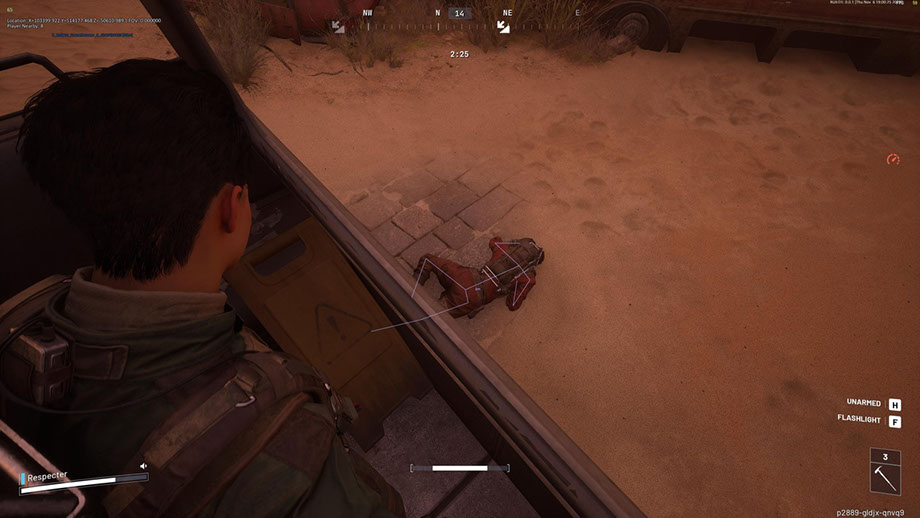
Shack Private est un puissant cheat privé pour ARC Raiders, créé pour ceux qui veulent jouer au niveau supérieur. La triche pour ARC Raiders combine un Aimbot professionnel avec un réglage fluide du FOV, une sélection précise des os et un mode Silent Aim, ainsi qu'un ESP flexible qui affiche les joueurs, les ARC, les objets et les conteneurs avec filtrage par distance.
Le cheat ARC Raiders propose un radar bien pensé, un système de personnalisation des couleurs, une prise en charge complète des manettes Xbox et une interface moderne avec un thème et des animations sombres. Tous les paramètres - de la visualisation au contrôle - peuvent être ajustés de manière flexible pour vous convenir.
Shack Private fonctionne de manière stable sans interdictions et offre une furtivité maximale dans le jeu. Un cheat privé pour ARC Raiders avec contournement anti-triche garantit une utilisation sûre. Une installation facile, une configuration conviviale et le support de notre équipe en font un excellent choix pour les joueurs débutants et expérimentés. Bénéficiez de l'avantage maintenant - à faible coût et sans risque.
Configuration requise
Clés globales — fonctionnent dans le monde entier.
Le paiement avec une carte Binance peut être disponible pour certains produits. Contactez-nous en privé avant l’achat pour vérifier la disponibilité et convenir des détails.
Fonctionnalités
Général
- Aimbot pour ARC Raiders - Paramètres de base
- Aimbot pour ARC Raiders est un système de visée automatique professionnel avec des options de personnalisation avancées :
- FOV réglable (1-180°) - ajuste l'angle de vision pour l'acquisition de la cible
- Contrôle de distance maximale (0 à 1 000 m) - limitation de la portée de fonctionnement
- Sélection des os – Ciblez avec précision la tête, le cou, la poitrine et d'autres parties du corps.
- Contrôle de visibilité - plusieurs modes pour déterminer la visibilité de la cible
- Affichage circulaire FOV - indication visuelle de la zone de capture
- Éclairage d'une cible capturée - mise en évidence visuelle de la cible actuelle
- Système flexible de sélection et de priorisation des objectifs :
- Ciblage des joueurs - suivi automatique des adversaires
- Cibler les ARC - cibler les robots ennemis
- Visée fluide (0 à 100 %) : ajuste la vitesse de déplacement de la visée
- Priorité à la cible : choisissez entre les joueurs ou les cibles ayant les PV les plus faibles
- Délai de commutation de cible (0 à 1 000 ms) : contrôle la vitesse de commutation de cible
- Sélection automatique de l'os visible - sélection intelligente du point de visée optimal
- Définition de la vitesse cible maximale - filtrage des objets en mouvement rapide
Filtres et paramètres
- Commutateur Ally ESP - afficher/masquer les joueurs alliés
- Afficher/masquer les corps - contrôlez la visibilité des cadavres
- Filtre de distance (0 à 1 000 m) : plage d'affichage limite
- Ajustement de la taille de la police (8–30) - ajuster la lisibilité du texte
Configuration
- Filtre de distance (0–1 000 m) - limitation de portée
- Ajustement de la taille de la police (8-30) - Ajustement du texte
- Articles et conteneurs ESP (ESP des articles et conteneurs)
Types de conteneurs
- Resupply Drop - conteneurs avec des fournitures
- Conteneur de récupération - conteneurs avec récupération
- Spacer Tech - conteneurs technologiques
- ARC Cargo Drop - Conteneurs de fret ARC
- Autres conteneurs - autres types
Principales caractéristiques
- Radar mini-circulaire - affichage compact des environs
- Suivi des joueurs - Surveillance des adversaires
- Suivi des ARC - Suivi des robots
- Affichage des objets - visualisation du butin
- Affichage des conteneurs - afficher les conteneurs sur le radar
- Autres objets - éléments supplémentaires
Outils auxiliaires pour un jeu confortable
- Réticule personnalisé (1-30) - Lunette personnalisée avec taille réglable
- Affichage FPS - Surveillance des performances
- Compteur de joueurs - nombre d'adversaires dans la zone
- Commutateur VSync - contrôle de synchronisation verticale
- Prise en charge des polices multilingues - affichage correct du texte
- Paramètres de trait de police - amélioration de la lisibilité
- Taille de police globale (8-30) - paramètre de texte universel
- Afficher tous les objets (Debug) - mode débogage pour les développeurs
Système de gestion des paramètres pratique
- Gérer les profils - créer et basculer entre les configurations
- Sauvegarde et chargement des configurations - accès rapide aux paramètres
- Système de configuration JSON - un format de stockage pratique
- Prise en charge du contrôleur Xbox - intégration complète de la manette de jeu
- Configuration des touches de raccourci - combinaisons de touches individuelles
AVANTAGES DE SHACK PRIVÉ
1. Furtivité maximale - en contournant l'anti-triche et l'OBS du jeu
2. Stabilité - travaillez sans interdictions ni plantages
3. Flexibilité de configuration - contrôle total sur tous les paramètres
4. Polyvalence - prend en charge divers périphériques d'entrée
5. Niveau professionnel - algorithmes avancés et optimisation
6. Facilité d'utilisation - interface intuitive pour les débutants et les professionnels
Système de contrôle universel
- Prise en charge de la manette Xbox - fonctionnement complet avec une manette de jeu
- Personnalisation des touches - Configuration personnalisée pour PC et Xbox
- Prise en charge de la souris, du clavier et du contrôleur - contrôle multiplateforme
- Silent Aim FOV - Mode Rage pour un jeu agressif
SYSTÈMES ESP POUR ARC RAIDERS
- Joueur ESP (joueur ESP) - visualisation des adversaires
Paramètres principaux
- Affichage des noms des joueurs - afficher les surnoms au-dessus des têtes
- Affichage de la distance - distance par rapport à chaque joueur
- Boites (2D/3D) - mise en valeur visuelle des adversaires
- Snaplines : lignes de direction vers les cibles
- Squelette du joueur - Affichage de la structure osseuse
- Contrôle de visibilité - indication de cible visible/cachée
- Barre de santé - affiche les HP de l'ennemi
- Couleurs personnalisées : séparez les couleurs à des fins visibles et masquées
- Affichage du nom ARC - Identification du robot
- Affichage de la distance - distance à chaque ARC
- Boites (2D / 3D) - mise en valeur visuelle
- Lignes (Snaplines) - guides pour robots
- Squelette - Cartographie de la structure ARC
- Contrôle de visibilité - indication de visibilité
- Barre de santé - affichage des HP du robot
- Couleurs personnalisées - couleurs pour les ARC visibles/cachés
Options d'affichage
- Noms d'éléments : affiche les noms de tous les objets
- Distance aux objets - distance à chaque objet
- Quantités et piles - informations sur le nombre d'articles
- Afficher les objets sélectionnés - afficher les éléments déjà collectés
- Affichage des conteneurs - visualisation de tous les conteneurs
Filtres et configuration
- Afficher les conteneurs ouverts/fermés - filtrer par statut
- Filtrer uniquement ceux disponibles pour le butin - affichant uniquement les conteneurs disponibles
- Filtre de distance (0–1 000 m) - limitation de portée
- Ajustement de la taille de la police (8-30) - Ajustement du texte
- SYSTÈME RADAR (Système radar pour ARC Raiders)
- Mini radar intelligent pour un avantage tactique dans les Raiders ARC :
Configuration du radar
- Taille (50-200 px) – ajustez la taille du radar
- Portée (100 à 2 000 m) - rayon de balayage
- Transparence (20-100%) – niveau de visibilité
- Position X/Y - Placement de l'écran
- Taille de l'icône (1 à 8) : échelle des éléments radar
Système de couleurs
- Couleurs individuelles pour chaque élément - contrôle total de la palette
- Sélection des couleurs RGBA - réglage fin avec transparence
- Couleurs pour les objets visibles/cachés - paramètres séparés
- Paramètre de couleur FOV - couleur de la zone de capture
- Couleur de la vue - Personnalisation de la vue
- Couleur du joueur - Paramètres ESP du joueur
- Color ARCs - mise en place de robots ESP
- Couleur des objets et des conteneurs - visualisation du butin
Interface moderne et intuitive
- Design moderne - style d'interface actuel
- Thème sombre - agréable pour les yeux lors de longues parties
- Structure des onglets - navigation organisée
- Animations fluides - beaux effets visuels
- Conseils d'information - aide à la configuration
- Fenêtre redimensionnable - adaptation à l'écran
- Conception adaptative - affichage correct à différentes résolutions
Questions fréquentes
Quelles fonctionnalités sont incluses dans Shack ?
Quels modes de paiement sont acceptés ?
Comment contacter le support ?
Paiement confirmé, mais produit absent. Combien de temps attendre ?
J’ai la clé. Où télécharger et trouver les instructions ?
Après le paiement, vous recevrez des instructions détaillées sur l'activation, le lancement et l'utilisation du logiciel.
Les instructions seront envoyées à l'adresse e-mail indiquée avant le paiement.
Vous y trouverez également le lien de téléchargement et les composants nécessaires.
Communauté de cheats
Mises à jour des cheats, statut de détection et aide d'autres joueurs — sur notre Telegram et Discord.